
Northwind Architects — Bold Architecture Home Page for Divi 5
A bold, full-page Divi 5 homepage layout for architecture studios. Dark hero with oversized type, project gallery, services grid, and a high-contrast CTA section. Ready to import.
Rate this element
Download this section, free
- Divi 5 JSON, imports in seconds
- Commercial license included
- No account needed
This page ships inside Northwind: Architecture Studio Theme (6 Pages), 6 coherent pages that share one brand.
Click to view the full page
Overview
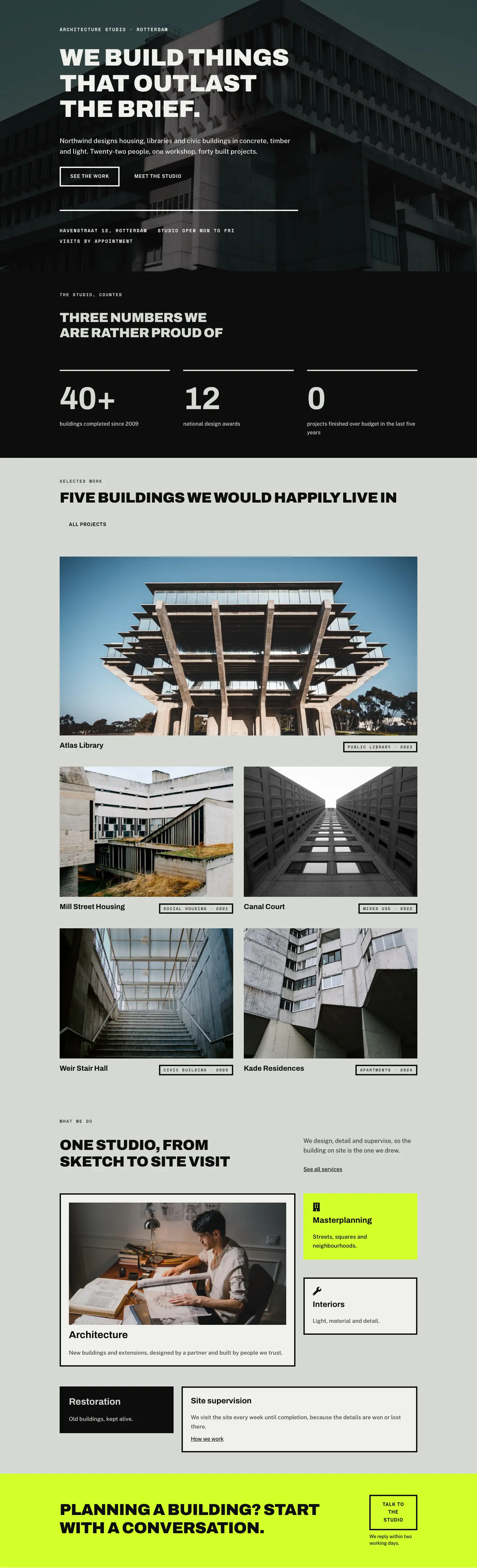
Northwind Architects is a full-page Divi 5 layout built around a three-colour system — near-black #0d0d0d, warm sage #d6d8d3, and an acid-yellow #d4ff2a — that does the heavy lifting typography can't do alone. The hero section layers a Pexels architectural photograph behind a 70% dark gradient overlay, then anchors a left-aligned content block to the vertical centre of an 80vh group. Archivo Black at 72px with -1px letter-spacing and uppercase carries the headline; a 14px Space Mono eyebrow in #f0f1ed pins the studio's city. Two ghost buttons sit side by side — one with a 4px solid border, one borderless — both reversing to a filled state on hover, so interaction feels structural rather than decorative.
Below the fold the layout moves through four distinct sections, each with its own background and purpose. The statistics section on #0d0d0d uses a CSS grid at gridColumnCount: 3 (collapsing to a single column on phones) to present three large Archivo numerals at 96px — 40+, 12, and 0 — each introduced by a 4px solid divider line that echoes the hero buttons. The portfolio section on sage #d6d8d3 opens with a full-width 2:1 hero image spanning both grid columns, followed by four 4:3 project cards in a two-column grid; each card carries a bordered category pill in Space Mono to identify typology and year.
The services section demonstrates how the same grid system can carry mixed information densities. A narrow-and-wide two-column row introduces the section in a split-heading pattern, then three subsequent rows present five service tiles — Architecture (with a 16:9 project photo), Masterplanning (on acid yellow with a Font Awesome icon), Interiors, Restoration (dark-background inversion), and Site Supervision — in asymmetric column combinations that prevent the grid from feeling mechanical. The page closes on the acid-yellow CTA strip: a wide Archivo heading paired with a ghost button and a plain-text reassurance line, all in a flex row that wraps to column on mobile.
What’s inside
- Full-viewport hero (80vh desktop / 560px phone minimum) with a Pexels photo background, dual-stop dark gradient overlay, and a left-aligned Archivo Black headline at 72px → 52px → 38px across breakpoints
- Two-button CTA pair with ghost/outline style, hover fill reversal, and zero border-radius — one solid-bordered, one borderless — sitting in a flex-wrap row
- 4px divider-ruled statistics block: three oversized Archivo numerals (96px → 64px) in a three-to-one-column responsive CSS grid on a near-black background
- Five-project portfolio grid: one full-width 2:1 feature image spanning the grid, plus four 4:3 project cards each with a bordered Space Mono category-and-year pill
- Asymmetric services layout across three rows using narrow-wide column splits (8/24 and 16/24 flex proportions) and five service tiles with mixed background colours including an acid-yellow accent tile with a Font Awesome building icon
- Acid-yellow CTA strip with a flex-row heading-plus-button layout that collapses to a stacked column on mobile, with a plain-text reply-time reassurance below the button
- Three-font system: Archivo (headings, display numerals), Public Sans (body, buttons), Space Mono (labels, eyebrows, category pills) — all loaded via Google Fonts, no custom font files needed
Who it’s for
This layout is a direct fit for independent architecture studios, boutique structural engineering practices, landscape architecture firms, and urban planning consultancies that want a portfolio-first home page with genuine editorial weight. It also works for interior design studios, heritage conservation specialists, and real estate developers who commission bespoke buildings and need to project craft credibility rather than volume. The typography scale and monochrome-plus-accent palette communicate the kind of considered restraint that clients hiring for civic, cultural, or residential landmark projects expect to see.
Customization tips
The three-colour palette is set in exactly three hex values: swap #0d0d0d (near-black), #d6d8d3 (warm sage), and #d4ff2a (acid yellow) globally and the layout re-skins completely — try off-white + charcoal + burnt orange for a warmer practice, or white + navy + electric blue for a more corporate feel. The hero headline is set with textWrap: balance, so it reflows cleanly up to about 60 characters before the line breaks feel uneven; keep your studio tagline under that threshold. Portfolio images should be cropped to 2:1 for the feature card and 4:3 for the remaining four — the objectFit: cover setting handles minor aspect-ratio variance, but avoid portrait-orientation shots or the subject will be heavily cropped. The statistics section expects short labels (under eight words) so the 96px numerals retain visual dominance; longer copy will push the number down and break the rhythm.
How to install this layout
- Download the layout JSON file from this page.
- Open the target page in the Divi 5 builder.
- Open the portability panel (up/down arrows icon) and choose the Import tab.
- Upload the JSON. Tick “replace existing content” only for full-page imports.
- Check the page at desktop and mobile widths, then swap in your copy and images.
Full walkthrough with troubleshooting: How to Import a Divi 5 Layout.
Questions about Northwind Architects — Bold Architecture Home Page for Divi 5
How does the layout stack on mobile phones?
Every multi-column row carries an explicit `flexDirection: column` override at the phone breakpoint, so sections stack top-to-bottom in source order. The hero group has a `minHeight: 560px` floor so the headline and buttons are never squeezed. The statistics grid drops from three columns to one, and the portfolio grid drops from two to one. No content is hidden — it all reflows.
Which Divi 5 modules does this layout use?
Section, Row, Column, Group, Heading, Text, Button, Image, Divider, and Icon. Every module is a native Divi 5 block — there are no third-party or legacy Divi 4 modules, so it works in any standard Divi 5 installation without extra plugins.
The portfolio images are from Pexels — do I need to replace them?
Yes. The placeholder images reference live Pexels URLs and are included only to demonstrate the intended aspect ratios and composition style. Replace them with your own project photography before publishing. The feature card expects a 2:1 landscape image; the four smaller cards expect 4:3.
What should I edit first to make the layout feel like my studio?
Start with the hero: replace the background image, update the H4 eyebrow (city/country), and rewrite the H1 headline. Then update the three statistics in the dark section — they carry the most personality. The service tile names and descriptions in the bottom rows take five minutes to swap and immediately make the layout specific to your practice.
Can I remove the acid-yellow sections if they don't match our brand?
Yes. The Masterplanning service tile and the CTA strip are the only two elements that use `#d4ff2a`. You can recolour both to any background — the tile's Font Awesome icon and text are styled in `#0d0d0d`, which reads on any light background, and the CTA button switches to a filled state on hover so it works on darker backgrounds too with a colour tweak.
Are the Font Awesome icons included, or do I need to install something?
Divi 5 bundles Font Awesome, so the building icon (fa-building, ``) and the tools icon (``) in the services section render without any additional plugin or CDN setup.
Which Divi version does this layout need?
Divi 5. The layout is generated natively for Divi 5 and validated against its real module structure before publication, so it imports clean into the current builder.
Can I use this layout on client websites?
Yes. Every download includes a commercial license covering unlimited sites you own or build for clients. Only reselling or redistributing the layout file itself is prohibited.
Included in these packs
More full landing pages
Browse all full landing pages
Kiln & Clay — Minimal Pottery_studio Visit Page for Divi 5
full_landing · pottery_studio · minimal

Kiln & Clay — Minimal Pottery_studio Our Story Page for Divi 5
full_landing · pottery_studio · minimal

Kiln & Clay — Minimal Pottery_studio Studio Membership Page for Divi 5
full_landing · pottery_studio · minimal

Kiln & Clay — Minimal Pottery_studio The Shop Page for Divi 5
full_landing · pottery_studio · minimal

Kiln & Clay — Minimal Pottery_studio Classes Page for Divi 5
full_landing · pottery_studio · minimal

Kiln & Clay — Minimal Pottery_studio Home Page for Divi 5
full_landing · pottery_studio · minimal