
Northwind Architects — Bold Architecture Journal Page for Divi 5
Short essays from the Northwind studio on concrete, timber, brutalism and the four rhythms of an architecture project. Read our material notes and client Q&A.
Rate this element
Download this section, free
- Divi 5 JSON, imports in seconds
- Commercial license included
- No account needed
This page ships inside Northwind: Architecture Studio Theme (6 Pages), 6 coherent pages that share one brand.
Click to view the full page
Overview
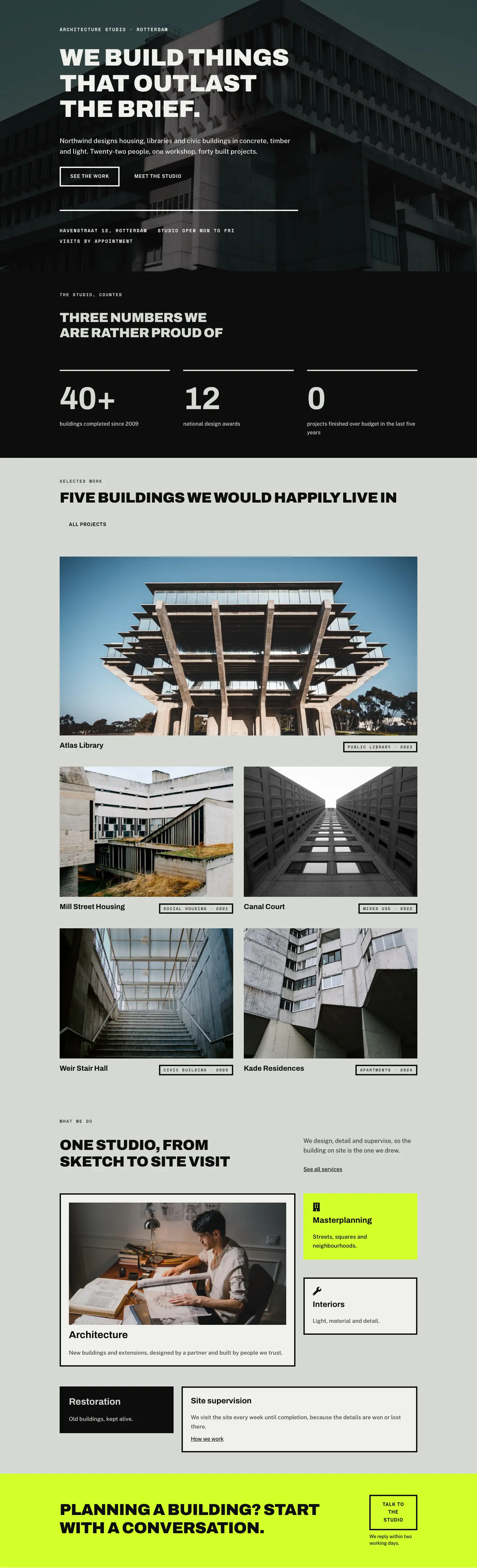
Northwind Architects Journal is a five-section editorial layout built for architecture practices that want their website to read like a considered publication rather than a brochure. The opening section drops straight into near-black (#0d0d0d) with generous vertical breathing room (112px top, 168px bottom on desktop), a Space Mono eyebrow in tight uppercase, and an Archivo Black h1 at 60px with -1px tracking and textWrap: balance for clean line breaks at every breakpoint. A short 72px hairline rule below the headline keeps the hierarchy legible without adding visual noise. The section exits through a 100px curved SVG divider that dissolves into the sage-grey (#d6d8d3) tone used for the next three sections, so the transition feels structural rather than decorative.
The process section uses a four-column CSS grid (collapsing to two columns on tablet and a single column on phone) to present four studio phases, each anchored by a neon-yellow (#d4ff2a) 48px circular badge containing a Space Mono numeral. A flex-grow divider line connects each badge to the column edge on desktop but hides on phone, keeping the mobile view uncluttered. The neon yellow is the layout's single accent color, which makes it easy to remap to any brand color without touching the neutral palette.
The materials comparison section runs two equal-height cards side by side: one on an off-white (#f0f1ed) ground with a 4px near-black border, one on near-black with reversed type. Each card holds a label, a bold h3 subheading, and four icon-plus-text rows using Font Awesome glyphs at 16px. The contrast between the two cards is intentional and structural: light versus dark, ✗ marks on one side, ✓ marks on the other. Below the comparison sits a full-bleed background-image section that positions a floating off-white content card against a Pexels architecture photograph, using cover sizing so any wide-format substitution fills cleanly.
The FAQ uses five Divi Toggle modules stacked inside a group with a 4px top border and 4px bottom borders between each item. Titles are Archivo at 28px with a 600 weight, answers are Public Sans at 17px with 1.7em line-height. The first toggle opens by default. Three typefaces do all the work across the layout: Archivo carries the display headings, Space Mono handles the small uppercase labels and numbered badges, and Public Sans covers every body copy and button label. All three are Google Fonts, so there are no extra license requirements beyond what Divi already loads.
What’s inside
- Near-black hero section: Archivo Black h1 (60px/46px/34px across breakpoints), Space Mono eyebrow, 72px centered divider rule, and a 100px curved SVG section divider
- Four-step process grid: 4-col to 2-col to 1-col responsive layout, neon-yellow (#d4ff2a) numbered circles, flex-grow divider lines (hidden on phone), and per-step h3 + body copy
- Side-by-side materials comparison: light card and dark card, each with a label, bold h3, and four Font Awesome icon rows, equal height via `alignItems: stretch`
- Five Divi Toggle FAQ items with 4px border separators, 28px Archivo titles, and 17px Public Sans answers. First item open by default
- Background-image CTA section: full-bleed Pexels photo with a floating 520px off-white content card, 4px black border, and a `Book a visit` ghost button
- Ghost buttons with 4px solid square borders and `fill on hover` state across three sections (two light-on-dark, one dark-on-light)
- Three-typeface editorial system: Archivo (headings, 700-900), Space Mono (labels, badges), Public Sans (body, buttons)
Who it’s for
This layout suits architecture studios, interior design practices, landscape architects, and urban planning consultancies that want to publish editorial content alongside their project work. It also fits design-led contractors, materials consultants, and architectural educators who need a journal or insights section that carries the same authority as their portfolio. The editorial structure (process steps, comparison cards, FAQ toggles) translates readily to engineering firms, heritage conservation offices, or any professional practice where a point of view on materials and method is part of the pitch.
Customization tips
The three core colors map cleanly to any brand palette: replace #0d0d0d (near-black), #d6d8d3 (sage/grey), and #d4ff2a (neon accent) to recolor the entire layout in minutes. The neon yellow appears only on the numbered process badges, so swapping it for a brand color creates an immediate identity shift without touching the neutrals.
The process grid accepts three to five steps without reflow issues; adding a fifth simply extends the grid. Keep each step label to one or two words and each description to one sentence so the column heights stay balanced on desktop.
The background-image CTA section uses cover sizing, so replace the Pexels URL with any wide landscape photograph (minimum 1920px wide, ideally 16:9 or wider). Avoid portrait crops as they will center-crop badly.
Toggle answers are written short (one to two sentences). Longer answers are fine but push the section taller on desktop. The content card in the CTA section has a fixed max-width of 520px; headlines there should stay under six words to avoid awkward wrapping at tablet widths.
How to install this layout
- Download the layout JSON file from this page.
- Open the target page in the Divi 5 builder.
- Open the portability panel (up/down arrows icon) and choose the Import tab.
- Upload the JSON. Tick “replace existing content” only for full-page imports.
- Check the page at desktop and mobile widths, then swap in your copy and images.
Full walkthrough with troubleshooting: How to Import a Divi 5 Layout.
Questions about Northwind Architects — Bold Architecture Journal Page for Divi 5
Does the layout ship with the Pexels photo, or do I need to supply my own image?
The CTA section references a Pexels URL directly in the layout JSON. You can keep that placeholder during setup, but you should replace it with an image you own or have licensed before going live, since Pexels photos require attribution or a paid license depending on your use.
Which font licenses do I need for Archivo, Space Mono, and Public Sans?
All three are open-source Google Fonts with no additional licensing required. Divi loads them from your theme's font picker; just select them in the module settings and they resolve at no cost.
The process grid has four steps. What happens if I need three or five?
The grid is defined as `gridColumnCount: 4` on desktop and `2` on tablet. Adding a fifth step extends the grid row naturally. Dropping to three leaves a gap on desktop unless you set `gridColumnCount: 3` in the Group module's layout settings. Both adjustments take under a minute in the Divi 5 visual builder.
The materials comparison uses Font Awesome icons (f00c and f00d). Can I change those?
Yes. Each icon is a Divi Icon module with a `unicode` value you can swap in the builder's icon picker. The icons are 16px and left-aligned inside a flex row; any Font Awesome solid glyph at that size will slot in without breaking the layout.
How does the layout behave on mobile? Does the two-column card comparison stack?
Yes. The comparison row uses `flexDirection: column` on phone, so the concrete card stacks above the timber card, each at full width. The process grid also drops to a single column. The hero font scales from 60px down to 34px, and all section padding scales independently so nothing feels cramped on small screens.
The FAQ section has five toggle items. Can I add or remove questions without breaking the border treatment?
Each toggle has a 4px solid bottom border and the wrapper group has a 4px solid top border, creating a clean ruled list. Adding or removing Toggle modules inside that group maintains the pattern automatically. There is no manual border on the last item, so removal never leaves a trailing line.
Which Divi version does this layout need?
Divi 5. The layout is generated natively for Divi 5 and validated against its real module structure before publication, so it imports clean into the current builder.
Can I use this layout on client websites?
Yes. Every download includes a commercial license covering unlimited sites you own or build for clients. Only reselling or redistributing the layout file itself is prohibited.
Included in these packs
More full landing pages
Browse all full landing pages
Kiln & Clay — Minimal Pottery_studio Visit Page for Divi 5
full_landing · pottery_studio · minimal

Kiln & Clay — Minimal Pottery_studio Our Story Page for Divi 5
full_landing · pottery_studio · minimal

Kiln & Clay — Minimal Pottery_studio Studio Membership Page for Divi 5
full_landing · pottery_studio · minimal

Kiln & Clay — Minimal Pottery_studio The Shop Page for Divi 5
full_landing · pottery_studio · minimal

Kiln & Clay — Minimal Pottery_studio Classes Page for Divi 5
full_landing · pottery_studio · minimal

Kiln & Clay — Minimal Pottery_studio Home Page for Divi 5
full_landing · pottery_studio · minimal