
Northwind Architects — Bold Architecture Projects Page for Divi 5
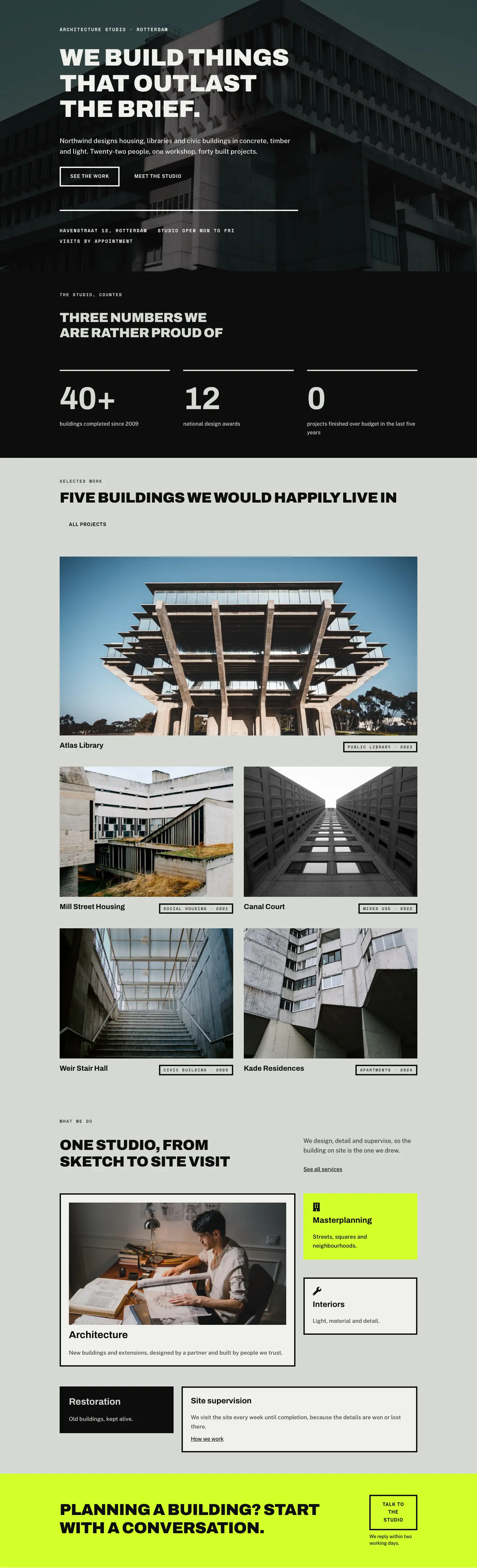
A bold, full-page architecture projects layout for Divi 5. Showcases a photo gallery, three case studies, a before-and-after comparison, and a studio CTA — ready for architecture and design firms.
Rate this element
Download this section, free
- Divi 5 JSON, imports in seconds
- Commercial license included
- No account needed
This page ships inside Northwind: Architecture Studio Theme (6 Pages), 6 coherent pages that share one brand.
Click to view the full page
Overview
Northwind Architects is a full-page projects showcase built around three typographic layers and a restrained palette that lets architectural photography do the work. The hero section opens with a full-bleed Pexels image locked behind a uniform rgba(13,13,13,0.7) gradient overlay, so any photograph you swap in reads consistently dark. Over it sit an uppercase Space Mono breadcrumb at 13 px, an Archivo Black h1 at 56 px with −1 px tracking, and a capped-width lead line in Public Sans — three voices that establish hierarchy in under four lines of content.
The gallery section beneath uses a three-column Group layout where each column stacks two Image modules at alternating aspect ratios (4:5 tall then 4:3 landscape, or the reverse), producing a brickwork rhythm without any custom CSS. Column gap is a tight 16 px, keeping the grid dense. A split-column header row above the grid aligns the section label and pull-quote to baseline, a detail that reads as intentional craft rather than template padding.
The case-study rows alternate image-left and image-right across three 1/2 + 1/2 rows, each vertically centred with alignItems: center. On mobile, a negative order: -1 on the second project's image column ensures the photo always precedes its text regardless of source order — a responsive decision baked into the JSON, not needing a plugin. Text columns carry 48 px desktop padding that collapses to 0 on phone, preventing the copy from kissing the edge.
The before-and-after section pairs Divi 5's native Before/After Image module with a two-item comparison list — each item ruled by a 4 px top border in #0d0d0d, a Space Mono label, and Public Sans body — sitting in a narrower 9/24 column against the wider 15/24 image column. The page closes on a chartreuse #d4ff2a CTA band: a horizontal flex group that places the h2 and a square-cornered button side by side on desktop, stacking on phone. The button's transparent fill with a 4 px solid border inverts to an off-white fill on hover, the only interactive state in the layout.
What’s inside
- Full-bleed hero section with a darkening gradient overlay (70 % opacity, both stops) that works with any architectural photograph you supply
- Three-column masonry-style gallery using native Divi 5 Image modules at 4:5 and 4:3 aspect ratios, with a 16 px column and row gap
- Three alternating image-text case-study rows with automatic mobile reordering (order: −1) so photos always lead on small screens
- Native Divi 5 Before/After Image module paired with a ruled before/after comparison list using 4 px top-border dividers in Space Mono labels
- Chartreuse (#d4ff2a) CTA section with a horizontally spaced flex layout: headline left, ghost button right — collapses to a stacked column on phone
- Split-column gallery header row with baseline alignment between the section label and descriptive pull-quote
- Consistent three-font system throughout: Archivo Black for display headings, Space Mono for labels/eyebrows, Public Sans for body text
Who it’s for
This layout fits independent architecture studios, landscape architects, and urban-design practices that want a projects page with editorial weight rather than a portfolio grid. It also suits civil engineers, heritage consultants, and property developers who need to present a small number of landmark projects with enough depth to impress a committee or planning authority. Interior designers and fit-out contractors with strong project photography will find the alternating case-study format a natural fit for before-and-after narratives.
Customization tips
The palette is controlled at two points: the hero overlay (rgba(13,13,13,0.7)) and the CTA section background (#d4ff2a). Swap the chartreuse for any high-contrast accent — terracotta, cobalt, or warm white all work — and update the CTA button border to match. The gallery tolerates six to eight images before the three-column rhythm feels crowded; below six, remove one Group module from a column rather than leaving an empty slot. Hero and case-study images should be landscape at 3:2 or 4:3 for the wide slots, and portrait at 4:5 for the tall gallery slots — the objectFit: cover lock means cropping is automatic but subject placement matters. Case-study body copy reads best at 40–80 words per project; longer passages will unbalance the vertically centred rows.
How to install this layout
- Download the layout JSON file from this page.
- Open the target page in the Divi 5 builder.
- Open the portability panel (up/down arrows icon) and choose the Import tab.
- Upload the JSON. Tick “replace existing content” only for full-page imports.
- Check the page at desktop and mobile widths, then swap in your copy and images.
Full walkthrough with troubleshooting: How to Import a Divi 5 Layout.
Questions about Northwind Architects — Bold Architecture Projects Page for Divi 5
How does the gallery handle an odd number of project photos?
Each column is an independent Group module containing two stacked images. You can remove one image from any column without breaking the layout — the remaining image simply takes the full column height. Avoid leaving a column completely empty; instead remove the column from the row entirely.
What happens to the alternating case-study rows on mobile?
The second project row uses `order: -1` on its image column so the photo appears above the text on phone screens, matching the visual pattern of the other two rows. This is set in the JSON; you do not need to add custom CSS.
Can I replace the Before/After Image module with a second case study?
Yes. Delete the Before/After Image module and its column, expand the text column to full width (24/24), and use the same heading-text-link pattern from the other case-study rows. The section background (#f0f1ed) is already set.
What aspect ratio should my hero photograph be?
The hero section uses padding (120 px top / 104 px bottom on desktop) rather than a fixed height, so the section grows with content. A landscape image at 16:9 or 3:2, at least 1920 px wide, works best with the `cover` + `center center` position setting already in the JSON.
Which fonts are used and do I need to load them separately?
The layout uses Archivo (display), Space Mono (labels), and Public Sans (body) — all Google Fonts. Divi 5 loads Google Fonts automatically when you select them in the module font settings, so no manual enqueuing is needed.
Which Divi version does this layout need?
Divi 5. The layout is generated natively for Divi 5 and validated against its real module structure before publication, so it imports clean into the current builder.
Can I use this layout on client websites?
Yes. Every download includes a commercial license covering unlimited sites you own or build for clients. Only reselling or redistributing the layout file itself is prohibited.
Included in these packs
More full landing pages
Browse all full landing pages
Kiln & Clay — Minimal Pottery_studio Visit Page for Divi 5
full_landing · pottery_studio · minimal

Kiln & Clay — Minimal Pottery_studio Our Story Page for Divi 5
full_landing · pottery_studio · minimal

Kiln & Clay — Minimal Pottery_studio Studio Membership Page for Divi 5
full_landing · pottery_studio · minimal

Kiln & Clay — Minimal Pottery_studio The Shop Page for Divi 5
full_landing · pottery_studio · minimal

Kiln & Clay — Minimal Pottery_studio Classes Page for Divi 5
full_landing · pottery_studio · minimal

Kiln & Clay — Minimal Pottery_studio Home Page for Divi 5
full_landing · pottery_studio · minimal