
Northwind Architects — Bold Architecture The Studio Page for Divi 5
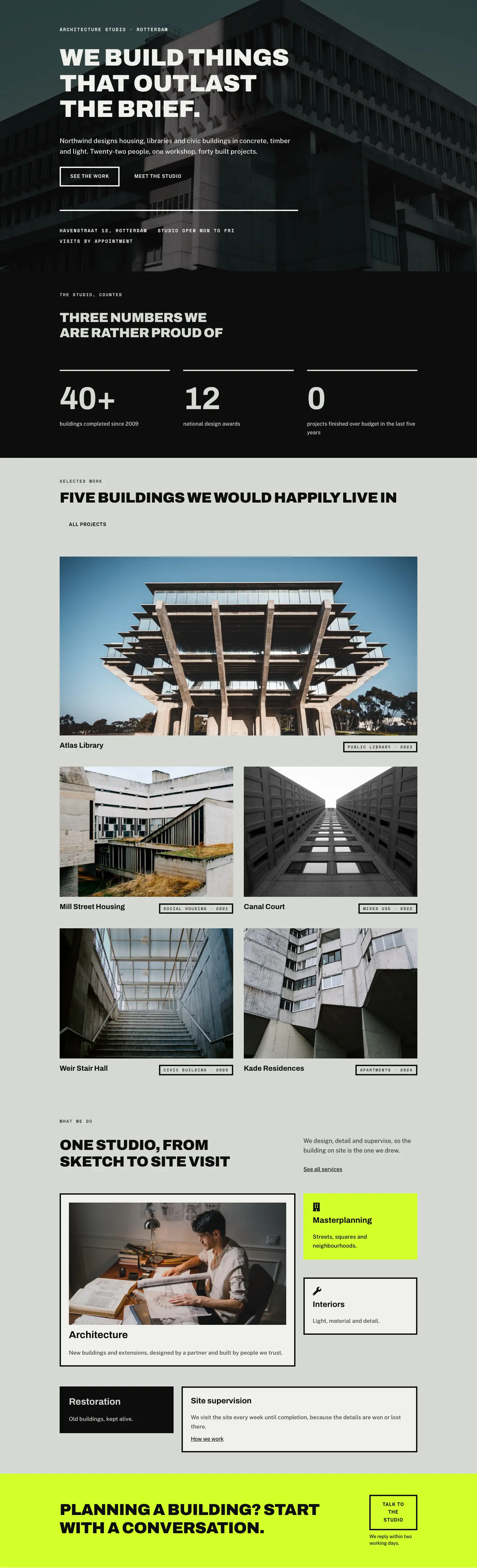
A bold, editorial Divi 5 full landing page for an architecture studio. Features a large manifesto headline, partner grid with portraits, numbered design principles, and a recruitment CTA — all in a stark monochrome palette.
Rate this element
Download this section, free
- Divi 5 JSON, imports in seconds
- Commercial license included
- No account needed
This page ships inside Northwind: Architecture Studio Theme (6 Pages), 6 coherent pages that share one brand.
Click to view the full page
Overview
Northwind Architects opens on a wide sage ground (#d6d8d3) with 180px of top padding on desktop, scaling to 80px on phones — that air is structural, not decorative. A full-width Group capped at 920px holds two stacked Divi Heading modules: a Space Mono h4 at 13px, uppercase, 2px letter-spacing names the studio and its founding year, then an Archivo h1 at 104px, weight 900, letter-spacing −1px, and text-wrap: balance delivers the manifesto line. A 2px solid divider cuts cleanly below, then a 16/24 + 8/24 two-column row places the studio description on the left (Public Sans 20px, 1.7em line-height) and a single underlined "Read our principles" link on the right. The asymmetry is deliberate: the narrow right column never competes with the statement.
The partners section stays on the same sage ground and introduces a heading row where the H2 baseline-aligns opposite a short descriptor (alignItems: flex-end in the JSON), so the heading and the commentary land on the same visual floor. Below it, four equal columns each hold a 1:1 square portrait image followed by a Group with a 4px top border, an Archivo h3 name, and a Space Mono role label in uppercase. On tablet the grid wraps to 2×2 (12/24 flex per column); on phones it becomes a single stack. The border accent reads like a ruled annotation, consistent with how the rest of the layout uses line weight rather than shadow or color to establish hierarchy.
The principles section inverts the palette to near-black (#0d0d0d). An Archivo h2 at 56px introduces four numbered rows, each sitting between 4px sage dividers. Every row is a horizontal flex group: a fixed 64px number column in Space Mono, a flex-grow title column (Archivo h3, 34px, #d6d8d3), and a max-360px description in Public Sans 17px. On phones the three columns collapse to a vertical stack with 8px row gaps. The contrast between the dark field and the sage divider colour (#d6d8d3) keeps the section readable without introducing a third accent.
The final two sections close with personality and a conversion path. A 9/24 portrait column carries a 4:5 image with pill-rounded top corners and a 32px bottom corner, paired against a 15/24 text column of three Archivo 22px paragraphs and an italic signed attribution. The closing CTA layers a full-bleed architecture photograph behind a left-anchored card (max 520px), framed by a 4px solid border on all sides, with a ghost button that fills to black on hover. Padding drops proportionally at every breakpoint so nothing feels cramped or collapsed on mobile.
What’s inside
- Full-page hero: Archivo h1 at 104px/72px/44px (desktop/tablet/phone) with a 2px structural divider and a 16/24 + 8/24 intro copy split below
- Four-partner grid: 1:1 square portrait images with cover-fit, 4px top-border name cards, responsive 4-col → 2×2 → single-stack layout
- Numbered principles list: four rows between 4px horizontal dividers, fixed-width number column (Space Mono) + flex-grow heading + max-360px description text
- Managing partner spotlight: 4:5 portrait with pill-round top and 32px asymmetric bottom corner, three-paragraph first-person statement, italic signed attribution
- Full-bleed photo CTA: background image section with a left-anchored #f0f1ed card, 4px border on all sides, divider, and a ghost-to-filled "See openings" button
- Three-font system throughout: Archivo (display headings), Space Mono (all labels and numbering), Public Sans (body and navigation copy)
- All five sections carry explicit padding breakpoints (desktop, tablet, phone) and flex-direction overrides so the column stacking order is never left to chance
Who it’s for
This layout is built for architecture practices, structural engineering studios, interior design firms, and landscape architects who need a studio page that leads with credibility rather than a portfolio grid. It suits boutique firms of 10 to 50 people where named partners and a stated philosophy are genuine differentiators. It also fits high-end construction management companies and heritage restoration specialists who want a web presence that signals precision and permanence. The principles section adapts naturally to any discipline where a numbered manifesto (values, working methods, commitments to craft) carries weight with a discerning client.
Customization tips
The entire layout runs on two palette variables: #d6d8d3 (sage section backgrounds) and #0d0d0d (dark section and borders). Swapping both in the Divi Theme Builder global presets updates every module simultaneously. The hero h1 is set with text-wrap: balance, which works best at 5 to 10 words; headlines longer than 12 words will start to lose the tight 1.02em line-height. Partner portrait images must be square (1:1) cropped before upload, ideally 800×800px, because the module enforces that aspect ratio with cover-fit. The managing partner portrait uses a 4:5 ratio (800×1000px is a reliable crop). Principle descriptions are capped at max-width 360px in the JSON, so keep each to 15 to 25 words to avoid the text column growing taller than the heading beside it on desktop. The CTA card background photo is set at the section level as a CSS background image (cover, center center), so any landscape architecture shot at 1920px wide works without touching the card markup.
How to install this layout
- Download the layout JSON file from this page.
- Open the target page in the Divi 5 builder.
- Open the portability panel (up/down arrows icon) and choose the Import tab.
- Upload the JSON. Tick “replace existing content” only for full-page imports.
- Check the page at desktop and mobile widths, then swap in your copy and images.
Full walkthrough with troubleshooting: How to Import a Divi 5 Layout.
Questions about Northwind Architects — Bold Architecture The Studio Page for Divi 5
How does the hero headline behave on small screens?
The h1 is set at 104px on desktop, drops to 72px on tablet, and 44px on phones. Those values are encoded directly in the Divi Heading module's responsive font settings, so they apply without any custom CSS. The text-wrap: balance property also applies at all three breakpoints, keeping the headline from producing a single orphaned word on a narrow viewport.
What aspect ratio should partner portrait photos be?
Square, exactly. Each of the four partner columns enforces a 1:1 aspect ratio with object-fit: cover on the Divi Image module. Photos that are not pre-cropped to square will be center-cropped automatically, so the subject should be framed centrally in the source image. 800×800px at 72 DPI is sufficient for web use.
How is the principles section structured inside Divi?
Each principle is a Divi Group module containing three child Groups: a fixed-64px number block, a flex-grow heading block, and a max-360px description block. The parent Group uses flexDirection: row on desktop and flexDirection: column on phones. Between each principle row sits a standalone Divi Divider module set to 4px solid #d6d8d3. Editing a principle means opening the heading module and the text module inside that parent group.
The managing partner portrait has an unusual shape — can I change it?
Yes. The image uses a Divi Image module with border-radius set to 999px top-left and top-right (creating the pill top) and 32px bottom-right and bottom-left. To make it fully rectangular, set all four corners to 0px in the module's design settings. To make it a full circle, set all four to 999px. The 4:5 aspect ratio is enforced at the module level, so keep source images at that ratio.
Does the CTA section's background photo need to meet specific dimensions?
The photo is set as a CSS background image at the Divi Section level, with size: cover and position: center center. A landscape image of at least 1920×1080px works reliably across all screen widths. The content card sits at a fixed max-width of 520px on the left, so the right two-thirds of the photo is always visible on desktop — choose a shot with clear sky or structure in that zone.
Which section should I edit first when adapting this for a different firm?
Start with the hero h1 (the manifesto line) and the studio description paragraph directly below it, then update the partner names, roles, and photos. Those four cards establish the firm's identity before any other section is read. The principles section is high-impact but can be updated last because the numbered format works verbatim as a placeholder while you finalize copy.
Which Divi version does this layout need?
Divi 5. The layout is generated natively for Divi 5 and validated against its real module structure before publication, so it imports clean into the current builder.
Can I use this layout on client websites?
Yes. Every download includes a commercial license covering unlimited sites you own or build for clients. Only reselling or redistributing the layout file itself is prohibited.
Included in these packs
More full landing pages
Browse all full landing pages
Kiln & Clay — Minimal Pottery_studio Visit Page for Divi 5
full_landing · pottery_studio · minimal

Kiln & Clay — Minimal Pottery_studio Our Story Page for Divi 5
full_landing · pottery_studio · minimal

Kiln & Clay — Minimal Pottery_studio Studio Membership Page for Divi 5
full_landing · pottery_studio · minimal

Kiln & Clay — Minimal Pottery_studio The Shop Page for Divi 5
full_landing · pottery_studio · minimal

Kiln & Clay — Minimal Pottery_studio Classes Page for Divi 5
full_landing · pottery_studio · minimal

Kiln & Clay — Minimal Pottery_studio Home Page for Divi 5
full_landing · pottery_studio · minimal