
Nullbyte Security — Dark Cybersecurity Approach Page for Divi 5
See exactly what happens when you hire Nullbyte. Senior testers, written scope, fixed price, free retest. A plain three-week web application test from kickoff to debrief.
Rate this element
Download this section, free
- Divi 5 JSON, imports in seconds
- Commercial license included
- No account needed
This page ships inside Nullbyte: Cybersecurity & Tech Consultancy Theme (6 Pages), 6 coherent pages that share one brand.
Click to view the full page
Overview
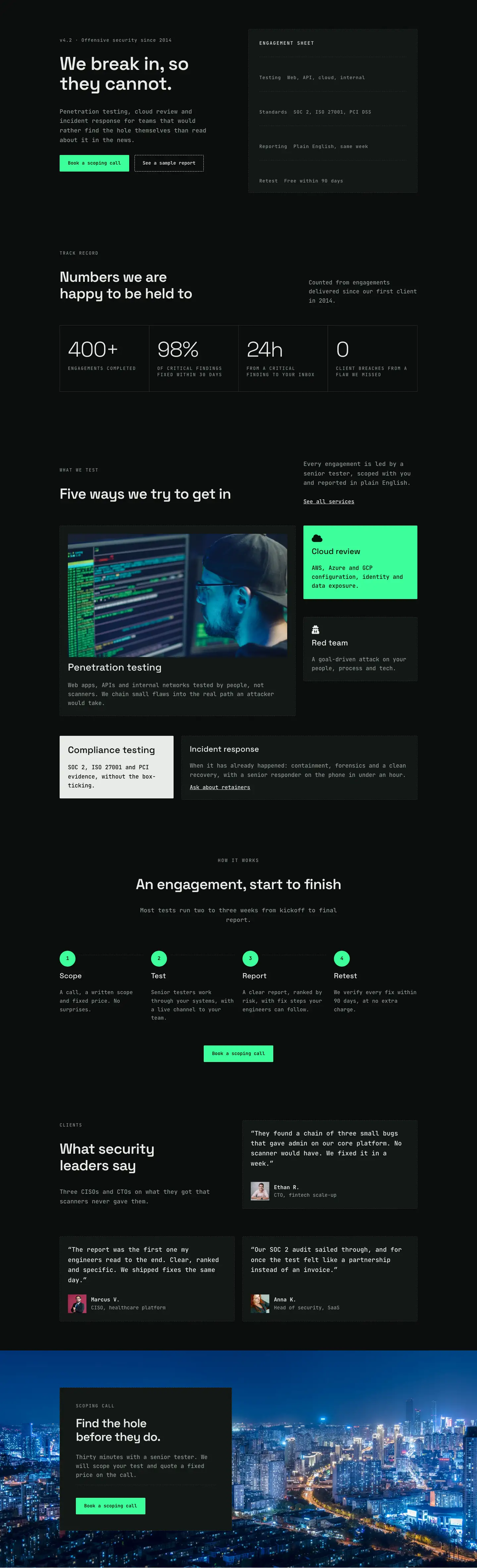
The layout opens on a near-black section (#0b0d0c) where a Pexels network photograph sits behind a 75% solid gradient overlay, keeping the image atmospheric without competing with the type above it. Space Grotesk at 56px carries the H1 at -1px letter-spacing, and JetBrains Mono handles both the breadcrumb trail and the 19px lead sentence directly beneath. Section padding scales from 120px top on desktop down to 64px on phone, so the hero breathes at every breakpoint without dominating a small screen.
The engagement timeline in the second section uses an 8/16 column split: a narrow left column holds the overline label, H2, and a single supporting sentence, while the wider right column runs a vertical connector built entirely from native Divi Group modules. Each timeline node is a 14x14px solid square in the brand neon green (#3dff9a); a 2px-wide Group set to flex-grow fills the vertical gap down to the next node automatically. Four steps (Kickoff, Testing, Reporting, Retest) hang off this spine, each with a JetBrains Mono day-range overline above a Space Grotesk H3 and a short body paragraph. On mobile the two columns stack and the connector gap compresses from 28px to 20px, keeping the timeline readable without horizontal scrolling.
The third section pairs two comparison cards in a 12/12 split. The automated-scan card uses the slightly elevated #131715 background with a dashed 1px border and four Font Awesome X marks in muted grey-green (#8d9892). The Nullbyte test card inverts to #e8ece9 near-white with dark text, four checkmarks, and a solid dark CTA button labeled "See a sample report". The contrast is immediate and deliberately teachable: a prospect reads the value gap in a few seconds. A fourth section on the same #131715 background presents eight ground rules as a two-column CSS grid, each item a check icon paired with a single JetBrains Mono line in near-white, collapsing to one column on phone.
The page closes with a six-question FAQ in a dashed-top-border format (Space Grotesk H3 plus JetBrains Mono body, no accordion, no plugin) alongside a ghost "Book a call" button. A full-bleed neon-green (#3dff9a) CTA band follows. The green appears nowhere in the body sections, so when it arrives as the final band it reads as deliberate punctuation rather than a recurring accent. A dark "Book a scoping call" button and a one-line sub-caption complete the close.
What’s inside
- Five-section dark approach page (hero, timeline, comparison, ground rules, FAQ + CTA) pre-wired across all modules
- Vertical engagement timeline built from native Divi Group modules: a 14x14px neon-green dot plus a 2px flex-grow connector line, zero custom CSS required
- Side-by-side scanner vs. penetration-test comparison using two contrasting cards and Font Awesome icon rows (fa-times / fa-check)
- Eight-item ground-rules checklist laid out in a responsive two-column CSS grid that reflows to one column on mobile
- Six-question FAQ section with 2px dashed top-border separators, no accordion plugin needed
- Full-bleed neon-green (#3dff9a) CTA band with a dark ghost-style button, used only at the close for maximum contrast impact
- Two-typeface system (Space Grotesk for display headings, JetBrains Mono for body and labels) pre-set across every module
- Photography hero with Pexels background image and 75% dark gradient overlay built into the Divi section background settings
Who it’s for
Built for penetration testing firms, managed security service providers, and independent security consultants who need a credible approach page that speaks to technical buyers. It suits red team agencies, cloud security consultancies, and compliance-focused IT shops building dedicated service pages for web application testing, network assessments, or mobile app security. The dark monospace aesthetic signals hands-on technical depth without feeling dated, and the scanner-vs-human-tester comparison makes it effective for teams that need to educate prospects who have only ever run automated scans.
Customization tips
Start by replacing the hero background image (currently a Pexels network photo, ID 5473309) with a licensed image that fits your firm. The 75% gradient overlay sits on top, so any high-contrast dark scene reads cleanly beneath it. The neon-green accent (#3dff9a) appears in three places: each timeline dot Group, the closing CTA section background, and the CTA button border. Updating those three locations is all it takes to shift the brand accent across the full page. Keep comparison card body copy to roughly one short line per row (the current rows average eight to ten words) to avoid breaking the icon-text alignment. FAQ answers average about fifteen words each; staying near that keeps the two-column grid balanced on desktop. Body copy is set in JetBrains Mono at 16 to 19px depending on context, and those sizes are already optimised for readability on dark backgrounds, so resist the urge to go smaller.
How to install this layout
- Download the layout JSON file from this page.
- Open the target page in the Divi 5 builder.
- Open the portability panel (up/down arrows icon) and choose the Import tab.
- Upload the JSON. Tick “replace existing content” only for full-page imports.
- Check the page at desktop and mobile widths, then swap in your copy and images.
Full walkthrough with troubleshooting: How to Import a Divi 5 Layout.
Questions about Nullbyte Security — Dark Cybersecurity Approach Page for Divi 5
Is the vertical timeline built with a plugin or custom CSS?
Neither. Each timeline item is a native Divi Group module. The dot is a 14x14px Group with a solid #3dff9a background, and the connecting line is a 2px-wide Group with flex-grow set so it fills the gap between nodes automatically. No third-party plugin or custom CSS is required.
What background image is used in the hero, and can I keep it?
The hero uses Pexels photo 5473309 (a dark network and cable scene) with a 75% opacity dark gradient overlay. You can use it for mockups and internal previews, but you should replace it with a properly licensed image before publishing a client or live site.
How does the layout stack on mobile?
All two-column rows switch to flex-direction column on phone. The timeline column gap compresses from 28px to 20px, the FAQ and ground-rules grids collapse to a single column, and the CTA band stacks the headline above the button group. Section padding steps down from 88px to 40px across tablet and phone breakpoints.
What fonts are used, and do they need to be installed separately?
The layout uses Space Grotesk for display headings and JetBrains Mono for body copy, labels, and buttons. Both are Google Fonts. Divi 5 loads Google Fonts automatically when they are set in module typography, so no manual enqueue or plugin is needed.
The comparison cards have very different backgrounds. How do I retheme them?
The dark card uses #131715 as its Group background with #8d9892 text. The light card uses #e8ece9 with #0b0d0c text. To retheme: update the Group decoration background for each card, then update the heading and body font colors inside to maintain contrast. The icon colors are set per Icon module and can be changed in the same pass.
Can I remove or reorder the timeline steps?
Yes. Each step is a self-contained Group containing an overline Heading, an H3 Heading, and a Text module. You can duplicate or delete any step group. If you remove a step, also remove its corresponding dot-and-line Group from the left column of that row so the connector stays aligned.
Which Divi version does this layout need?
Divi 5. The layout is generated natively for Divi 5 and validated against its real module structure before publication, so it imports clean into the current builder.
Can I use this layout on client websites?
Yes. Every download includes a commercial license covering unlimited sites you own or build for clients. Only reselling or redistributing the layout file itself is prohibited.
Included in these packs
More full landing pages
Browse all full landing pages
Kiln & Clay — Minimal Pottery_studio Visit Page for Divi 5
full_landing · pottery_studio · minimal

Kiln & Clay — Minimal Pottery_studio Our Story Page for Divi 5
full_landing · pottery_studio · minimal

Kiln & Clay — Minimal Pottery_studio Studio Membership Page for Divi 5
full_landing · pottery_studio · minimal

Kiln & Clay — Minimal Pottery_studio The Shop Page for Divi 5
full_landing · pottery_studio · minimal

Kiln & Clay — Minimal Pottery_studio Classes Page for Divi 5
full_landing · pottery_studio · minimal

Kiln & Clay — Minimal Pottery_studio Home Page for Divi 5
full_landing · pottery_studio · minimal