
Nullbyte Security — Dark Cybersecurity Home Page for Divi 5
Offensive security since 2014. Penetration testing, cloud review, red team and incident response for teams that need to find the hole before attackers do. Fixed price, plain English reports.
Rate this element
Download this section, free
- Divi 5 JSON, imports in seconds
- Commercial license included
- No account needed
This page ships inside Nullbyte: Cybersecurity & Tech Consultancy Theme (6 Pages), 6 coherent pages that share one brand.
Click to view the full page
Overview
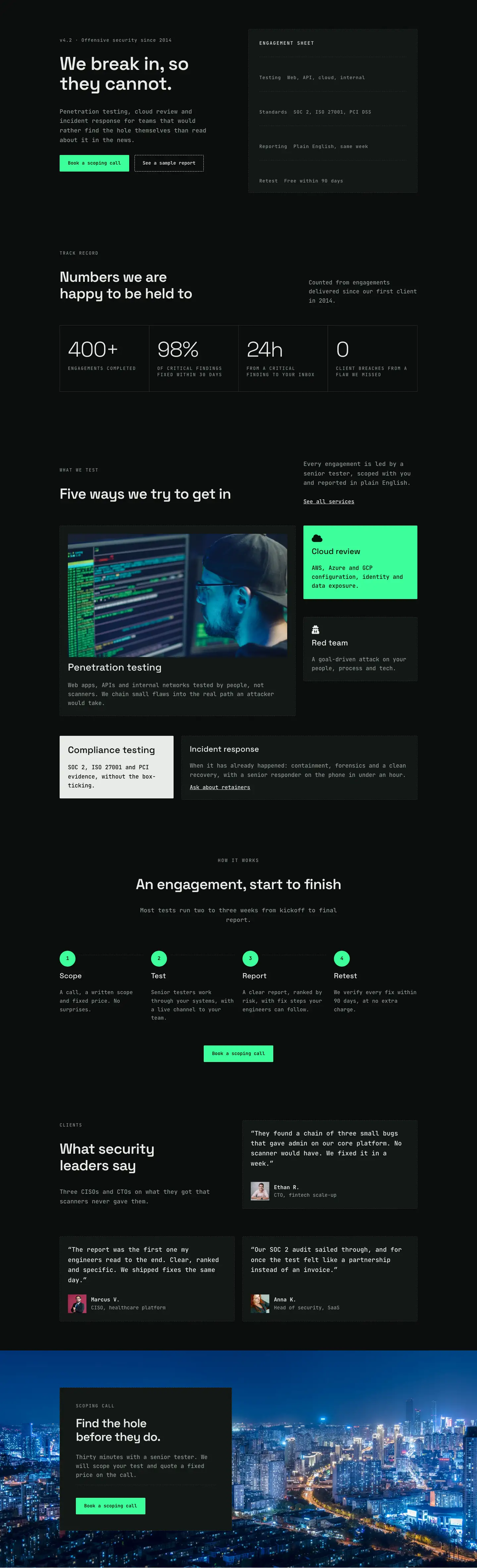
Nullbyte Security opens on a split-column hero set against a near-black #0b0d0c canvas. The left column leads with a 14px monospaced version badge in JetBrains Mono with 1px letter-spacing, followed by a Space Grotesk H1 at 56px, tight -1px tracking, and textWrap: balance for short-line control. Body copy sits in JetBrains Mono at 18px with a 1.6em line-height, then a horizontally grouped button pair. The primary CTA uses a solid acid-green #3dff9a fill with a matching dashed 1px border and near-black #04130b type. The secondary button sits beside it as a transparent ghost with a dashed off-white border. To the right, a dark #131715 card with a 1px dashed #2a312d border holds an "Engagement sheet": a vertical stack of dashed-divider rows listing scope, standards, reporting turnaround, and retest policy. Two typefaces carry the entire page. Space Grotesk handles all headings and the large stat numerics. JetBrains Mono handles everything else, from body paragraphs to uppercase section labels to button text.
The second section introduces the track record with an asymmetric two-column header (flex-type 16/24 and 8/24 splits for a deliberate lean-left weight) before a CSS grid of four stat cells. Each cell holds a Space Grotesk numeral at 64px weight 300 with -2px tracking, over a 13px uppercase JetBrains Mono label. The grid runs four columns on desktop and collapses to two on tablet and phone. Cell gaps are filled by a 1px #2a312d line, forming a graph-paper grid against the page background. Setting the large numerics at weight 300 rather than bold creates an editorial restraint that reads as confident rather than loud.
The services section presents five cards with intentionally differentiated backgrounds: a dark bordered card with a full 16:9 image for penetration testing, an acid-green inverted card with a Font Awesome icon for cloud review, a near-white #e8ece9 card for compliance testing, and two dark cards for red team and incident response. The variation signals service tier without resorting to color-coded tags on every card. A four-step process section follows, centered at maxWidth 720px, with numbered steps in a four-column CSS grid. Each step has a 48px circular #3dff9a badge connected to a dashed #2a312d horizontal line on desktop. The testimonials section runs three quote cards across two rows, each with a 56px square avatar at 1:1 cover fit, a 19px quote in JetBrains Mono, and an attributed name and title. The final section overlays a dark background image with a left-anchored #131715 card at maxWidth 520px, a dashed internal divider, and the repeating primary CTA.
Spacing is consistent and fully explicit throughout. Every section carries 88px of vertical padding on desktop, 64px on tablet, and 40px on phone, set directly in the module decoration rather than inherited from global styles. Two-column rows use flexWrap: wrap and flexDirection: column at the phone breakpoint, and all columns expand to full-width 24/24 flex-type on phone. The process grid steps from 4 to 2 to 1 column across breakpoints. Every heading size steps down explicitly (H1: 56px, 42px, 34px; section H2: 44px, 36px, 30px), so the layout renders correctly regardless of your Divi global typography settings.
What’s inside
- Split-column hero with a Space Grotesk H1 at 56px, a JetBrains Mono version badge, and a side-by-side button group (solid acid-green primary plus dashed ghost secondary) in a Divi Group module
- Right-column "Engagement sheet" card built from Text and Divider modules on a `#131715` background with a dashed `#2a312d` border, listing scope, standards, turnaround, and retest policy as divider-separated rows
- Four-cell CSS grid stats block (400+, 98%, 24h, 0) with 64px Space Grotesk numerals at weight 300 and uppercase 13px JetBrains Mono labels, collapsing from 4 columns to 2 on tablet and phone
- Five service cards across three rows with distinct background treatments: 16:9 cover-fit image card, acid-green inverted card with Font Awesome icon, near-white card, and two dark dashed-border cards
- Four-step numbered process in a CSS grid with 48px circular `#3dff9a` Group badges, dashed connector lines (disabled on phone), and individual Heading and Text modules per step
- Three testimonial cards with 56px square avatar images at 1:1 cover fit, 19px quoted body text, and name/title attribution rows using Divi Image, Text, and Group modules
- Background-image CTA section with a left-anchored dark card at maxWidth 520px, a dashed Divider module, and the repeating primary green CTA button
Who it’s for
Penetration testing firms, red team consultancies, and managed security service providers will find this layout immediately deployable. It suits independent infosec consultants who need to lead with a credibility-heavy track record, cloud security reviewers targeting AWS, Azure, or GCP clients, and compliance-focused firms working within SOC 2, ISO 27001, or PCI DSS scopes. The service-card architecture and numbered engagement process also adapt well to any technical professional services firm (legal forensics, financial audit, technical due diligence) that needs to walk a prospect through a structured methodology before a conversion CTA.
Customization tips
The palette pivots on two decisions: the page background (#0b0d0c) and the acid-green accent (#3dff9a). Swap the accent globally to shift tone without breaking contrast. A cyan (#00e5ff) or amber (#f5c518) both hold up against the near-black base. The card surface (#131715) and border (#2a312d) move together; keep them two to three steps lighter than the page background to preserve the layered depth.
Copy length matters in the stats grid. Each label is 13px uppercase with 2px tracking, so labels beyond five or six words will wrap and break cell symmetry. Aim for three to four words per stat label. The H1 uses textWrap: balance, so phrase lengths of five to ten words render most cleanly. Service card images are set to 16:9 at cover fit, so use landscape photos with a centered subject. Avatar images in the testimonials use 1:1 at cover fit; square crops at 400px wide or larger render sharply at the 56px display size.
How to install this layout
- Download the layout JSON file from this page.
- Open the target page in the Divi 5 builder.
- Open the portability panel (up/down arrows icon) and choose the Import tab.
- Upload the JSON. Tick “replace existing content” only for full-page imports.
- Check the page at desktop and mobile widths, then swap in your copy and images.
Full walkthrough with troubleshooting: How to Import a Divi 5 Layout.
Questions about Nullbyte Security — Dark Cybersecurity Home Page for Divi 5
How does the layout stack on smaller screens?
Every two-column row is configured with `flexWrap: wrap` and `flexDirection: column` at the phone breakpoint, so columns stack vertically and expand to full-width (24/24 flex-type). The stats grid goes from 4 columns to 2. The process grid goes from 4 to 2 on tablet, then to 1 on phone. Section padding steps down from 88px to 64px on tablet and 40px on phone. All breakpoint values are set explicitly in the Divi 5 JSON, so nothing depends on theme defaults or custom CSS to behave correctly.
Which Divi 5 modules does this layout use?
Section, Row, Column, Group, Heading, Text, Button, Image, Icon, and Divider. No third-party modules or plugins are required beyond Divi 5 itself. The CSS grid stat block and the process step connectors are achieved entirely through Group decoration settings (display: grid, gridColumnCount) rather than custom code.
The service cards have different background colors. Can I make them all match?
Yes. Each service card is an independent Group module with its own background color. Set all five to `#131715` for a uniform look. If you do, consider keeping at least one visual differentiator (an icon color change or a dashed border on a featured card) so the column does not read as flat. The acid-green cloud review card currently anchors the right column visually; removing it without a replacement signal weakens the grid rhythm.
What size should the testimonial avatar photos be?
Avatar images are displayed at 56px wide in a 1:1 container at cover fit. Any square photo at 200px wide or larger will render cleanly at that size. The background image in the final CTA section is set to `size: cover` centered, so a 1920px landscape photo is the right target for that slot.
What should I edit first after importing?
Start with the three text strings that anchor the whole page: the H1 in the hero, the four stat values and their labels, and the CTA button text. Those three areas carry the most conversion weight and are also the most company-specific. Replace the placeholder Pexels images in the service card and the testimonial avatars next, since those are the most visually prominent third-party assets. Font and color changes can come last, as they are global and will cascade through the whole layout.
Which Divi version does this layout need?
Divi 5. The layout is generated natively for Divi 5 and validated against its real module structure before publication, so it imports clean into the current builder.
Can I use this layout on client websites?
Yes. Every download includes a commercial license covering unlimited sites you own or build for clients. Only reselling or redistributing the layout file itself is prohibited.
Included in these packs
More full landing pages
Browse all full landing pages
Kiln & Clay — Minimal Pottery_studio Visit Page for Divi 5
full_landing · pottery_studio · minimal

Kiln & Clay — Minimal Pottery_studio Our Story Page for Divi 5
full_landing · pottery_studio · minimal

Kiln & Clay — Minimal Pottery_studio Studio Membership Page for Divi 5
full_landing · pottery_studio · minimal

Kiln & Clay — Minimal Pottery_studio The Shop Page for Divi 5
full_landing · pottery_studio · minimal

Kiln & Clay — Minimal Pottery_studio Classes Page for Divi 5
full_landing · pottery_studio · minimal

Kiln & Clay — Minimal Pottery_studio Home Page for Divi 5
full_landing · pottery_studio · minimal