
Nullbyte Security — Dark Cybersecurity Research Page for Divi 5
Nullbyte publishes real-world security advisories, pentest write-ups, and open tools. Bug chains, infrastructure findings, hardware research — disclosed responsibly.
Rate this element
Download this section, free
- Divi 5 JSON, imports in seconds
- Commercial license included
- No account needed
This page ships inside Nullbyte: Cybersecurity & Tech Consultancy Theme (6 Pages), 6 coherent pages that share one brand.
Click to view the full page
Overview
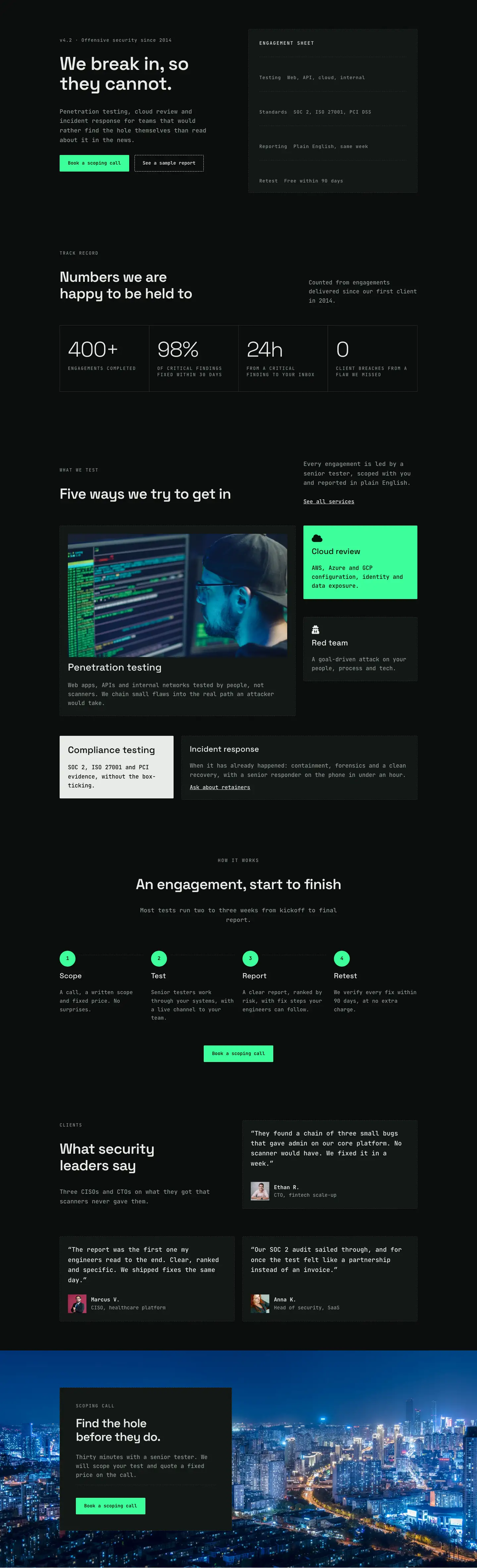
Nullbyte Security Research is built on two alternating background values (#131715 and #0b0d0c) that shift visual weight across sections without any dividing line between them. The opening section splits its columns at the grid level (16/24 units left, 8/24 right on desktop), placing the H1 at 52px in Space Grotesk against a JetBrains Mono breadcrumb trail in muted sage (#8d9892). That typeface pairing runs through the entire layout: Space Grotesk for anything editorial (headlines, pull quotes, article titles), JetBrains Mono for anything operational (labels, captions, buttons, category tags). The result reads less like a marketing page and more like a terminal window someone has been actively working in.
The research write-ups section is where the structural work is most concentrated. A CSS grid drops five article cards into a 2-column layout on desktop, with the featured piece spanning the full grid width at a 2:1 aspect ratio, twice as wide as the 4:3 cards beneath it. Each card is self-contained: a full-bleed cover image (sharp zero-radius corners, object-fit cover), an H3 article title in Space Grotesk at 22px, and a dashed-border category pill in JetBrains Mono at 12px with 2px letter-spacing, uppercase, labeling the research domain. The five supplied cards cover Web application, Infrastructure, Internal network, Hardware, and Cloud, a range that signals breadth without inventing categories. On mobile the grid collapses to a single column and the featured image holds its proportional crop.
The press quote section uses a dashed top border (2px, #e8ece9) on each of three equal columns to replace the conventional blockquote element. Publication names are set in uppercase Space Grotesk at 20px with 3px letter-spacing; the quotes themselves run at 22px italic; attributions drop to JetBrains Mono in #8d9892 at 15px. Below that, the photo gallery works as a three-column stacking arrangement, each column holding two images with a 16px gap and alternating between 4:5 portrait and 4:3 landscape crops to generate vertical rhythm without explicit art direction on the page.
The CTA section breaks from the dark palette entirely with a #3dff9a neon green background and near-black (#04130b) heading text at 48px. The "Book a scoping call" button reverses to a dark fill (#131715) with a matching dashed dark border, the same border vocabulary used across every tag and ghost button in the layout, now inverted for contrast. Padding steps down predictably across breakpoints (88px desktop, 64px tablet, 40px mobile) on every section, so the proportional weight of each block is preserved at every viewport width without any custom CSS.
What’s inside
- Two alternating dark backgrounds (#131715 and #0b0d0c) across four content sections, with a fifth neon-green (#3dff9a) CTA section as the accent break
- CSS grid article listing: featured write-up card spans the full 2-column width at a 2:1 aspect ratio, four secondary cards laid out at 4:3
- Per-card dashed-border category tags (JetBrains Mono, uppercase, 2px letter-spacing) labeling research domains including Web application, Infrastructure, Hardware, Cloud, and Internal network
- Three-column press quote strip with dashed 2px top-border dividers, 22px italic pull quotes, and mono attribution captions in muted sage
- Six-image laboratory photo gallery in a 3-column layout, each column stacking a 4:5 portrait and a 4:3 landscape image with a 16px gap
- Dual-typeface system throughout: Space Grotesk for all editorial headings and pull quotes, JetBrains Mono for all labels, captions, and buttons
- Ghost "All research" button (transparent fill, dashed white border) in the write-ups section header, inverted dark-fill CTA button in the final neon section
- Full responsive scaling on every section: grids collapse to single column on mobile, H1 steps from 52px to 32px, section padding scales from 88px to 40px
Who it’s for
Built for cybersecurity consultancies, penetration testing firms, and independent researchers who publish advisories, CVE write-ups, or responsible disclosure reports. It also fits managed security service providers building an editorial web presence, bug bounty teams establishing a public track record, and university or corporate security labs that release findings openly. The press quote strip, category-tagged article grid, and lab photo gallery position the owner as practitioners rather than vendors, which matters when the target audience is engineers and CISOs reading for technical substance rather than marketing copy.
Customization tips
The two dark background values (#131715 and #0b0d0c) are set directly on each section's background decoration. Swap both with your own dark tones and the alternating rhythm holds automatically. The neon green CTA background (#3dff9a) is a single section-level value: replace it with your accent color, then update the H2 text (#04130b) and small caption text to maintain legibility. The CTA button uses a dark fill (#131715) with a matching dashed border, so update both to the same value. Article titles (H3, Space Grotesk, 22px) are comfortable at 40-65 characters; titles longer than 75 characters will push the category tag onto its own row on smaller viewports. Category tag labels are uppercase JetBrains Mono at 12px, so keep them to one or two words. The featured write-up image expects a 2:1 landscape crop (1600x800px works cleanly); secondary write-up cards use 4:3. In the lab gallery, the first image per column is a 4:5 portrait slot and the second is a 4:3 landscape slot. Matching those proportions keeps the stacking rhythm intact.
How to install this layout
- Download the layout JSON file from this page.
- Open the target page in the Divi 5 builder.
- Open the portability panel (up/down arrows icon) and choose the Import tab.
- Upload the JSON. Tick “replace existing content” only for full-page imports.
- Check the page at desktop and mobile widths, then swap in your copy and images.
Full walkthrough with troubleshooting: How to Import a Divi 5 Layout.
Questions about Nullbyte Security — Dark Cybersecurity Research Page for Divi 5
The featured write-up card spans two columns on desktop. Does that hold on tablet?
The CSS grid is defined at the desktop level with gridColumnCount set to 2. At the phone breakpoint it switches to gridColumnCount 1 and the featured card's span resets to 1, making it the top card in the stacked list. Tablet inherits the desktop 2-column grid, so the full-width featured card is visible on medium screens.
What image aspect ratios do the article cards and gallery slots expect?
The featured write-up card uses a 2:1 ratio (for example 1600x800px). The four secondary write-up cards use 4:3. In the lab gallery, the first image in each of the three columns is a 4:5 portrait slot; the second is a 4:3 landscape slot. Keeping to these ratios preserves the intended stacking rhythm across all three gallery columns.
Are the dashed borders on the category tags and buttons custom CSS or native Divi?
Native Divi 5 border decoration throughout: style set to dashed, 1px width, on Group and Button modules respectively. No custom CSS is involved, so they render and edit entirely within the Divi 5 visual builder.
The CTA section is bright neon green. How involved is a color swap?
It is a single background value on the section module. Change it to your accent color, then update the H2 heading (#04130b) and the small sub-text color to maintain contrast against the new background. The button fill (#131715) and its dashed border share the same color value, so update both together and the button reads correctly against any bright background.
Can I add more article cards to the write-ups grid?
Yes. The grid Group is set to 2 columns on desktop and 1 on mobile. Add a new Group block inside it using the same card structure (Image, Heading, tag Group) and it slots into the next grid cell automatically. The featured card's gridColumnSpan of 2 is set only on that specific Group, so new cards default to a single column span.
How many press quotes can the 'In the press' section hold comfortably?
As written, it uses a 3-column equal row. Adding a fourth quote means changing the column structure to four equal columns or switching to a 2-column layout. The dashed top border and column typography are set on each column module, so they copy over cleanly when you duplicate a column.
Which Divi version does this layout need?
Divi 5. The layout is generated natively for Divi 5 and validated against its real module structure before publication, so it imports clean into the current builder.
Can I use this layout on client websites?
Yes. Every download includes a commercial license covering unlimited sites you own or build for clients. Only reselling or redistributing the layout file itself is prohibited.
Included in these packs
More full landing pages
Browse all full landing pages
Kiln & Clay — Minimal Pottery_studio Visit Page for Divi 5
full_landing · pottery_studio · minimal

Kiln & Clay — Minimal Pottery_studio Our Story Page for Divi 5
full_landing · pottery_studio · minimal

Kiln & Clay — Minimal Pottery_studio Studio Membership Page for Divi 5
full_landing · pottery_studio · minimal

Kiln & Clay — Minimal Pottery_studio The Shop Page for Divi 5
full_landing · pottery_studio · minimal

Kiln & Clay — Minimal Pottery_studio Classes Page for Divi 5
full_landing · pottery_studio · minimal

Kiln & Clay — Minimal Pottery_studio Home Page for Divi 5
full_landing · pottery_studio · minimal