
Nullbyte Security — Dark Cybersecurity Services Page for Divi 5
Senior-led web, API, cloud, red team, compliance, and incident response testing. Fixed prices, written scopes, free retest within 90 days. SOC 2, ISO 27001, PCI DSS, HIPAA accepted.
Rate this element
Download this section, free
- Divi 5 JSON, imports in seconds
- Commercial license included
- No account needed
This page ships inside Nullbyte: Cybersecurity & Tech Consultancy Theme (6 Pages), 6 coherent pages that share one brand.
Click to view the full page
Overview
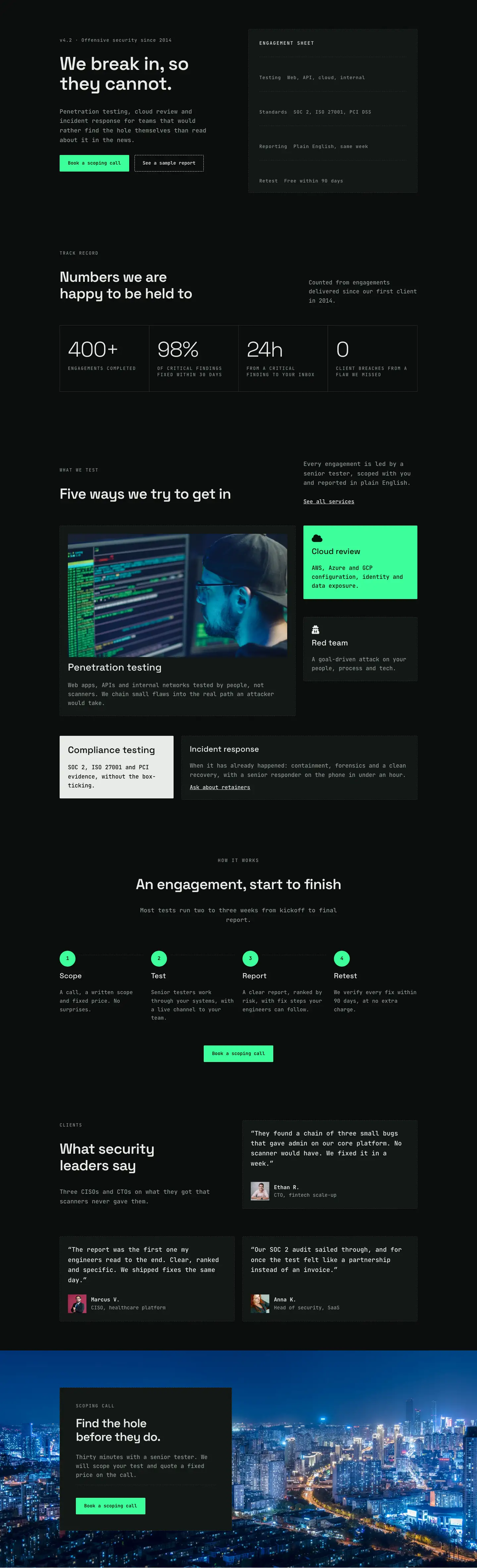
The layout runs seven sections end to end, building a complete cybersecurity services page from a split-column masthead down to a neon-green CTA closer. The primary canvas alternates between #131715 (a deep forest-dark green-black) and #0b0d0c (near-black), a pairing that creates section rhythm without relying on any imagery until the methodology section mid-page. The sole accent is #3dff9a, an electric terminal-green reserved entirely for the final CTA band, which arrives with enough contrast to read as a standalone conversion unit after four dense content sections.
Two typefaces carry all the typographic work. Space Grotesk handles every heading, from the 52 px H1 in the masthead to 44 px section H2s, 28 px pricing card titles, and 28 px toggle questions, all set at -1 px tracking and 1.15 em line-height for a condensed, editorial feel. JetBrains Mono covers body copy, eyebrow labels (13 px, uppercase, 2 px letter-spacing, #8d9892 muted sage), and button labels throughout. Its monospace cadence reinforces the technical context without reading as a gimmick. Vertical section padding steps from 88 px desktop through 64 px tablet to 40 px mobile, keeping proportions consistent across all three breakpoints.
The services section uses a single centered column (max 880 px) with a prominent dashed #e8ece9 divider opening the list, then #2a312d micro-dividers separating each of the five service rows. Each row is a horizontal flex group: a 24 px FontAwesome icon aligned to flex-start, beside a stacked H3 and a one-sentence body description. The pricing section presents two cards in a 2-column grid. The dark #0b0d0c card handles the point-in-time test; the inverted #e8ece9 card carries the Recommended continuous plan. Both use 1 px dashed borders at 2 px corner radius, reading as blueprint borders rather than the rounded cards typical of SaaS pricing pages.
The methodology section pairs a four-item divi/accordion (first item open by default) with a 4:5-ratio portrait image in a vertically-centered two-column row. On mobile the row wraps to column, placing the accordion above the image. The report-contents section renders an eight-item icon-checklist in a native CSS grid (two desktop columns, one mobile column). The FAQ uses five divi/toggle modules with flush horizontal padding and dashed bottom borders at zero corner radius, reading as a plain ruled list rather than a card stack. The closing CTA reverses every palette decision up to that point: a single #3dff9a section with dark-on-green H2 text and a near-black button, the only surface on the page where the visitor is directly asked to act.
What’s inside
- Five icon-plus-text service rows (web/API testing, cloud and infrastructure, red team, compliance, incident response) separated by dashed divi/divider modules inside a single max-880 px centered column
- Four-phase methodology accordion (divi/accordion, first item open by default) paired with a 4:5 portrait image in a two-column, vertically-centered section
- Eight-item report-contents checklist rendered in a native two-column CSS grid via divi/group display:grid, collapsing to one column on mobile
- Side-by-side pricing cards in a 2-column grid: one dark (`#0b0d0c`) and one light-inverted (`#e8ece9`, Recommended), each with a feature list, 56 px price display in Space Grotesk, and a CTA button
- Five-question FAQ built from divi/toggle modules with flush padding, dashed bottom borders, and zero corner radius
- Neon-green (`#3dff9a`) CTA close section with an inline H2 and dark action button, wrapping to column on mobile
- Dual typeface system applied consistently throughout: Space Grotesk for all headings, JetBrains Mono for body copy, eyebrows, and buttons
Who it’s for
This layout fits cybersecurity consultancies, penetration testing firms, and managed security service providers who need a services page that reads with the seriousness enterprise and mid-market buyers expect. It also works well for independent security researchers building a solo practice, and for SaaS, fintech, and healthcare organizations that run internal security programs and want a credible public-facing page. Agencies building sites for any of these clients can import and restyle it without structural changes.
Customization tips
The two-tone background rhythm (sections alternate between #131715 and #0b0d0c) is the fastest lever: swap both hex values to any near-black pair and the whole page recolors without touching any other setting. The neon-green CTA section (#3dff9a) is set on a single section background value; change it to your accent color and update the H2 text color (#04130b) alongside it to maintain contrast. Font changes are straightforward because the Space Grotesk / JetBrains Mono split is applied consistently throughout the layout: swapping Space Grotesk for another geometric sans such as Inter or DM Sans works without touching size or weight values, as those are all explicitly set per breakpoint. Service row descriptions should stay to two lines at 16 px to keep the icon visually aligned with the H3 on tablet. The 4:5 methodology image is set to objectFit: cover, so any portrait photo fills it cleanly; wide landscape photos will crop significantly at top and bottom.
How to install this layout
- Download the layout JSON file from this page.
- Open the target page in the Divi 5 builder.
- Open the portability panel (up/down arrows icon) and choose the Import tab.
- Upload the JSON. Tick “replace existing content” only for full-page imports.
- Check the page at desktop and mobile widths, then swap in your copy and images.
Full walkthrough with troubleshooting: How to Import a Divi 5 Layout.
Questions about Nullbyte Security — Dark Cybersecurity Services Page for Divi 5
What modules make up the services list?
Each service row is a divi/group set to horizontal flex, containing a divi/icon and a nested divi/group holding an H3 heading and a divi/text. The rows are separated by divi/divider modules in dashed style. Adding a sixth service means duplicating one row group and updating the H2 copy ('Five services, one standard of work') above the list.
How does the methodology accordion behave on mobile?
The divi/accordion sits in the left column of a two-column row that has flexDirection: column on phone, so the accordion stacks above the image. The first item is set open by default via the 'open: on' advanced option; all four items expand and collapse independently.
What aspect ratio should my replacement image be in the methodology section?
The image module is sized at 4:5 (portrait) with objectFit: cover and width: 100%. Any portrait-oriented photo fills the frame without distortion. Wide landscape photos will lose significant content at top and bottom as the module crops to fill the 4:5 ratio.
Can I change the neon-green CTA section to a different brand color?
Yes. The `#3dff9a` value is set on a single section background. Change it to your accent color, then update the H2 text color (`#04130b`) and the qualifier text below the button (also `#04130b`) to maintain legibility against the new background.
What should I edit first to make the page specific to my business?
Start with the five service names and their one-sentence descriptions (the H3 and divi/text inside each row group), then the pricing numbers and tier names inside the two cards. The H1 title and masthead subtitle are in the first section. Update the eyebrow labels ('What we do', 'Our method', etc.) last, as they describe page structure and are easy to overlook.
Which Divi version does this layout need?
Divi 5. The layout is generated natively for Divi 5 and validated against its real module structure before publication, so it imports clean into the current builder.
Can I use this layout on client websites?
Yes. Every download includes a commercial license covering unlimited sites you own or build for clients. Only reselling or redistributing the layout file itself is prohibited.
Included in these packs
More full landing pages
Browse all full landing pages
Kiln & Clay — Minimal Pottery_studio Visit Page for Divi 5
full_landing · pottery_studio · minimal

Kiln & Clay — Minimal Pottery_studio Our Story Page for Divi 5
full_landing · pottery_studio · minimal

Kiln & Clay — Minimal Pottery_studio Studio Membership Page for Divi 5
full_landing · pottery_studio · minimal

Kiln & Clay — Minimal Pottery_studio The Shop Page for Divi 5
full_landing · pottery_studio · minimal

Kiln & Clay — Minimal Pottery_studio Classes Page for Divi 5
full_landing · pottery_studio · minimal

Kiln & Clay — Minimal Pottery_studio Home Page for Divi 5
full_landing · pottery_studio · minimal