
Perihelion Observatory — Dark Observatory About Page for Divi 5
A full landing page Divi 5 layout for a nonprofit public observatory. Features a cinematic dark-sky hero, timeline history, values list, founder quote, and donation CTA — ready to import.
Rate this element
Download this section, free
- Divi 5 JSON, imports in seconds
- Commercial license included
- No account needed
This page ships inside Perihelion: Observatory & Planetarium Theme (6 Pages), 6 coherent pages that share one brand.
Click to view the full page
Overview
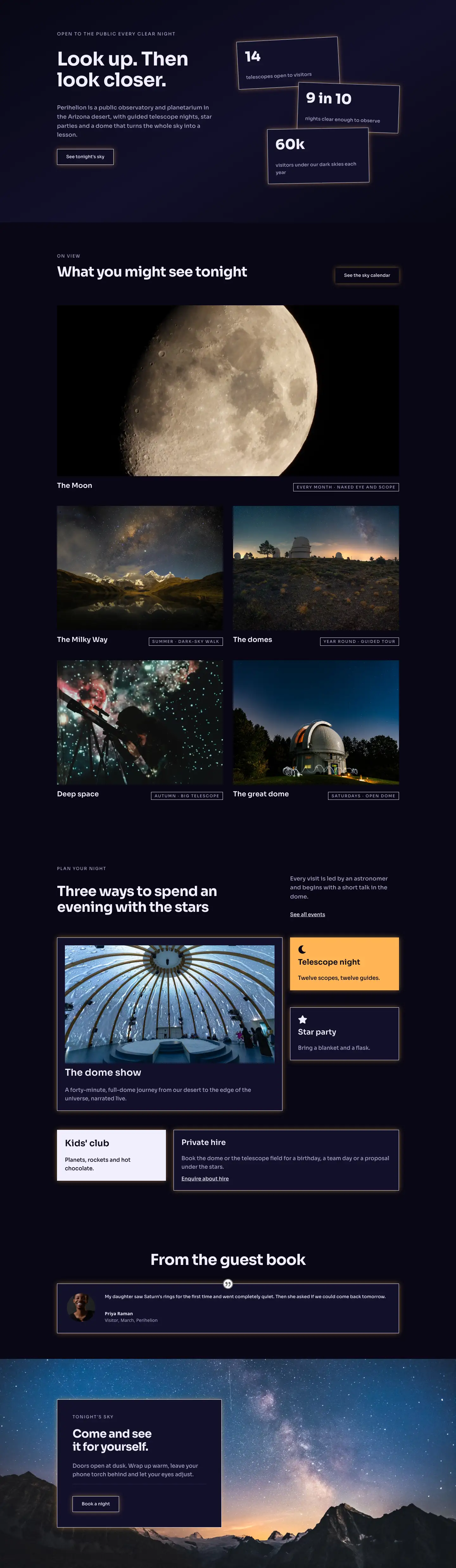
Perihelion opens with a full-bleed hero on #080714, a near-black indigo that anchors the entire palette. A 13 px Sora uppercase eyebrow in muted lavender (#a8a3c8) labels the organisation, then the H1 steps to 104 px with a 1.02 em line height and textWrap: balance applied directly in the layout, dropping to 72 px on tablet and 44 px on phone through explicit breakpoint values rather than fluid scaling. Below a 1 px #2b2750 divider, a deliberate asymmetric row splits the grid 16/24 on the left for the mission paragraph (20 px Sora body, max-width 560 px) and 8/24 on the right for a single underlined link. Both columns override to full 24/24 width on phone and stack vertically, so the link always appears below the paragraph rather than beside it.
The second section places a Pexels night-sky photograph behind a 70 % dark gradient applied identically at both 0 % and 100 % stops, producing a flat veil that keeps image texture present without a directional fade competing with the white text. Inside, a CSS-grid Group module arranges four milestone cards across four columns (32 px column gap, 40 px row gap), collapsing to two columns on tablet and one on phone with a tighter 32 px row gap. Each card sets only a top border at 2 px #f6f3ff while keeping all other sides at 0 px width, so the rule serves as a typographic anchor for the 48 px year number (weight 700, -1 px letter-spacing, 1 em line height) without boxing the card in.
Section three shifts to #12102a, a fractionally lighter indigo, and builds a five-principle values list with native Icon and Group modules. Each row uses flexDirection: row with alignItems: flex-start and a 24 px column gap: a Font Awesome solid icon sits fixed on the left at 24 px while the text group grows to fill the remainder. Rows are separated by 1 px #2b2750 dividers, with a heavier 2 px #f1eefc rule above the first item giving the block a clean top edge. The H2 heading is constrained to max-width 720 px and left-aligned, consistent with the 640 px subtext container below it.
A founder quote section follows, using a full-bleed photograph with no gradient overlay so the image sits at full exposure. The open-quote character is a plain Text module set to 120 px and 0.8 em line height, providing the visual lead-in without a separate typographic module. The quote body runs at 42 px / 1.3 em with textWrap: balance, scaling to 26 px on phone, and attribution sits beneath a 64 px-wide 2 px divider. The fifth section returns to #080714 over a third photograph and left-aligns a contained #12102a card at max-width 520 px. The card uses sharp 0 px corner radius, a 1 px #f1eefc perimeter border, and an amber box-shadow at rgba(255,180,84,0.45), the only warm accent in an otherwise cool palette. The ghost button inverts on hover: transparent fill becomes solid #f1eefc while the label text flips to #080714.
What’s inside
- Full-width hero with a 104 px H1 and three-breakpoint responsive sizing (72 px tablet, 44 px phone), plus an asymmetric 16/24 + 8/24 two-column intro that stacks cleanly on mobile
- Four-card CSS-grid milestone timeline inside a full-bleed photographed section, collapsing 4 columns to 2 to 1 with per-breakpoint gap values and top-border-only card anchors
- Five-principle values list built with native Icon and Group modules in a flex-row layout, separated by thin `#2b2750` dividers with a heavier 2 px accent rule at the top of the block
- Oversized founder pull-quote at 42 px body text with a 120 px decorative open-quote character, `textWrap: balance`, and name-plus-title attribution below a short 64 px divider
- Contained donation CTA card with `#12102a` fill, 1 px `#f1eefc` perimeter border, amber glow box-shadow, and a ghost button with hover fill inversion (transparent to solid `#f1eefc`, label to `#080714`)
- Three distinct background treatments across five sections: solid `#080714`, full-bleed photography with a flat 70 % gradient veil, and photography without overlay, creating deliberate visual cadence
- Consistent Sora typeface throughout with a two-tone hierarchy: near-white `#f6f3ff` / `#f1eefc` for primary content and `#a8a3c8` lavender-grey for labels and supporting body copy
Who it’s for
This layout suits science nonprofits, public observatories, planetariums, and dark-sky reserves that need an About page conveying institutional authority alongside genuine community warmth. It is also a strong fit for astronomy clubs, natural history museums, and STEM-focused charities (any organisation whose brand depends on low-light aesthetics and typographic credibility rather than colour-heavy marketing). Designers building sites for academic institutions, research foundations, or community-education organisations will find the structure adaptable without visual compromise.
Customization tips
The two background shades (#080714 for sections 1, 4, and 5 and #12102a for section 3) can be changed in each section's Background decoration. Because text colours and the Sora typeface are consistent throughout, swapping to a warmer near-black such as #0d0808 shifts the whole page temperature with minimal follow-up. The amber box-shadow (rgba(255,180,84,0.45)) appears in two places: the containing Group module and the Button module of the CTA card. Update both if the brand calls for a different accent; keeping the alpha between 0.40 and 0.50 preserves the soft-glow effect. Milestone card copy works best at two to three lines per card at 16 px; more than four lines creates uneven row heights before the tablet breakpoint collapses the grid to two columns. Background images for the photographed sections should be at least 1920 px wide and landscape-oriented (16:9 or wider) so the cover plus center center position does not clip the focal point. The quote-section image has no gradient overlay, so choose a photograph dark enough at the centre for 42 px white text to remain legible at all viewport widths.
How to install this layout
- Download the layout JSON file from this page.
- Open the target page in the Divi 5 builder.
- Open the portability panel (up/down arrows icon) and choose the Import tab.
- Upload the JSON. Tick “replace existing content” only for full-page imports.
- Check the page at desktop and mobile widths, then swap in your copy and images.
Full walkthrough with troubleshooting: How to Import a Divi 5 Layout.
Questions about Perihelion Observatory — Dark Observatory About Page for Divi 5
Can I add a fifth milestone card to the history grid?
Yes, but the grid Group is configured for `gridColumnCount: 4` on desktop. A fifth card will wrap onto a second row. To keep one row, change `gridColumnCount` to 5 on desktop and update the tablet value from 2 to 3, then check the result manually since column widths narrow considerably at that breakpoint.
What happens to the asymmetric hero columns on mobile?
Both columns override to `flexType: 24_24` on phone and the row switches to `flexDirection: column`, so they stack full-width. The mission paragraph renders first, followed by the 'Read our story' link as a separate full-width block.
The quote section has no gradient overlay. What if my replacement photo is too bright for the white text?
The other two photography sections use a `rgba(6,5,18,0.7)` gradient applied at both 0 % and 100 % stops with 'Overlays image' enabled. If your replacement photo is lighter, add the same gradient to the quote section's Background decoration under the Gradient tab to restore contrast for the 42 px quote text.
Which Font Awesome icons are used in the values list?
Five solid-weight icons: `f06e` (eye), `f0c3` (flask/beaker), `f186` (crescent moon), `f0c0` (group/users), and `f004` (heart). They are rendered through Divi's native Icon module and rely on Font Awesome 5 being loaded by your theme. No external icon library is required.
The five principles are written for an observatory. How much copy fits in each row?
Each row uses a fixed 24 px icon on the left and a flex-grow text group on the right. The existing descriptions run to one short sentence at 16 px / 1.6 em. Two sentences fit without breaking the visual rhythm; three or more will push the dividers apart noticeably and are best avoided on the narrower phone viewport.
Which Divi version does this layout need?
Divi 5. The layout is generated natively for Divi 5 and validated against its real module structure before publication, so it imports clean into the current builder.
Can I use this layout on client websites?
Yes. Every download includes a commercial license covering unlimited sites you own or build for clients. Only reselling or redistributing the layout file itself is prohibited.
Included in these packs
More full landing pages
Browse all full landing pages
Kiln & Clay — Minimal Pottery_studio Visit Page for Divi 5
full_landing · pottery_studio · minimal

Kiln & Clay — Minimal Pottery_studio Our Story Page for Divi 5
full_landing · pottery_studio · minimal

Kiln & Clay — Minimal Pottery_studio Studio Membership Page for Divi 5
full_landing · pottery_studio · minimal

Kiln & Clay — Minimal Pottery_studio The Shop Page for Divi 5
full_landing · pottery_studio · minimal

Kiln & Clay — Minimal Pottery_studio Classes Page for Divi 5
full_landing · pottery_studio · minimal

Kiln & Clay — Minimal Pottery_studio Home Page for Divi 5
full_landing · pottery_studio · minimal