
Perihelion Observatory — Dark Observatory Home Page for Divi 5
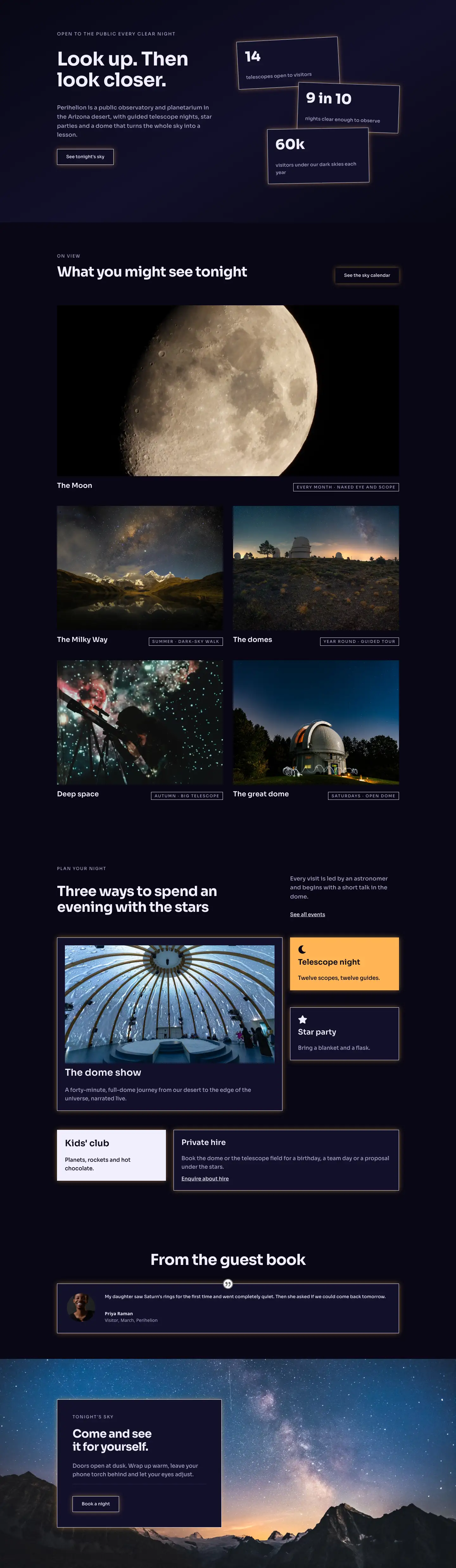
A full-page Divi 5 homepage layout for a public observatory or planetarium. Deep navy background, stacked stat cards, photo gallery grid, event program cards, testimonial, and a full-bleed CTA section with starfield background.
Rate this element
Download this section, free
- Divi 5 JSON, imports in seconds
- Commercial license included
- No account needed
This page ships inside Perihelion: Observatory & Planetarium Theme (6 Pages), 6 coherent pages that share one brand.
Click to view the full page
Overview
The layout opens on a near-black canvas: #080714 set as a three-stop linear gradient angled at 150 degrees, barely warming to #12102a at mid-scroll before returning to pure void. That subtlety matters because the background is not flat, so text and bordered cards appear to float rather than sit against a wall. The hero splits into two equal columns: the left carries a Sora h1 at 60px with -1px tracking and text-wrap: balance, paired with a 14px uppercase eyebrow at 2px letter-spacing and a ghost CTA button. The right column stacks three stat cards (14 telescopes, 9-in-10 clear nights, 60k annual visitors), each in a #12102a panel with a 1px #f1eefc border and a warm amber diffuse box-shadow. On desktop those cards are nudged off-axis by CSS transforms (-3deg, 2deg, -1deg) and overlap each other via -40px negative top margins, creating a scattered-on-a-desk effect. On mobile the rotations zero out, the negative margins become positive gutters, and the columns stack vertically.
The second section uses a CSS Grid to present five celestial subjects, where the lead card (the Moon) spans both columns at a 2:1 aspect ratio while the remaining four sit at 4:3. Each card pairs a cover-fit photograph with an h3 title and a small uppercase frequency badge built from a divi/group with a 1px border and 12px Sora text. The section header is a flex row that pushes the h2 heading left and a ghost secondary button to the right, aligned to the baseline. On phone the grid collapses from two columns to one and the header stack goes vertical.
The events section runs three rows of paired cards. Visual accent is applied deliberately: one card per row breaks from the dark palette ("Telescope night" in amber #ffb454 with a crescent-moon Font Awesome icon; "Kids' club" in near-white #f1eefc with dark text) while neighbouring cards stay in #12102a. This colour-pop rhythm guides the eye without relying on photography for every cell. Type weight scales from 44px section headings down to 30px card headings and 17px body copy, maintaining a clear three-level hierarchy throughout.
The page closes on a full-bleed starfield photograph used as a CSS background-image on the section wrapper, with #080714 as a colour fallback. A single left-aligned card at max-width: 520px holds the final call to action, padded at 48px on all sides, with an eyebrow, an h2, a paragraph, a thin divi/divider module, and a ghost "Book a night" button. Responsive section padding is consistent across all five sections: 100px vertical on desktop, 72px on tablet, 48px on phone.
What’s inside
- Hero with h1 left column (Sora 60px, text-wrap: balance) and three overlapping stat cards right column, using CSS transforms (tilted on desktop, flat on mobile) and negative-margin stacking
- CSS Grid 'on view' gallery: one 2:1 lead image card spanning both columns plus four 4:3 image cards, each with a cover-fit photo, h3 title, and a bordered uppercase frequency badge
- Events section with six named experience cards across three paired rows, built from divi/group modules containing divi/icon, divi/heading, divi/text, and divi/image combinations
- Deliberate colour-pop card pattern: one accent card per row in amber (#ffb454) or near-white (#f1eefc) among dark #12102a neighbours, with matching icon fills and box-shadow glows
- Native divi/testimonial module styled with a dark #12102a card background, 1px solid border, and warm amber diffuse box-shadow
- Background-image CTA section: starfield photograph as a CSS section background with a left-aligned dark card overlay (max-width 520px, 48px all-side padding), divi/divider separator, and ghost button
- Sora typeface across all modules at three weight levels (700/600/500) and a clear size scale from 60px H1 down to 12px badge labels
- Ghost buttons with amber diffuse box-shadow (rgba(255,180,84,0.45)) and ghost-to-solid fill-on-hover interaction, appearing at hero, gallery header, and CTA
Who it’s for
Public observatories, planetariums, dark-sky parks, and astronomy societies are the direct fit: the event card structure maps one-to-one onto programmes like dome shows, telescope nights, star parties, and school sessions. Astronomical tourism venues, science museums with evening programmes, and university outreach departments running public open nights will find the layout equally applicable. The palette and typographic tone also work for a private stargazing glamping site or a natural dark-sky reserve that needs to communicate atmosphere and build bookings before a visitor arrives.
Customization tips
The two accent colours (amber #ffb454 and near-white #f1eefc) are the fastest place to start: swapping those two values across the accent cards, icon fills, and button glows recolours the whole palette without touching the dark base. The base dark (#080714) and mid-tone (#12102a) are used exclusively as backgrounds, so changing them as a pair shifts overall warmth, for example toward a deep navy. Hero stat cards hold short numeric values well (two to five characters) before the 44px type starts to crowd; keep stat labels to a single line under 30 characters. The 'on view' image cards are locked to their aspect ratios (2:1 lead, 4:3 for the rest) with object-fit: cover, so replace photos at exactly those proportions to avoid unexpected cropping. The CTA section background image is a CSS property on the section wrapper; swap the Pexels URL for your own dark-sky photograph at 1920px wide or wider, and the #080714 colour fallback will keep the overlay card legible while the image loads.
How to install this layout
- Download the layout JSON file from this page.
- Open the target page in the Divi 5 builder.
- Open the portability panel (up/down arrows icon) and choose the Import tab.
- Upload the JSON. Tick “replace existing content” only for full-page imports.
- Check the page at desktop and mobile widths, then swap in your copy and images.
Full walkthrough with troubleshooting: How to Import a Divi 5 Layout.
Questions about Perihelion Observatory — Dark Observatory Home Page for Divi 5
The hero stat cards are rotated on desktop. Do those tilts affect mobile layout?
No. Each stat card group carries an explicit phone breakpoint that sets the z-rotation to 0deg and removes the translate, so on mobile the cards stack straight and vertically with standard spacing. The negative-margin overlap also converts to positive margins at the phone breakpoint.
What aspect ratios should replacement photos follow in the 'on view' grid?
The lead Moon card is set to 2:1 (wide landscape). The four smaller grid cards and the 'dome show' event card are 16:9. The remaining event images use 4:3. All images use object-fit: cover, so photos crop to fill the container rather than letterboxing, but providing images at or above the target ratio prevents unexpected subject loss.
Which Divi 5 modules make up the event cards in the 'Plan your night' section?
Each card is a divi/group with a flex-column layout. The icon-led cards (Telescope night, Star party) contain a divi/icon, divi/heading, and divi/text. The dome show card adds a divi/image above the heading and text. No blurb or specialty modules are used, so all text and icons are editable directly in the visual builder without touching JSON.
The testimonial section shows only one review. Can more be added?
Yes. Duplicate the divi/testimonial module inside the same column to stack additional reviews vertically, or move them into a multi-column row for a side-by-side layout. The testimonial portrait image is a Pexels URL set in the portrait.innerContent field; replace it with your own headshot URL. The dark card styling is applied per-module, so duplicated testimonials inherit the same background and border automatically.
How do I swap the CTA background starfield for my own photo without editing JSON?
In the Divi 5 visual builder, select the final section, open its background settings, and replace the image URL under the background-image field. The section also has #080714 set as a background colour, which acts as a fallback if your image is slow to load and ensures the card text stays readable at all times.
Can the amber glow on the buttons and cards be removed for a flat look?
Yes. The amber box-shadow (rgba(255,180,84,0.45)) is set individually on each button module and each card group module. Select any element in the builder and clear its box-shadow value, or set the colour to rgba(0,0,0,0). Because the shadow is per-module rather than a global theme setting, you can remove it selectively, for example keeping the glow on accent cards only.
Which Divi version does this layout need?
Divi 5. The layout is generated natively for Divi 5 and validated against its real module structure before publication, so it imports clean into the current builder.
Can I use this layout on client websites?
Yes. Every download includes a commercial license covering unlimited sites you own or build for clients. Only reselling or redistributing the layout file itself is prohibited.
Included in these packs
More full landing pages
Browse all full landing pages
Kiln & Clay — Minimal Pottery_studio Visit Page for Divi 5
full_landing · pottery_studio · minimal

Kiln & Clay — Minimal Pottery_studio Our Story Page for Divi 5
full_landing · pottery_studio · minimal

Kiln & Clay — Minimal Pottery_studio Studio Membership Page for Divi 5
full_landing · pottery_studio · minimal

Kiln & Clay — Minimal Pottery_studio The Shop Page for Divi 5
full_landing · pottery_studio · minimal

Kiln & Clay — Minimal Pottery_studio Classes Page for Divi 5
full_landing · pottery_studio · minimal

Kiln & Clay — Minimal Pottery_studio Home Page for Divi 5
full_landing · pottery_studio · minimal