
Perihelion Observatory — Dark Observatory Learn Page for Divi 5
A dark, editorial Divi 5 landing page for an observatory education hub. Features programme listings, featured courses, team bios, and a warm amber CTA — ready to import and customise.
Rate this element
Download this section, free
- Divi 5 JSON, imports in seconds
- Commercial license included
- No account needed
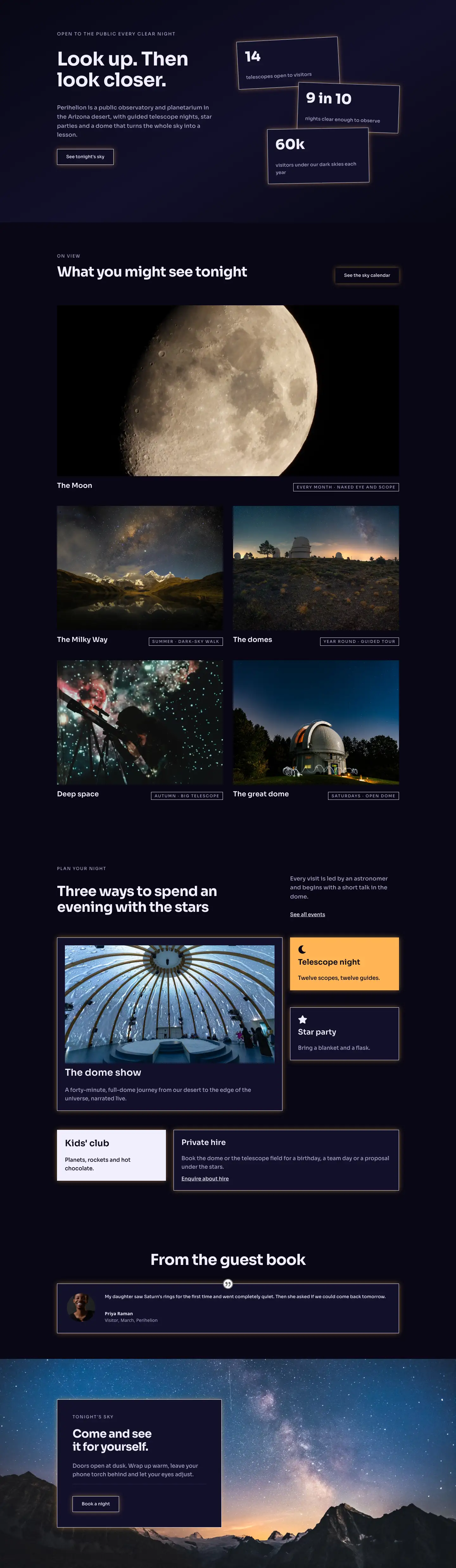
This page ships inside Perihelion: Observatory & Planetarium Theme (6 Pages), 6 coherent pages that share one brand.
Click to view the full page
Overview
Perihelion Observatory Learn is a dark full-landing page built for observatories, planetariums, and astronomy education programmes that need to present courses and instructors with authority. The layout opens with a two-column header section on #12102a — a deep indigo-navy — where a 52 px Sora h1 occupies a wider left column (16/24 flex units) and a short descriptor sits in a narrower right column (8/24), creating an immediate sense of editorial weight without clutter. A thin #2b2750 border at the base of this header section acts as a low-key horizon line before the content begins.
The programmes section that follows uses a centred h2 plus four Blurb modules arranged in a 2×2 grid on desktop, each carrying a Font Awesome icon on a solid #ffb454 amber square. The amber pops hard against the deep background and does the work of a colour accent without requiring any image assets in that section. Below that, three featured-course rows alternate image and text in equal 12/24 columns, vertically centred with alignItems: center. Each row leads with an uppercase numeric label (01, 02, 03) in the muted lavender #a8a3c8, followed by an h3 title, a short paragraph, and an underlined "See dates" inline link — a tight, scannable rhythm that communicates programme depth without padding.
The team section drops to #080714 (near-black) and breaks into a 4-column grid of 1:1 square portrait images, each capped with a 2 px white top border and an uppercase role label in the muted lavender. The alternating background shift from #12102a to #080714 across sections gives the page a layered depth without introducing new hues. The page closes with a full-width amber CTA band where the headline and a ghost-style button sit in a flex row that collapses to a column on mobile, keeping the conversion moment prominent on every screen size.
What’s inside
- Two-column header with asymmetric flex widths (16/24 + 8/24) — h1 at 52 px desktop / 32 px phone, breadcrumb text module, and subtitle text module
- Programmes grid: centred h2 section label + four Blurb modules in a 2×2 layout, each with a Font Awesome icon on an amber (#ffb454) square background
- Three alternating image-text course rows with vertically centred equal columns, numbered h4 labels, h3 course titles, body text, and inline 'See dates' links
- Three 4:3 aspect-ratio Image modules with `objectFit: cover`, one per featured course, with the second image reordering to order: -1 on mobile for correct reading flow
- Four-column team grid with 1:1 square portrait images, 2 px solid top-border name cards, name as h3, and role as uppercase tracked text
- Amber (#ffb454) CTA section with a space-between flex row containing an h2 headline and a ghost button that inverts to dark on hover with a box-shadow preset
- Three distinct background layers — #12102a (header/programmes), #080714 (featured courses + team), #ffb454 (CTA) — all responsive padding scaled across desktop, tablet, and phone breakpoints
Who it’s for
This layout is a natural fit for observatories, planetariums, and science centres building a dedicated learning or education page. It also works well for astronomy clubs promoting member courses, university outreach departments listing public programmes, and science communicators who run workshops or lectures. The structured course-row format and team grid translate cleanly to any knowledge-led organisation — think natural history museums, nature reserves with guided tours, or specialist photography schools — where credibility comes from the people and the programme, not a hero image.
Customization tips
The two background colours (#12102a and #080714) are set at the section level and can be swapped to any dark pair from your brand palette in under a minute. The amber accent (#ffb454) appears on every Blurb icon background and on the CTA section background — change all three spots and the accent shift is complete. Keep course titles under 30 characters so they stay on one or two lines at the 32 px size; longer titles will push the alternating rows uneven. The four team portrait images expect a 1:1 crop at 800 px wide minimum — square headshots work best, and objectFit: cover handles any slight mismatches. The 4:3 course images (min 1200 px wide) accept any landscape photography with a clear focal point in the centre third, since the sides may be cropped on narrower viewports. The CTA headline is set to textWrap: balance, so it handles up to around 50 characters gracefully before it needs manual line-break tuning.
How to install this layout
- Download the layout JSON file from this page.
- Open the target page in the Divi 5 builder.
- Open the portability panel (up/down arrows icon) and choose the Import tab.
- Upload the JSON. Tick “replace existing content” only for full-page imports.
- Check the page at desktop and mobile widths, then swap in your copy and images.
Full walkthrough with troubleshooting: How to Import a Divi 5 Layout.
Questions about Perihelion Observatory — Dark Observatory Learn Page for Divi 5
How does the layout stack on mobile?
Every multi-column row has explicit phone breakpoints. The two-column header wraps to a single column, the 2×2 programme grid stacks to one column, and each course row collapses image-above-text. The astrophotography row uses `order: -1` on the image column at phone size so the image always appears before the text regardless of source order.
Which Divi 5 modules does this layout use?
Section, Row, Column, Heading, Text, Blurb, Image, Button, and Group. No third-party modules or custom code blocks are required — everything is native Divi 5 built on builder version 5.8.0.
The amber CTA section is quite bold — can I tone it down?
Yes. The amber is a single `background.color` value on the last section. Replace `#ffb454` with a mid-tone from your palette and update the headline colour from `#080714` to ensure contrast. The ghost button border and hover background reference the same dark colour, so those update visually once you swap the section background.
What image dimensions should I use for the course rows?
The three featured-course images are set to a 4:3 aspect ratio with `objectFit: cover`. Supply images at least 1200 × 900 px for sharp rendering at full column width on desktop. The team portraits use a 1:1 ratio at 800 × 800 px minimum.
Can I add a fifth team member or a fifth course row?
For the team, duplicate an existing 1/4 column inside the four-column row — on tablet it already wraps to a 2×2 grid, so a fifth card will sit alone on the second tablet row. For courses, duplicate one of the three alternating rows and remember to flip the padding side (left vs right) to maintain the alternating indent.
Which Divi version does this layout need?
Divi 5. The layout is generated natively for Divi 5 and validated against its real module structure before publication, so it imports clean into the current builder.
Can I use this layout on client websites?
Yes. Every download includes a commercial license covering unlimited sites you own or build for clients. Only reselling or redistributing the layout file itself is prohibited.
Included in these packs
More full landing pages
Browse all full landing pages
Kiln & Clay — Minimal Pottery_studio Visit Page for Divi 5
full_landing · pottery_studio · minimal

Kiln & Clay — Minimal Pottery_studio Our Story Page for Divi 5
full_landing · pottery_studio · minimal

Kiln & Clay — Minimal Pottery_studio Studio Membership Page for Divi 5
full_landing · pottery_studio · minimal

Kiln & Clay — Minimal Pottery_studio The Shop Page for Divi 5
full_landing · pottery_studio · minimal

Kiln & Clay — Minimal Pottery_studio Classes Page for Divi 5
full_landing · pottery_studio · minimal

Kiln & Clay — Minimal Pottery_studio Home Page for Divi 5
full_landing · pottery_studio · minimal