
Perihelion Observatory — Dark Observatory Visit and Tickets Page for Divi 5
Book dome shows, telescope nights, and season passes at Perihelion Observatory. Group and school visits welcome. Under-fives go free. Reserve your evening online.
Rate this element
Download this section, free
- Divi 5 JSON, imports in seconds
- Commercial license included
- No account needed
This page ships inside Perihelion: Observatory & Planetarium Theme (6 Pages), 6 coherent pages that share one brand.
Click to view the full page
Overview
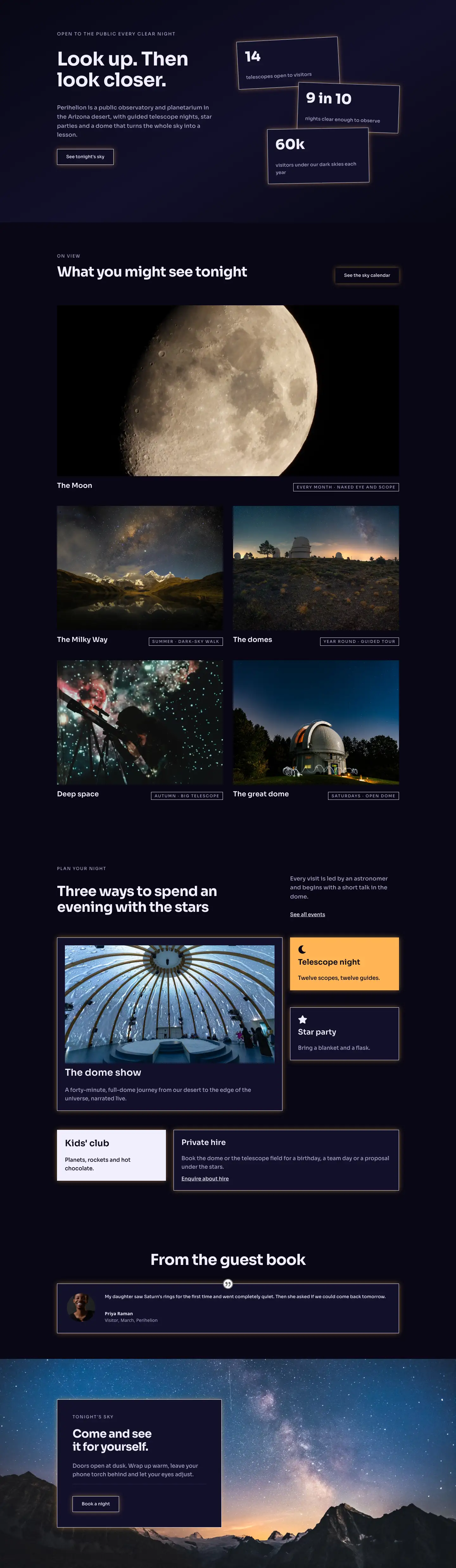
The layout opens with a two-column header section set on #12102a — a deep indigo that reads as twilight sky rather than flat black. The left column (16/24 flex units) carries a breadcrumb trail and an H1 in Sora 700 at 52px with -1px letter-spacing; the right column (8/24 units) holds a single support line in muted lavender (#a8a3c8) at 18px. A 1px #2b2750 border runs beneath, separating sections without visual noise. On mobile the columns stack and the heading scales to 32px, keeping hierarchy intact.
The ticket comparison section drops to near-black #080714 — deliberately darker than the surrounding sections to frame the pricing cards as the page's focal point. A centered H2 at 44px introduces three equal-width cards. Two share the same #12102a background and ghost-button treatment; the middle "Telescope night" card breaks rank with a solid #ffb454 amber fill and a "Most popular" pill badge, creating an instant visual anchor. All three carry the same warm amber box-shadow (rgba(255,180,84,0.45)) so the glow unifies the row while the fill contrast does the highlighting work. Each card is structured identically: tier name, one-line description, a 44px price figure beside a smaller "per adult" label in baseline alignment, a #2b2750 divider, three icon-checked features, then a CTA button. The flexGrow/flexShrink sizing on the feature-list group pins buttons to the card bottom regardless of content length — a detail that survives real copy edits.
The third section uses an asymmetric split: a narrow 8/24 label column holds the heading stack, while a wider 16/24 column renders eight icon-checked amenities in a two-column CSS grid at Sora 17px. The grid collapses to a single column on mobile. That editorial imbalance — narrow heading, wide checklist — communicates confidence without extra decoration, and the consistent 100px desktop / 48px mobile padding across all sections keeps the breathing room feeling deliberate.
The page closes with a groups-and-schools enquiry section: a left column presents an H2, body text, and three feature rows; the right column frames a native Divi contact form inside a #080714 card with a 1px #f1eefc border and the same amber glow shadow running throughout. Form fields use #12102a backgrounds with #f1eefc borders, staying readable without departing from the palette. Every ghost button inverts to near-white fill on hover, consistent across all four CTAs on the page.
What’s inside
- Three-tier pricing card row (Dome Show / Telescope Night / Season Pass) with flex-grow-pinned CTA buttons that stay bottom-aligned regardless of copy length
- Featured amber card (`#ffb454` fill) with a native "Most popular" badge pill built from a nested `divi/group` — no custom HTML or images
- Eight-item two-column CSS grid checklist for the amenities section (`display:grid`, `gridColumnCount:2`), collapsing to a single column on mobile
- Native Divi contact form with styled Name and Email fields, custom placeholder colors, and an amber-glow submit button for group-booking enquiries
- Consistent amber box-shadow (`rgba(255,180,84,0.45)`) on all three pricing cards, the contact-form card, and every CTA button for visual cohesion
- Asymmetric column splits (8/24 label + 16/24 grid in the amenities section; 16/24 heading + 8/24 subhead in the header) for editorial hierarchy without extra layers
- Fully responsive at three breakpoints: heading scales 52px → 32px, section padding 100px → 48px, card row wraps on tablet and stacks on phone
- Built entirely with native Divi 5 modules: section, row, column, heading, text, group, icon, button, contact-form, and contact-field
Who it’s for
This layout suits any venue running time-slotted public events with tiered admission: observatories, planetariums, science centres, and natural history museums are the obvious fit, but the three-tier card structure with a highlighted featured option maps cleanly to escape rooms, guided tour operators, botanical gardens with evening events, or heritage sites offering standard, premium, and season-pass access. The built-in group-booking enquiry form makes it practical for school trip coordinators and corporate event planners. Designers building for clients in science communication, astronomy education, or family-activity tourism will find the dark palette and amber accent immediately on-brand.
Customization tips
The three section backgrounds (#080714, #12102a, and the amber #ffb454 feature card) are the palette's load-bearing elements — swap the amber to teal or coral and update the matching box-shadow color values in all three card columns and the contact-form card to keep the glow consistent across the page. Sora is set inline per module rather than globally, so replacing it with any geometric sans (Outfit, DM Sans, Plus Jakarta Sans) means one font change per heading and text module. The price figures are plain divi/text modules at 44px — edit the copy directly in the Divi editor. Each checklist row is a divi/group containing a divi/icon and a divi/text; add or remove rows without breaking alignment since they use flexDirection: column with a fixed rowGap. The contact form's two fields can be extended by adding divi/contact-field blocks inside the existing divi/contact-form. Background images can be dropped into any section's background object alongside the existing color value without touching the layout structure.
How to install this layout
- Download the layout JSON file from this page.
- Open the target page in the Divi 5 builder.
- Open the portability panel (up/down arrows icon) and choose the Import tab.
- Upload the JSON. Tick “replace existing content” only for full-page imports.
- Check the page at desktop and mobile widths, then swap in your copy and images.
Full walkthrough with troubleshooting: How to Import a Divi 5 Layout.
Questions about Perihelion Observatory — Dark Observatory Visit and Tickets Page for Divi 5
Does the 'Most popular' badge on the Telescope Night card require any custom code or HTML?
No. It is a nested `divi/group` module with a `#12102a` background, 12px border radius, and a `divi/text` inside — built entirely with native Divi 5 modules.
How do the three pricing cards behave on smaller screens?
On tablet the row uses `flexWrap: wrap` so the cards reflow into a two-then-one arrangement. On phone they stack in a single full-width column. The featured amber card keeps its fill color and glow shadow at all breakpoints.
Can I add a fourth pricing tier without restructuring the layout?
The row is set to `equal-columns_3` with `flexWrap: nowrap` on desktop, so adding a fourth column means updating the column structure to `1_4,1_4,1_4,1_4` and adjusting the flex sizing values. On tablet the cards already wrap, so a fourth card folds in cleanly at that breakpoint.
The amenities checklist has eight items in a two-column grid — what happens if I add more?
The parent group uses `display: grid` with `gridColumnCount: 2`, so additional icon-text rows drop in automatically. On mobile it becomes a single column, so any number of items stacks without overflow.
Does the contact form need a third-party form plugin?
No. It uses Divi's built-in `divi/contact-form` module with `divi/contact-field` children and submits through Divi's native handler. No additional plugins are required.
Are there any background images in this layout, and can I add a star-field or texture?
All backgrounds are flat hex colors — depth comes from the amber glow shadows and indigo borders. You can add an image to any section's background object alongside the existing color value without touching the column or module structure.
Which Divi version does this layout need?
Divi 5. The layout is generated natively for Divi 5 and validated against its real module structure before publication, so it imports clean into the current builder.
Can I use this layout on client websites?
Yes. Every download includes a commercial license covering unlimited sites you own or build for clients. Only reselling or redistributing the layout file itself is prohibited.
Included in these packs
More full landing pages
Browse all full landing pages
Kiln & Clay — Minimal Pottery_studio Visit Page for Divi 5
full_landing · pottery_studio · minimal

Kiln & Clay — Minimal Pottery_studio Our Story Page for Divi 5
full_landing · pottery_studio · minimal

Kiln & Clay — Minimal Pottery_studio Studio Membership Page for Divi 5
full_landing · pottery_studio · minimal

Kiln & Clay — Minimal Pottery_studio The Shop Page for Divi 5
full_landing · pottery_studio · minimal

Kiln & Clay — Minimal Pottery_studio Classes Page for Divi 5
full_landing · pottery_studio · minimal

Kiln & Clay — Minimal Pottery_studio Home Page for Divi 5
full_landing · pottery_studio · minimal