
Perihelion Observatory — Dark Observatory Sky Tonight Page for Divi 5
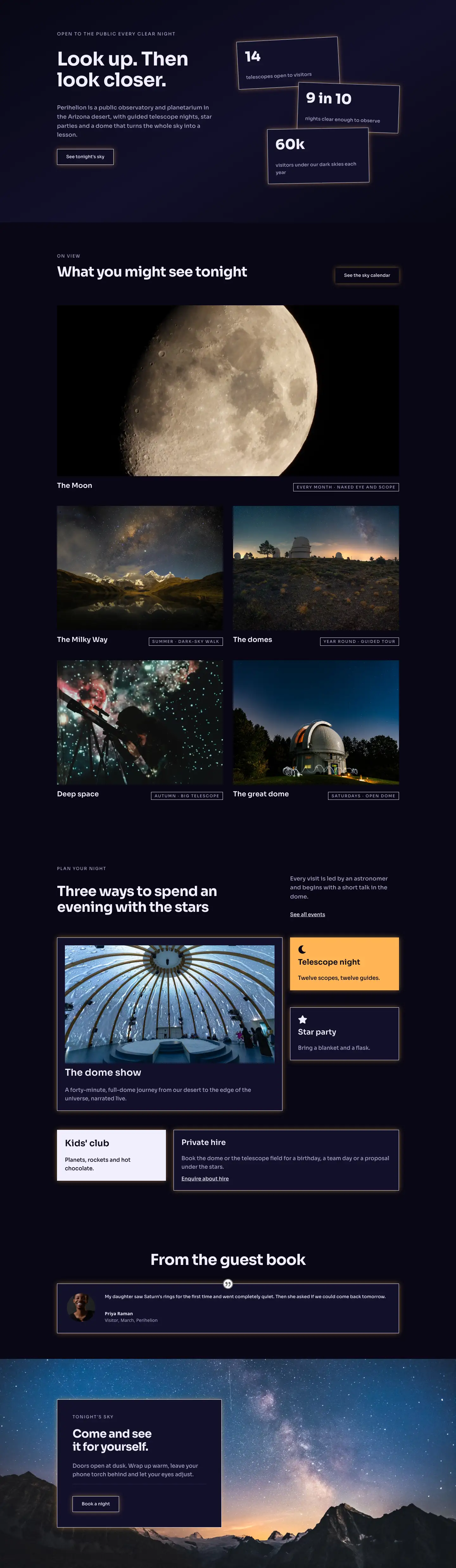
What to see in the night sky this month. Moon phases, planets, meteor showers and deep-sky objects — with tips from our astronomers at Perihelion Observatory.
Rate this element
Download this section, free
- Divi 5 JSON, imports in seconds
- Commercial license included
- No account needed
This page ships inside Perihelion: Observatory & Planetarium Theme (6 Pages), 6 coherent pages that share one brand.
Click to view the full page
Overview
Perihelion Observatory Sky Tonight is a four-section dark full-landing page built entirely in Sora on a two-tone deep-space palette: an ink-black #080714 hero and FAQ section bookend two midtone #12102a content sections, creating a deliberate rhythm that feels like moving through a dark observatory from dome to terrace. The hero drops a full-viewport Pexels night-sky photo behind a 70% dark gradient overlay, with 120px top padding scaling down to 64px on phones, so the breadcrumb trail, 56px H1, and constrained 600px lead line sit in generous breathing room without ever feeling cramped on a handset.
The second section is built around a group-carousel module showing six celestial targets — the Moon, Jupiter, Saturn, Meteors, Andromeda, and Satellites — each card stacking a square amber (#ffb454) icon tile, an H3 name, and a two-line muted-lavender (#a8a3c8) description. The carousel shows three slides on desktop, two on tablet, and one on phone, with white arrow navigation and no dot-nav, keeping the interface clean and purposeful. The 14px uppercase Sora label above the H2 and a max-width 640px body constrain the prose column so it never competes with the carousel.
The third section pairs a narrow left column carrying a label-heading-text-divider stack ("naked eye" vs. "through the telescope") with a wider right column holding a native Divi 5 before-after-image module: a bare night-sky on one side, a sharp-crescent moon on the other. The asymmetric flex split — 9/24 left, 15/24 right — lets the comparison slider dominate without feeling unbalanced, and both columns stack full-width on tablet and phone. The fourth section delivers a numbered tip list (01/02/03 at 80px weight-700) separated by #2b2750 dividers, then closes with a centered accordion (#12102a toggle backgrounds, a warm amber box-shadow) that handles six visitor questions in the observatory's own voice.
What’s inside
- Full-viewport hero section with a Pexels night-sky photo, dark gradient overlay, breadcrumb text module, H1 heading, and max-width 600px lead paragraph
- Six-item group-carousel (Moon, Jupiter, Saturn, Meteors, Andromeda, Satellites) with amber icon tiles, 3/2/1-slide responsive breakpoints, and white arrow navigation
- Before-after-image module comparing naked-eye sky with a telescopic moon view, inside an asymmetric 9/24 + 15/24 two-column flex row
- Numbered tips column (01/02/03 at 80px weight-700) with `#2b2750` horizontal dividers separating each step and matching H3 headings
- Centered accordion with six pre-loaded observatory FAQ items, amber box-shadow highlight, and `#12102a` open/closed toggle backgrounds
- Sora typeface throughout with a three-level hierarchy: 13px uppercase labels at 2px letter-spacing, 44–56px H1/H2 headings at -1px tracking, and 16–19px muted-lavender body text
- Three-breakpoint spacing system: 120/88/64px hero padding and 100/72/48px section padding, with columns collapsing to full-width flex-direction:column on phones
Who it’s for
This layout is the right fit for observatories, planetariums, dark-sky parks, and astronomy clubs that need a monthly or seasonal "sky tonight" landing page. It works equally well for science museums running evening telescope events, university astronomy departments promoting public star parties, and eco-tourism operators offering guided night-sky experiences at dark-sky reserves. The before-after comparison section also makes it useful for telescope retailers or rental services wanting to dramatize the difference equipment makes.
Customization tips
The two background colors (#080714 and #12102a) are set on individual section decoration blocks, so swapping to a deep forest green or navy is a two-field change per section. The amber accent (#ffb454) appears on icon backgrounds and the accordion box-shadow -- update both together via global search in the JSON before importing. The carousel cards are grouped children: you can add or remove cards without touching the carousel wrapper, but keep card descriptions to two lines (around 60 characters) so all slides reach the same height. The before-after images should be landscape crops at roughly 3:2 ratio, minimum 1600px wide, to avoid pixelation on retina screens. The numbered tip column supports up to five steps before the large numerals push section height uncomfortably tall on mobile -- three is the tested sweet spot.
How to install this layout
- Download the layout JSON file from this page.
- Open the target page in the Divi 5 builder.
- Open the portability panel (up/down arrows icon) and choose the Import tab.
- Upload the JSON. Tick “replace existing content” only for full-page imports.
- Check the page at desktop and mobile widths, then swap in your copy and images.
Full walkthrough with troubleshooting: How to Import a Divi 5 Layout.
Questions about Perihelion Observatory — Dark Observatory Sky Tonight Page for Divi 5
Which Divi 5 modules does this layout use?
It uses divi/section, divi/row, divi/column, divi/heading, divi/text, divi/icon, divi/group, divi/group-carousel, divi/before-after-image, divi/accordion, divi/accordion-item, and divi/divider -- all native Divi 5 modules, no third-party plugins required.
How does the carousel behave on mobile?
The group-carousel is configured to show 3 slides on desktop, 2 on tablet, and 1 on phone. Arrow navigation stays visible at all breakpoints; dot navigation is disabled. Each card stacks its icon, heading, and text vertically via flexDirection:column.
What aspect ratio should I use for the before-after images?
The layout expects landscape images at roughly 3:2 (e.g. 1600x1067px). Both the before and after slots use the same dimensions, so mismatched crops will cause the slider to reflow unevenly.
Can I replace the Pexels hero photo with my own observatory image?
Yes. The hero background image URL is set in the section decoration block. Replace it with any full-width night-sky photo at 1920px or wider. The existing gradient overlay (rgba 6,5,18 at 70%) will apply automatically over your image.
What is the fastest thing to edit to make this feel like my observatory?
Start with the breadcrumb text, the H1, and the six carousel card headings and descriptions -- those carry the location-specific voice. Then swap the hero photo and the before-after images. Typography and spacing are already tuned and rarely need touching.
Does the accordion section work without JavaScript being loaded?
The divi/accordion module is a native Divi 5 interactive component. It requires the standard Divi 5 front-end scripts, which load automatically on any Divi 5 site. No additional JS libraries are needed.
Which Divi version does this layout need?
Divi 5. The layout is generated natively for Divi 5 and validated against its real module structure before publication, so it imports clean into the current builder.
Can I use this layout on client websites?
Yes. Every download includes a commercial license covering unlimited sites you own or build for clients. Only reselling or redistributing the layout file itself is prohibited.
Included in these packs
More full landing pages
Browse all full landing pages
Kiln & Clay — Minimal Pottery_studio Visit Page for Divi 5
full_landing · pottery_studio · minimal

Kiln & Clay — Minimal Pottery_studio Our Story Page for Divi 5
full_landing · pottery_studio · minimal

Kiln & Clay — Minimal Pottery_studio Studio Membership Page for Divi 5
full_landing · pottery_studio · minimal

Kiln & Clay — Minimal Pottery_studio The Shop Page for Divi 5
full_landing · pottery_studio · minimal

Kiln & Clay — Minimal Pottery_studio Classes Page for Divi 5
full_landing · pottery_studio · minimal

Kiln & Clay — Minimal Pottery_studio Home Page for Divi 5
full_landing · pottery_studio · minimal