
Sundrop Solar — Corporate Solar Home Page for Divi 5
A clean corporate Divi 5 landing page for a residential solar company. Features hero, benefits, product cards, testimonials, and a free-quote CTA — ready to customize for any solar installer.
Rate this element
Download this section, free
- Divi 5 JSON, imports in seconds
- Commercial license included
- No account needed
This page ships inside Sundrop: Solar Installer Theme (6 Pages), 6 coherent pages that share one brand.
Click to view the full page
Overview
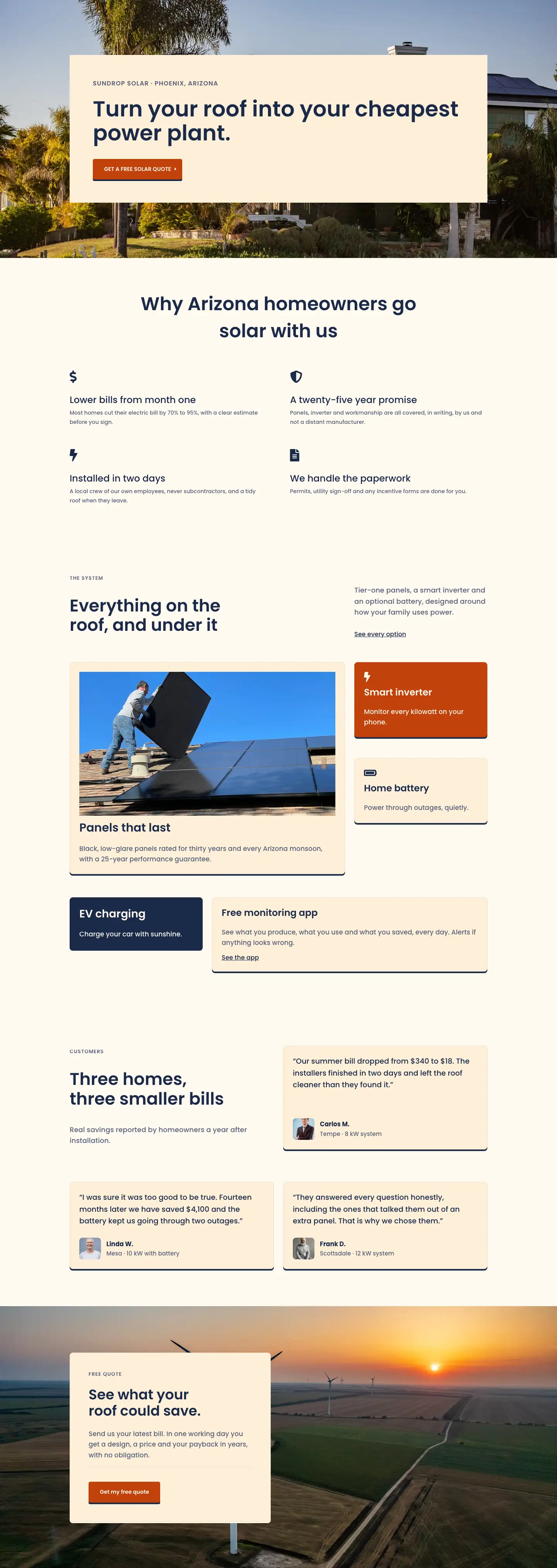
Sundrop Solar Home opens on a hero section with a Pexels rooftop installation photo set as a CSS background behind a full-width cream column (#fdf0d8). The column carries 60px of symmetric padding on desktop, stepping down to 30px on tablet and 20px on phone, so the framed photo is visible at the section edges without competing with the copy. A 16px uppercase Poppins eyebrow in slate (#566079), a 56px navy h1 at 1.1em line-height, and a burnt-orange (#c2410c) CTA button with a hard 4px vertical box shadow and a −4px hover lift establish the three-color system used consistently across every section: warm cream, deep navy, and burnt orange.
The features section places a centered h2 above a 2×2 grid of native icon-and-text pairs. Each cell uses a divi/icon module (Font Awesome dollar, leaf, lightning bolt, and document glyphs at 32px in navy) followed by a divi/text module carrying an h3 and a two-sentence body paragraph in slate. Below that, the product section works through two asymmetric rows. The first row splits desktop columns 16/24 and 8/24, putting a 16:9 Pexels installation photo inside a cream Group card on the left, and two compact stacked cards on the right using the burnt-orange and cream backgrounds to vary the rhythm. The second row flips the ratio, placing a navy-background EV charging card on the narrow left side and a wider cream monitoring-app card on the right, each with an inline text link.
The testimonials section uses the same asymmetric column logic for its header row, then fills two full-width rows with three cream Group cards. Each card holds a 19px quote, a divi/group flex row containing a 56px square portrait image at a 1:1 aspect ratio with rounded corners, a bold name in navy, and a city-plus-system-size label in slate. Every card and button across the layout shares the same hard 4px shadow (preset4, #1b2a4a) and −4px hover translate, so the interactive feedback is uniform and deliberate.
The page closes with a background-image section pulling a 1920px aerial solar-panel photo at cover/center center. A left-aligned Group card (max-width 520px, cream background, 48px internal padding on desktop) floats over it and contains an eyebrow, a 36px h2, supporting body copy, a thin sand-colored divi/divider, and the burnt-orange secondary CTA. On phone the card expands to full width, padding steps down to 24px, and every row in the layout collapses to a single column via explicit flexDirection: column breakpoint values, so the stacking order is intentional rather than incidental.
What’s inside
- Hero section: full-width Poppins h1 at 56px/44px/34px across breakpoints, with a burnt-orange CTA button carrying a hard 4px box shadow and −4px hover lift
- 2×2 icon-and-text feature grid using native `divi/icon` (Font Awesome: dollar, leaf, bolt, document) paired with `divi/text` h3 headings and body copy
- Asymmetric product card rows (16/24 + 8/24 desktop split) with three distinct card styles: cream `#fdf0d8`, burnt-orange `#c2410c`, and navy `#1b2a4a`
- 16:9 Pexels installation photo inside a Group card in the product section, set to `objectFit: cover`
- Three testimonial Group cards, each with a 1:1 portrait image at 56px, bold name, and city-plus-system-size attribution line
- Background-image CTA section with a max-width 520px floating lead-gen card, a `divi/divider` separator, and a secondary burnt-orange button
- Consistent Poppins type scale from 56px h1 down to 13px uppercase eyebrow across all five sections, with explicit tablet and phone size overrides on every heading
- Uniform hard 4px vertical box shadow and −4px hover translateY applied to every card and button throughout the layout
Who it’s for
This layout is built for residential solar installation companies, clean-energy contractors, and regional energy brokers who need a credible lead-generation homepage. It also fits HVAC or roofing firms expanding into solar, home-improvement agencies building a dedicated solar division page, and energy consultants who want to lead with trust signals before asking for contact details. The four-benefit grid, product-tier cards, and testimonials with real system sizes and city names make it especially strong for local service businesses competing on transparency rather than on price alone.
Customization tips
The three palette colors (cream #fdf0d8, burnt orange #c2410c, navy #1b2a4a) are set inline on individual modules rather than through a single global preset, so the fastest way to retheme is a find-and-replace on those three hex values in the JSON before importing. The hero h1 is sized at 56px with a 1.1em line-height, which accommodates headlines up to roughly 55 characters before pushing the button below the fold on tablet; shorter is better. Eyebrow labels are set to 13px uppercase Poppins with 1px letter-spacing and read well at two to four words. The three portrait images in the testimonials section are displayed at 56×56px with a 1:1 crop, so any head-and-shoulders photo shot square or cropped to 1:1 will slot in without distortion. The hero background and the CTA section background are both sourced from Pexels at 1920px wide; replace either with a landscape or rooftop photo at least 1600px wide for consistent coverage at size: cover.
How to install this layout
- Download the layout JSON file from this page.
- Open the target page in the Divi 5 builder.
- Open the portability panel (up/down arrows icon) and choose the Import tab.
- Upload the JSON. Tick “replace existing content” only for full-page imports.
- Check the page at desktop and mobile widths, then swap in your copy and images.
Full walkthrough with troubleshooting: How to Import a Divi 5 Layout.
Questions about Sundrop Solar — Corporate Solar Home Page for Divi 5
Does the hero use a background image or a foreground image?
Both. The section itself has a Pexels rooftop photo set as a CSS background image. The column on top carries a solid cream fill (`#fdf0d8`), so the photo is visible only around the column edges, framing the copy rather than appearing behind it.
Which Font Awesome icons are used in the features grid, and can I swap them?
The four icons reference FA unicode values: `` (dollar), `` (leaf), `` (lightning bolt), and `` (document). All are FA solid weight at 32px. You can replace any of them by changing the unicode value in the `divi/icon` module settings to any other FA solid glyph.
How do the asymmetric product card columns behave on phone?
Both rows in the product section apply `flexDirection: column` at the phone breakpoint, and every column is explicitly set to `flexType: 24_24` on phone, so the six cards stack into a single vertical list regardless of their desktop proportions.
What should I update first after importing?
Start with the h1 in the hero and the two CTA button labels, then update the three testimonial quotes, customer names, and city/system-size lines. The eyebrow referencing Phoenix, Arizona in the hero column should also be localized early. Swap images once the copy reflects your brand.
What image dimensions work best for the CTA section background?
The background is set to `size: cover` and `position: center center` at 1920px source width. Any wide landscape or aerial photo at least 1600px wide and roughly 16:9 will fill the section correctly across all viewports without any additional configuration.
Which Divi version does this layout need?
Divi 5. The layout is generated natively for Divi 5 and validated against its real module structure before publication, so it imports clean into the current builder.
Can I use this layout on client websites?
Yes. Every download includes a commercial license covering unlimited sites you own or build for clients. Only reselling or redistributing the layout file itself is prohibited.
Included in these packs
More full landing pages
Browse all full landing pages
Kiln & Clay — Minimal Pottery_studio Visit Page for Divi 5
full_landing · pottery_studio · minimal

Kiln & Clay — Minimal Pottery_studio Our Story Page for Divi 5
full_landing · pottery_studio · minimal

Kiln & Clay — Minimal Pottery_studio Studio Membership Page for Divi 5
full_landing · pottery_studio · minimal

Kiln & Clay — Minimal Pottery_studio The Shop Page for Divi 5
full_landing · pottery_studio · minimal

Kiln & Clay — Minimal Pottery_studio Classes Page for Divi 5
full_landing · pottery_studio · minimal

Kiln & Clay — Minimal Pottery_studio Home Page for Divi 5
full_landing · pottery_studio · minimal