
Sundrop Solar — Corporate Solar Savings and Pricing Page for Divi 5
Compare Sundrop Solar's Starter, Family, and Plus Battery packages from $14,900. Clear pricing, 7-year average payback, and $1,900 in yearly bill savings. Get a free quote today.
Rate this element
Download this section, free
- Divi 5 JSON, imports in seconds
- Commercial license included
- No account needed
This page ships inside Sundrop: Solar Installer Theme (6 Pages), 6 coherent pages that share one brand.
Click to view the full page
Overview
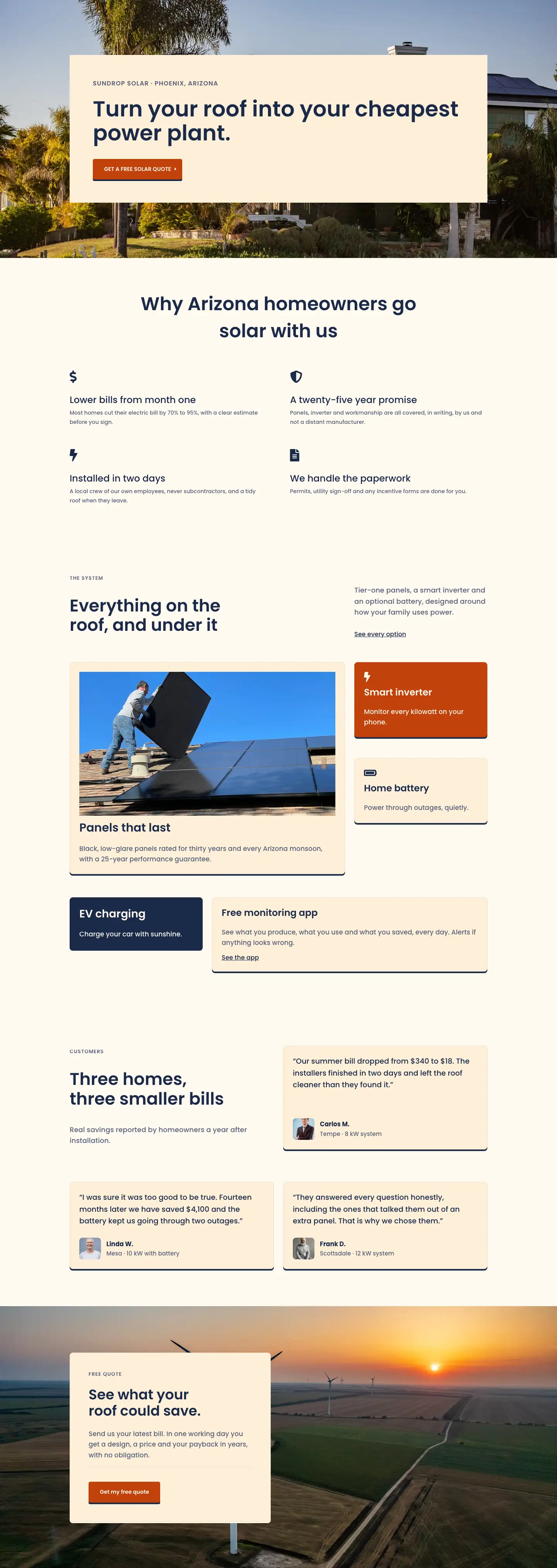
Sundrop Solar opens with a compact two-column hero on a warm sand background (#fdf0d8). The left column, sized at 16/24 flex units, carries a breadcrumb in 13px uppercase Poppins and an H1 at 52px Semi-Bold navy (#1b2a4a), stepping down to 40px at tablet and 32px on phone. The right column, at 8/24, holds a single orienting sentence in 18px slate (#566079) with 1.6em line height. A 1px #ecdcc0 bottom border closes the hero cleanly, letting the pricing section below breathe without a hard visual break. No image is required in the header, which means zero layout shift and nothing to swap for a new client.
The centrepiece is a three-card pricing section on off-white cream (#fffaf0), built with equal-height flex columns at 24px gap and alignItems: stretch. The outer column #fdf0d8 cards (Starter and Plus battery) share sand fills and #ecdcc0 borders. The middle Family card inverts the palette entirely: a rust background (#c2410c) flips all body text to cream, and a "Most chosen" badge pill in sand sits above the card name without requiring a separate section or overlay module. Each card contains a 44px price display paired baseline-aligned with a system-size label, a ruled divider, three icon-plus-text spec rows, and an outlined CTA button. On hover, every card and button lifts 4px via translateY and gains a solid preset4 navy box-shadow, an interaction that reads as tactile and confident.
The "Everything in every package" section on sand uses a 2/3 right column rendered as a CSS grid with two columns and zero row gap, creating a tight paired-icon checklist of eight items covering survey, shade analysis, permits, two-day installation, 25-year warranty, monitoring app, tax-incentive help, and a 12-month check-up. The grid collapses to a single column on phone, keeping every item readable without a horizontal scroll. This section addresses the most common objection in high-ticket solar sales before the buyer has to ask.
A deep navy section (#1b2a4a) presents three statistics at 96px with tight -2px letter-spacing and a 2px cream rule above each figure: $1,900 average annual savings, 7.2-year payback, and 98% of systems beating their estimate. The page closes with a split quote-request section pairing a left-column benefit list (icon rows: free site survey, design on roof photo, clear payback estimate) against a right-column contact form card styled with sand input fields, #ecdcc0 border, and a rust submit button that echoes the featured pricing card accent. Section padding across the entire layout steps from 96px to 68px to 44px at each breakpoint using explicit Divi 5 responsive values.
What’s inside
- Split 16/8 hero row with H1 at 52px scaling through three explicit breakpoints (52px / 40px / 32px) and a breadcrumb nav, no image required
- Three equal-height pricing cards (Starter / Family / Plus battery) using flex stretch alignment, 24px column gap, and per-card icon checklists with panel count, annual savings, and payback years
- Featured card palette inversion: the Family card uses rust (#c2410c) background with cream text and a 'Most chosen' badge pill, achieved entirely with native Divi 5 group and text modules
- Hover lift micro-interaction on all three pricing cards and all CTA buttons (translateY -4px combined with solid preset4 navy box-shadow)
- Two-column CSS Grid icon checklist of eight 'what's included' items collapsing to single column on phone, built from divi/icon and divi/text pairs inside a divi/group
- Stats section on deep navy with three 96px display figures, -2px letter-spacing, and 2px cream divider accents above each metric
- Native Divi 5 contact-form with sand-toned input fields, Poppins typography throughout, and a rust submit button with the same box-shadow and hover-lift treatment as the pricing CTAs
- Five independent responsive breakpoints across section paddings, column structures, and type scales, all set as explicit Divi 5 values rather than CSS overrides
Who it’s for
This layout suits residential solar installers, energy efficiency consultants, and renewable energy agencies that need to move a prospect from curiosity to quote request on a single page. It is the right fit for regional solar companies selling two or three standard system tiers, and for Divi web designers building sites for those clients. The transparent pricing structure and payback data make it strong in markets where buyers self-research before calling, primarily suburban homeowners in the US, UK, and Australia. It also adapts cleanly to heat pump installers, battery storage companies, or any home-energy business with tiered package pricing and a lead-capture goal.
Customization tips
The palette is anchored to four hex values: sand (#fdf0d8), cream (#fffaf0), navy (#1b2a4a), and rust (#c2410c). Rust appears only in the featured pricing card and the contact form submit button, so a single color change there re-skins both the highlight and the conversion element at once. Poppins is set on every text and heading module individually, so switching to a brand typeface means updating each module's font family field rather than one global preset. Price figures and payback years are plain divi/text modules, editable directly. The 'Most chosen' badge is a nested divi/group with a background color and padding, and it can be hidden or moved to a different card without touching surrounding layout. Keep H2 copy under roughly 40 characters to stay within the 720px and 640px centred max-width groups the layout uses. The contact form ships with Name and Email fields only; add a message or phone field by inserting additional divi/contact-field blocks inside the existing contact-form module. The stats in the navy section are plain text, replace the three figures and their labels with your own numbers.
How to install this layout
- Download the layout JSON file from this page.
- Open the target page in the Divi 5 builder.
- Open the portability panel (up/down arrows icon) and choose the Import tab.
- Upload the JSON. Tick “replace existing content” only for full-page imports.
- Check the page at desktop and mobile widths, then swap in your copy and images.
Full walkthrough with troubleshooting: How to Import a Divi 5 Layout.
Questions about Sundrop Solar — Corporate Solar Savings and Pricing Page for Divi 5
How do all three pricing cards reach the same height even when their feature lists have different copy lengths?
The pricing row sets `alignItems: stretch` so every column expands to match the tallest card. Inside each column, the feature-checklist group carries `flexGrow` and `flexShrink` sizing, which fills any remaining vertical space and pushes the CTA button to the card bottom consistently.
Can I add a fourth pricing tier?
Yes. Duplicate any of the three divi/column blocks inside the pricing row, then update the row's column structure value from `1_3,1_3,1_3` to `1_4,1_4,1_4,1_4` in the row's advanced settings. At tablet width the columns already wrap, so a fourth card flows onto a second row without any additional responsive adjustments.
Does the contact form require a plugin to function?
No. It uses the native Divi 5 divi/contact-form module, which delivers submissions to your WordPress admin email with no third-party plugin needed. To route leads to a CRM or external webhook, use Divi's built-in form integration settings or a compatible form connector plugin.
What should I change first after importing the layout?
Update the three price figures, system sizes (kW and kWh), and payback years in the pricing cards. Then replace the three statistics in the navy section ($1,900, 7.2 years, 98%) with your real customer data. Those eight numbers do most of the persuasive work on the page.
How does the layout behave on phones?
The two-column hero wraps so the subtitle drops below the H1. Pricing cards stack to full width in a single column. The eight-item icon grid collapses from two columns to one. Price figures step from 44px to 36px, and the H1 moves from 52px to 32px. Section padding reduces from 96px to 44px top and bottom. All of this is controlled by explicit Divi 5 responsive values in the JSON, so no custom CSS is required.
Which Divi version does this layout need?
Divi 5. The layout is generated natively for Divi 5 and validated against its real module structure before publication, so it imports clean into the current builder.
Can I use this layout on client websites?
Yes. Every download includes a commercial license covering unlimited sites you own or build for clients. Only reselling or redistributing the layout file itself is prohibited.
Included in these packs
More full landing pages
Browse all full landing pages
Kiln & Clay — Minimal Pottery_studio Visit Page for Divi 5
full_landing · pottery_studio · minimal

Kiln & Clay — Minimal Pottery_studio Our Story Page for Divi 5
full_landing · pottery_studio · minimal

Kiln & Clay — Minimal Pottery_studio Studio Membership Page for Divi 5
full_landing · pottery_studio · minimal

Kiln & Clay — Minimal Pottery_studio The Shop Page for Divi 5
full_landing · pottery_studio · minimal

Kiln & Clay — Minimal Pottery_studio Classes Page for Divi 5
full_landing · pottery_studio · minimal

Kiln & Clay — Minimal Pottery_studio Home Page for Divi 5
full_landing · pottery_studio · minimal