
The Lantern House — Elegant Boutique_hotel Home Page for Divi 5
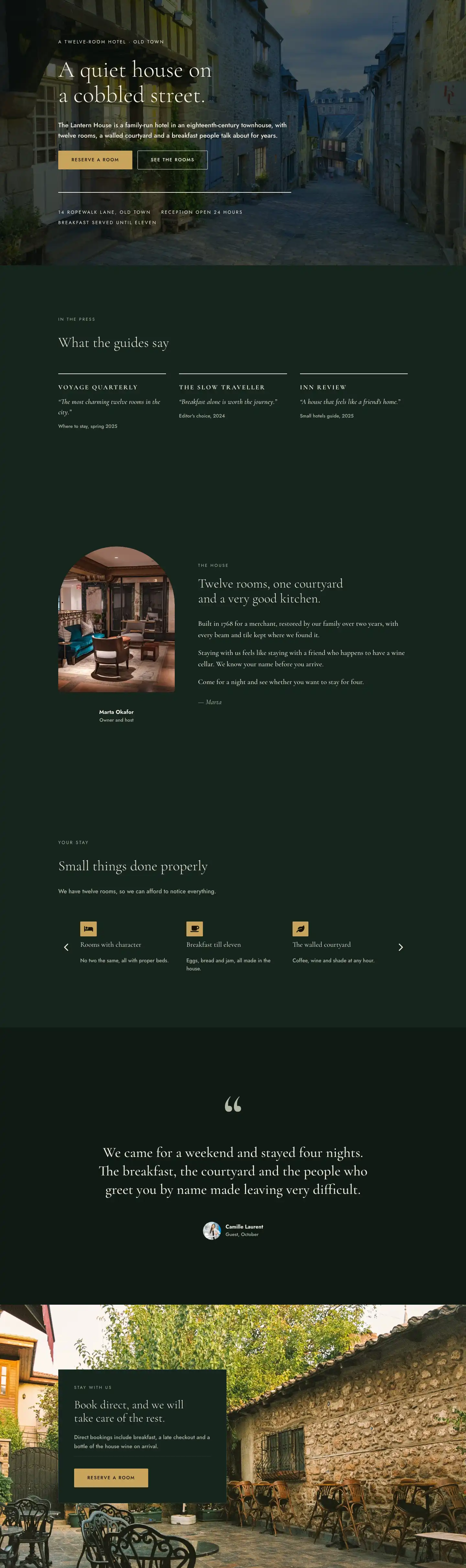
A full-page Divi 5 layout for a boutique hotel: dark forest hero with full-bleed photo, press quotes, owner story, amenity carousel, pull-quote testimonial and direct-booking CTA. Elegant serif typography, gold accents.
Rate this element
Download this section, free
- Divi 5 JSON, imports in seconds
- Commercial license included
- No account needed
This page ships inside The Lantern House: Boutique Hotel Theme (6 Pages), 6 coherent pages that share one brand.
Click to view the full page
Overview
The hero section grounds everything in atmosphere before a word is read. A Pexels photograph sits behind a near-opaque dark-green gradient overlay (#0f1a15 at 68% opacity across the full width), and the headline arrives in Cormorant Garamond at 72px, weight 300, warm ivory on forest green. A 14px Jost eyebrow in uppercase with 3px letter-spacing names the location before the hotel's voice kicks in, and a 20px Jost body paragraph follows at 1.6em line height. Two buttons share a flex row below: an amber fill (#c9a45c) for the primary reservation action and a ghost outline in ivory for the secondary. A solid 2px ivory divider separates the CTAs from a footer strip of three metadata text modules (address, reception hours, breakfast hours) in 14px uppercase Jost, so guests get the essential facts without a separate contact section. The group sets a minimum height of 80vh on desktop, 70vh on tablet, and 560px on mobile.
The three middle sections share a slightly lighter #16241d background, creating a deliberate two-tone rhythm against the deeper #0f1a15 used in the hero, testimonial, and final CTA sections. The press wall opens with a full-width heading row before breaking into three equal columns, each separated by 40px. The only decoration on each column is a 2px top rule in #f2ede1, which stacks a publication name in uppercase bold Cormorant Garamond, an italic pullquote at 22px, and a muted sage attribution line. The owner story section pairs a pill-top portrait image (4:5 aspect ratio, capped at 360px wide, with border-radius 999px top and 32px bottom) with a right-hand column of 22px Cormorant body text split across three separate text modules and finished with an italic signature. A 72px column gap and vertical center-alignment give this section a magazine-spread quality that is hard to achieve with a standard text-image row.
The amenities section uses Divi's native group-carousel module to present six feature cards: three across on desktop, two on tablet, one on mobile. Each card leads with a Font Awesome icon set in an amber badge (matching the CTA button color exactly), followed by a Cormorant H3 at 22px and a short Jost descriptor in sage. Arrows are on, dot navigation is off. The testimonial section treats a pull-quote as a pure typographic object: a 160px decorative opening quotation mark in muted sage (weight 700, 0.8em line height to keep it tight), a 44px centered quote set to balance text-wrap at max-width 960px, and a 56px circular avatar with name and month attribution below. The page closes with a full-bleed photograph section where a #16241d card with a subtle 1px #2b3d33 border floats left over the background image, holding the book-direct argument, a thin divider, and the final amber CTA.
On mobile, every multi-column row collapses to a single vertical stack via flex-direction column. Section vertical padding scales down proportionally: the deeper sections drop from 200px to 88px, the lighter ones from 160px to 72px. The carousel moves to one-up slides. The hero group drops from 80px to 56px internal padding while holding a 560px minimum height, which keeps the full CTA group visible without scrolling on any modern phone screen.
What’s inside
- Full-viewport hero: Pexels background photo with dual-layer dark-green gradient overlay, H1 in Cormorant Garamond at 72px (scales to 38px on mobile), amber fill + ivory ghost button pair, 2px divider, and a three-item metadata strip (address, hours, breakfast) in uppercase Jost
- Three-column press wall with equal-columns flex structure, 2px top-rule dividers, italic Cormorant Garamond pullquotes, and muted attribution lines, collapsing to a single stack on mobile
- Asymmetric owner story section: pill-top/flat-bottom portrait image at a 4:5 ratio alongside three editorial body paragraphs in 22px Cormorant and an italic signature, with a 72px column gap and vertical center-alignment
- Six-card amenities carousel using Divi's native group-carousel module, each card carrying an amber-badged Font Awesome icon, a Cormorant H3, and a short Jost descriptor, showing 3/2/1 slides across desktop, tablet, and mobile
- Full-width pull-quote section with a 160px decorative quotation mark, 44px centered testimonial text, and a 56px circular avatar attribution row
- Floating book-direct CTA card layered over a full-bleed background photograph, with a #16241d panel, benefit copy in 17px Jost, a thin divider, and a matching amber reserve button
Who it’s for
This layout is built for independent boutique hotel owners, bed-and-breakfast operators, heritage guesthouses, and small urban inns who manage their own websites or work with a designer. The press wall, owner story, and book-direct card are specifically designed to steer guests toward direct reservations and away from OTA commissions. It also suits designers and agencies building for the hospitality sector who need an editorial, trust-building aesthetic without starting from scratch. Vacation rental hosts and small retreat operators who want credibility signals (press coverage, a named host, social proof) will find the structure directly applicable.
Customization tips
The palette uses six hex values throughout: #0f1a15 and #16241d for the two section background tones, #f8f3e6 and #f2ede1 for the two ivory text tones, #b4b9a8 for muted/sage text, and #c9a45c for the amber accent (buttons, icon badges). Replacing the amber with a dusty rose, terracotta, or slate blue is the single biggest visual change you can make; update it in the button and icon module backgrounds together to keep them consistent.
Both fonts (Cormorant Garamond and Jost) are Google Fonts loaded automatically by Divi 5. The hero headline sits in a 720px max-width container; keep copy under 10 words to preserve the single-line balance at 72px. The press section columns expect short quotes under 20 words each, otherwise column heights will diverge. The owner portrait expects a 4:5 image at 800 x 1000px minimum, and tight face crops read better than full-length shots. The hero background and the final CTA section background are both Pexels images with centered positioning; replace them with your own property photography and keep key subjects near the center to avoid the gradient clipping them.
How to install this layout
- Download the layout JSON file from this page.
- Open the target page in the Divi 5 builder.
- Open the portability panel (up/down arrows icon) and choose the Import tab.
- Upload the JSON. Tick “replace existing content” only for full-page imports.
- Check the page at desktop and mobile widths, then swap in your copy and images.
Full walkthrough with troubleshooting: How to Import a Divi 5 Layout.
Questions about The Lantern House — Elegant Boutique_hotel Home Page for Divi 5
The amenities carousel shows six cards. Can I add or remove individual cards?
Yes. The group-carousel module accepts any number of child groups. Duplicate an existing card inside the carousel to add one, or delete a child group to remove one. The module is configured to show 3 slides on desktop, 2 on tablet, and 1 on mobile, so adding a seventh card simply extends the slide count at each breakpoint.
What kind of photo works behind the hero gradient overlay?
The overlay is rgba(10,18,14,0.68) running full-width, so any reasonably well-exposed photograph works. Interior shots with warm lighting (a lounge, a bedroom, a courtyard) contrast well against the dark-green tint. Avoid images where the key subject sits at the far edges, since the gradient covers the full frame at the same opacity and edge detail can get lost.
I only have two press reviews, not three. What do I do with the press section?
Delete the third column. The row uses a 1/3 + 1/3 + 1/3 column structure with equal-columns flex; removing one column leaves a clean two-column row. If you have no press coverage at all, the section can be deleted entirely without affecting anything else on the page.
The owner portrait has a pill-top shape. How do I change it?
The border-radius is set directly on the image module: topLeft 999px, topRight 999px, bottomRight 32px, bottomLeft 32px. Open the image module in Divi, go to Advanced > Border, and adjust those values. Setting all four to 999px gives a full circle; setting all to 0px gives a plain rectangle.
The final CTA section has a background photograph with a card floating over it. How do I swap the photograph?
The background image is set on the section's Background settings, not inside an image module. In Divi 5, click the section, open its design settings, go to Background, and replace the image URL. The card (#16241d fill with a 1px border) is a separate group module positioned on the left, so it stays in place regardless of the background photo you choose.
Does the large testimonial quote in section five need a real guest portrait?
The avatar is a standard divi/image module set to a 1:1 aspect ratio with a circular border-radius. Replace the Pexels placeholder with any 56x56px or larger square image. If you prefer no avatar, delete the 56px-wide image group and leave just the name and date text modules in the attribution row.
Which Divi version does this layout need?
Divi 5. The layout is generated natively for Divi 5 and validated against its real module structure before publication, so it imports clean into the current builder.
Can I use this layout on client websites?
Yes. Every download includes a commercial license covering unlimited sites you own or build for clients. Only reselling or redistributing the layout file itself is prohibited.
Included in these packs
More full landing pages
Browse all full landing pages
Kiln & Clay — Minimal Pottery_studio Visit Page for Divi 5
full_landing · pottery_studio · minimal

Kiln & Clay — Minimal Pottery_studio Our Story Page for Divi 5
full_landing · pottery_studio · minimal

Kiln & Clay — Minimal Pottery_studio Studio Membership Page for Divi 5
full_landing · pottery_studio · minimal

Kiln & Clay — Minimal Pottery_studio The Shop Page for Divi 5
full_landing · pottery_studio · minimal

Kiln & Clay — Minimal Pottery_studio Classes Page for Divi 5
full_landing · pottery_studio · minimal

Kiln & Clay — Minimal Pottery_studio Home Page for Divi 5
full_landing · pottery_studio · minimal