
The Lantern House — Elegant Boutique_hotel Rooms Page for Divi 5
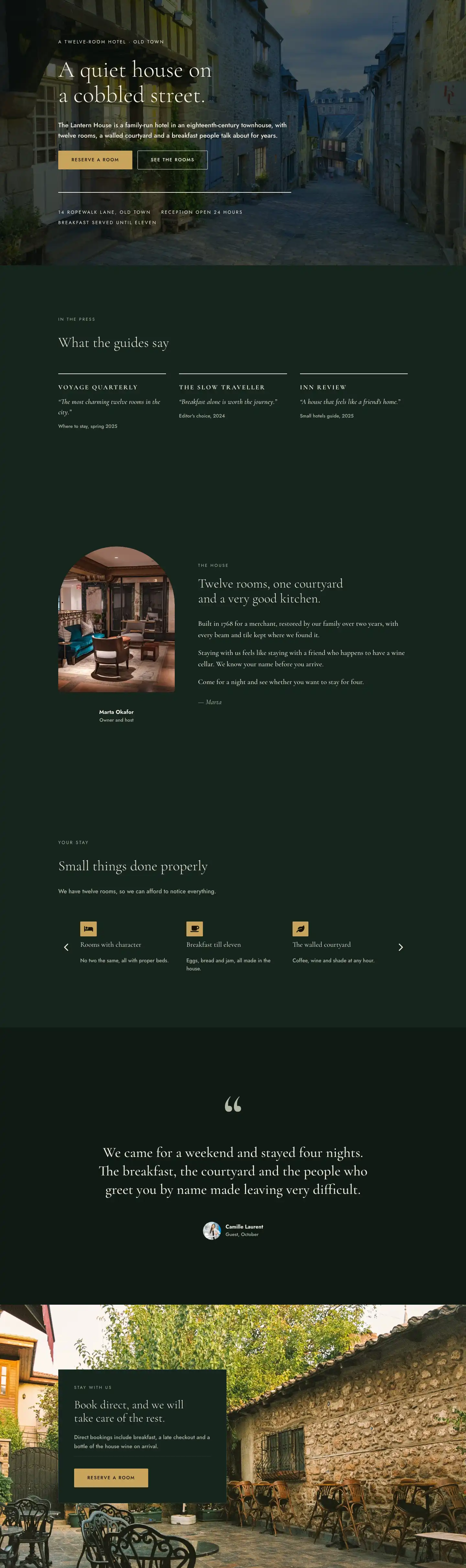
Elegant Divi 5 full-page layout for a boutique hotel rooms page. Features a dark hero, three-column pricing cards, photo gallery, amenities list, and FAQ — all in deep forest green and warm gold.
Rate this element
Download this section, free
- Divi 5 JSON, imports in seconds
- Commercial license included
- No account needed
This page ships inside The Lantern House: Boutique Hotel Theme (6 Pages), 6 coherent pages that share one brand.
Click to view the full page
Overview
The Lantern House Rooms page opens with a full-bleed hero section built on a deep forest green (#0f1a15) background, layered with a Pexels photograph of an interior space and a 68% dark gradient overlay that keeps the cream typography legible without washing out the image. The heading sits at 56px Cormorant Garamond light on desktop, stepping down to 42px on tablet and 32px on mobile — a deliberate reduction baked into the module's responsive font settings rather than left to browser scaling. A breadcrumb text module in 13px Jost uppercase with 3px letter-spacing anchors the visitor in site hierarchy before they read a word of the headline. The subtext is constrained to a 600px max-width group, which stops the short tagline from stretching into uncomfortable line lengths on wide monitors.
The rates section uses a three-column equal-height row on a matching #0f1a15 background, with 24px column and row gaps and alignItems: stretch so all three cards grow to the same height regardless of content length. Each card sits inside a column with its own background color: deep forest green for the Garden Room and Attic Suite, and warm antique gold (#c9a45c) for the featured Merchant Room. The gold card carries a "Guest favourite" pill badge — a nested group with a dark green background and rounded 12px corners — and inverts its text to near-black #14110a throughout, so the contrast relationship between card and type remains consistent across all three. Pricing is set in 44px Cormorant Garamond bold, baseline-aligned next to a 15px "per night" label in Jost, giving the price a typographic weight that reads as confident without feeling aggressive. A thin top-border divider (1px solid, color-matched per card) separates the amenity checklist from the name and price block, and each amenity row pairs a 15px Font Awesome checkmark icon with a 16px Jost text module.
The photo gallery section introduces a two-column asymmetric header row — 14/24 for the heading column, 10/24 for the caption — aligned to flex-end so the shorter caption text sits at the baseline of the larger heading. Below that, a three-column image grid populates each column with two stacked images at alternating 4:5 and 4:3 aspect ratios, creating a deliberate rhythm of tall-short-tall across the row and preventing the grid from reading as a uniform tile wall. All images use objectFit: cover and have no border radius, which preserves the rectilinear editorial feel.
The amenities and FAQ sections both use the slightly lighter #16241d as a background, creating a subtle two-tone alternation across the page's lower half. The amenities list renders as a two-column CSS grid (gridColumnCount: 2, collapsing to one column on mobile) with icon-plus-text rows and consistent 14px vertical padding per item. The FAQ distributes six question-answer pairs across two equal columns, each question separated from its predecessor by a 2px solid #f2ede1 top border and 20px top padding — a deliberate choice that gives each entry breathing room without requiring extra wrapper elements.
What’s inside
- Full-bleed hero section with a Pexels image background, 68% dark gradient overlay, and a responsive H1 in Cormorant Garamond (56px desktop / 32px mobile)
- Three equal-height pricing cards in a `1_3,1_3,1_3` flex row — two in deep forest green and one in antique gold — each with a room name, short descriptor, large price display, amenity checklist, and an outlined Reserve button
- A "Guest favourite" pill badge on the featured card, built from nested group modules with a dark background and 12px border radius
- Six-column staggered photo gallery using alternating 4:5 and 4:3 aspect-ratio image modules with `objectFit: cover`, organized across three columns with 16px gaps
- Two-column CSS grid amenities list with Font Awesome checkmark icons, collapsing to a single column on mobile, listing eight included-in-every-stay items
- Six-entry FAQ section spread across two equal columns, each entry topped with a 2px solid separator line and set in Cormorant Garamond H3 headings with Jost body text
- Consistent asymmetric section headers pairing an uppercase 13px Jost eyebrow label with large Cormorant Garamond H2 headings and a secondary text column, aligned to flex-end for baseline registration
Who it’s for
This layout is built for boutique and independent hotel owners who want a rooms page that leads with atmosphere rather than data tables. It suits small properties with a distinct character — a converted townhouse, a rural inn, a city bed-and-breakfast — where the pricing structure is simple enough to present as three tiers. Web designers and Divi freelancers building hospitality sites will find the card system easy to repurpose for vacation rentals, serviced apartments, or glamping operations where clear per-night pricing and a short amenity list close the booking decision.
Customization tips
The entire palette runs on three hex values you can swap at the preset level: #0f1a15 (darkest background), #16241d (mid background and card fill), and #c9a45c (gold accent for the featured card). Changing these three colors in your Divi global presets will shift the mood from forest-green luxury to navy, charcoal, or any dark tone you prefer. For copy length: the room description lines are short by design (one sentence each), so keep them under 60 characters to avoid breaking the card's vertical rhythm. Price figures use 44px Cormorant Garamond bold — if your pricing runs to four digits, test at 36px to prevent overflow on mobile. Gallery images are locked to 4:5 and 4:3 aspect ratios via the module's aspect ratio setting; replace placeholder images with your own at a minimum of 1200px on the short side and objectFit: cover will handle the crop automatically.
How to install this layout
- Download the layout JSON file from this page.
- Open the target page in the Divi 5 builder.
- Open the portability panel (up/down arrows icon) and choose the Import tab.
- Upload the JSON. Tick “replace existing content” only for full-page imports.
- Check the page at desktop and mobile widths, then swap in your copy and images.
Full walkthrough with troubleshooting: How to Import a Divi 5 Layout.
Questions about The Lantern House — Elegant Boutique_hotel Rooms Page for Divi 5
How do the three pricing cards stack on mobile?
Each card column is set to `flexType: 24_24` on both tablet and phone, so they stack full-width in a single column. The row also has `flexDirection: column` applied at the phone breakpoint, ensuring the order is preserved: Garden Room, then Merchant Room, then Attic Suite.
What font families does this layout use?
Two families throughout: Cormorant Garamond (used for all headings, pricing figures, and FAQ questions) and Jost (used for all body copy, labels, eyebrow text, and button labels). Both are available via Google Fonts and load through Divi's built-in font system.
Can I change the number of pricing tiers from three to two or four?
Yes. The rates row uses a `1_3,1_3,1_3` flex column structure. To drop to two tiers, delete one column and change the remaining columns to `1_2,1_2`. For four tiers, add a column and switch to `1_4` — though on smaller screens you may want to set the row to `flexWrap: wrap` on tablet as well.
What aspect ratios should my gallery photos be?
The layout alternates between 4:5 (portrait) and 4:3 (landscape) within each column, with the pattern inverted across the three columns to create visual rhythm. Stick to these ratios — the module's aspect ratio setting crops automatically, but a very different native ratio can affect perceived image quality.
Which section should I edit first after importing?
Start with the hero: swap the background image URL in the Section's background settings and update the H1 text and tagline. Then replace the placeholder room names, prices, and amenity lines in the three pricing cards. The gallery and FAQ can follow once the commercial information is accurate.
Is the "Guest favourite" badge hardcoded to the middle card?
It is placed inside the second column by default, but it is just a nested group module containing a text module. You can move it to any card by cutting and pasting the group, or remove it entirely if your property does not differentiate a featured tier.
Which Divi version does this layout need?
Divi 5. The layout is generated natively for Divi 5 and validated against its real module structure before publication, so it imports clean into the current builder.
Can I use this layout on client websites?
Yes. Every download includes a commercial license covering unlimited sites you own or build for clients. Only reselling or redistributing the layout file itself is prohibited.
Included in these packs
More full landing pages
Browse all full landing pages
Kiln & Clay — Minimal Pottery_studio Visit Page for Divi 5
full_landing · pottery_studio · minimal

Kiln & Clay — Minimal Pottery_studio Our Story Page for Divi 5
full_landing · pottery_studio · minimal

Kiln & Clay — Minimal Pottery_studio Studio Membership Page for Divi 5
full_landing · pottery_studio · minimal

Kiln & Clay — Minimal Pottery_studio The Shop Page for Divi 5
full_landing · pottery_studio · minimal

Kiln & Clay — Minimal Pottery_studio Classes Page for Divi 5
full_landing · pottery_studio · minimal

Kiln & Clay — Minimal Pottery_studio Home Page for Divi 5
full_landing · pottery_studio · minimal