
Tidewell Movement Studio — Organic Wellness Classes Page for Divi 5
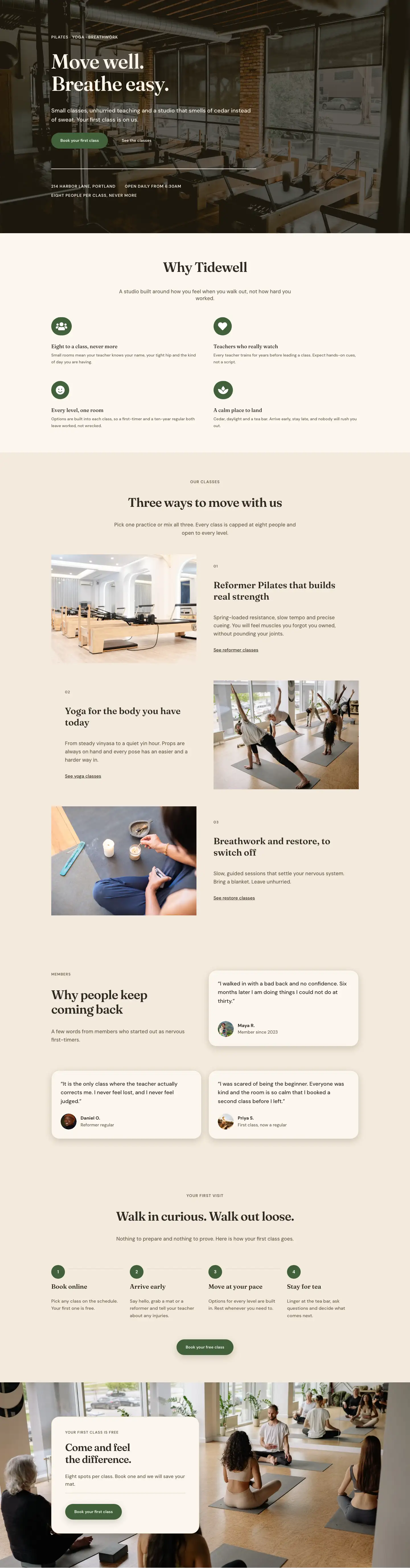
Explore Tidewell's small-group classes: reformer Pilates, mat Pilates, vinyasa and yin yoga, breathwork, and prenatal sessions. Eight spots per class. Your first is free.
Rate this element
Download this section, free
- Divi 5 JSON, imports in seconds
- Commercial license included
- No account needed
This page ships inside Tidewell: Pilates & Yoga Studio Theme (6 Pages), 6 coherent pages that share one brand.
Click to view the full page
Overview
The Tidewell layout opens with a full-bleed hero that layers a studio photograph behind a dark warm-tone gradient (rgba(34,26,16,0.7)), pulling the eye directly to the H1 "Classes for every body" set in Fraunces at 56px with -1px letter-spacing. A breadcrumb in 13px uppercase DM Sans and a max-width-600px subhead group beneath it keep the hero copy tight, just enough context to orient a visitor before they scroll. Section padding scales from 120px desktop to 64px on phone, so the breathing room holds at every breakpoint without manual adjustment.
The classes section uses an intentionally asymmetric flex grid across three rows. The featured class (Reformer Pilates) occupies a 16/24 column with a native 16:9 image header, while three supporting classes share an 8/24 column in stacked group cards. Each card carries 28px border radius, a 1px linen border (#dccdb4), and a warm drop shadow (8px vertical, 24px blur). The palette rotates deliberately across cards: cream (#fbf6ee), forest green (#41603a), and near-black (#2e2a22), giving the grid visual variety without changing any layout structure. On mobile every column resolves to 24/24 full width and the stack reads in document order.
The third section inverts the column weight. A narrow 8/24 left column carries the "What to know before you arrive" heading and intro, while a wider 16/24 right column holds an eight-item checklist. Each item is a divi/group in flex-row mode pairing a FontAwesome checkmark icon at 18px with a DM Sans text module, all spaced at 14px vertical padding per row. The group wrapping them uses a CSS grid layout (gridColumnCount: 2, collapses to 1 on phone), so two items sit side by side on desktop without any custom CSS.
The layout closes with a centered divi/accordion FAQ (six items, Fraunces titles at 19px, answers in warm brown #675b49, matching 28px radius and shadow) and a full-width forest-green CTA band. The CTA uses a space-between flex row to place the H2 offer copy on the left and a pill-shaped button (#fbf6ee fill, 999px radius) alongside "No commitment" micro-copy on the right. On phone the row collapses to a column, left-aligned. The pill button is the single booking action in the entire layout, keeping the conversion path unambiguous.
What’s inside
- Full-bleed hero with a background image, 70% dark warm overlay gradient, Fraunces H1 at 56px, and three-breakpoint padding (120px / 88px / 64px)
- Asymmetric classes grid: featured Reformer Pilates card at 16/24 column width with a native 16:9 divi/image header, three supporting class cards in an 8/24 column using alternating cream, forest-green, and near-black fills
- Five class-type group cards with 28px radius, linen border (#dccdb4), and warm box shadow throughout, each holding a divi/icon, H3 heading, and body text
- First-visit checklist: eight divi/icon + divi/text flex-row pairs laid out in a two-column CSS grid inside a divi/group, collapsing to one column on mobile
- Native divi/accordion with six FAQ items styled with matching 28px radius, cream open/closed toggle backgrounds, and Fraunces question titles
- Forest-green CTA band (#41603a) with a space-between flex row, pill-shaped booking button (999px radius, #fbf6ee fill), and inline micro-copy below
- Breadcrumb text module in the hero using uppercase DM Sans at 13px and 1px letter-spacing
- Fraunces + DM Sans type pairing across all sections with three distinct section background tones providing rhythm without extra graphic elements
Who it’s for
This layout is built for boutique fitness and wellness businesses that offer more than one class type and need a page that explains each one clearly without feeling clinical. Pilates studios, yoga centres, breathwork practitioners, and small-group wellness spaces will find the class-card grid maps directly to their offering. It also works for prenatal specialists and recovery-focused studios, since the layout already handles mixed-modality positioning and first-visit trust-building. Freelance designers building wellness sites for clients will find the card grid and checklist sections versatile enough to adapt to any service-comparison context without restructuring.
Customization tips
The three section background colors (#f3eadc warm sand, #fbf6ee off-white, #41603a forest green) are set at the divi/section level. Swapping all three values rethemes the layout end to end. A cooler brand palette (slate, sage, or charcoal) simply replaces those hex values at the source and every card border, text, and CTA inherits the shift.
The hero expects a landscape studio photograph. Background-size is cover with center-center positioning, so any 3:2 or 16:9 image fills the frame without manual cropping. The Reformer Pilates card uses a divi/image module with a 16:9 aspect ratio enforced in the module settings, so a direct image swap is all that is needed.
The five class cards can be reduced to three or expanded to six by removing or duplicating a divi/group inside the relevant column. Keep class descriptions to two sentences or under 25 words so card heights stay balanced across the asymmetric columns. The eight first-visit checklist items can be trimmed to six without breaking the two-column grid layout.
How to install this layout
- Download the layout JSON file from this page.
- Open the target page in the Divi 5 builder.
- Open the portability panel (up/down arrows icon) and choose the Import tab.
- Upload the JSON. Tick “replace existing content” only for full-page imports.
- Check the page at desktop and mobile widths, then swap in your copy and images.
Full walkthrough with troubleshooting: How to Import a Divi 5 Layout.
Questions about Tidewell Movement Studio — Organic Wellness Classes Page for Divi 5
Do the class cards stack correctly on mobile?
Yes. Every row in the classes section has flexWrap set to wrap and flexDirection set to column at the phone breakpoint. All 16/24 and 8/24 column flex types resolve to 24/24 full width on mobile, so each card becomes a full-width block in document order.
Which image module handles the Reformer Pilates card and what aspect ratio does it expect?
A native divi/image module with width 100%, aspect ratio 16/9, and objectFit cover enforced in the module's sizing settings. Any landscape photo you drop in fills the card header correctly without any manual cropping or padding adjustments.
Is the accordion a third-party plugin or a native Divi module?
It is a native divi/accordion with nested divi/accordion-item blocks. No plugin is required. The 28px border radius, linen border color (#dccdb4), warm shadow, and cream toggle backgrounds are all set inside the accordion's decoration properties in the layout JSON.
Can I add a second button to the CTA section?
Yes. The button sits inside a divi/group in flex-column mode with 10px rowGap. Add a second divi/button block inside that same group and it appears directly below the first, left-aligned. Keep button text under 24 characters to avoid wrapping inside the pill shape.
The checklist uses a CSS grid layout inside a divi/group. Which Divi 5 version introduced that?
The grid display mode (display: grid, gridColumnCount: 2) is a Divi 5 layout property. Every module in this layout declares builderVersion 5.8.0, which is the minimum version required. The layout will not function correctly in Divi 4.
What fonts are used and do I need to install anything?
Fraunces is used for all headings and DM Sans for body and UI text. Both are available in the Divi font selector. Choosing them there loads them from Google Fonts automatically. No manual font installation is needed.
Which Divi version does this layout need?
Divi 5. The layout is generated natively for Divi 5 and validated against its real module structure before publication, so it imports clean into the current builder.
Can I use this layout on client websites?
Yes. Every download includes a commercial license covering unlimited sites you own or build for clients. Only reselling or redistributing the layout file itself is prohibited.
Included in these packs
More full landing pages
Browse all full landing pages
Kiln & Clay — Minimal Pottery_studio Visit Page for Divi 5
full_landing · pottery_studio · minimal

Kiln & Clay — Minimal Pottery_studio Our Story Page for Divi 5
full_landing · pottery_studio · minimal

Kiln & Clay — Minimal Pottery_studio Studio Membership Page for Divi 5
full_landing · pottery_studio · minimal

Kiln & Clay — Minimal Pottery_studio The Shop Page for Divi 5
full_landing · pottery_studio · minimal

Kiln & Clay — Minimal Pottery_studio Classes Page for Divi 5
full_landing · pottery_studio · minimal

Kiln & Clay — Minimal Pottery_studio Home Page for Divi 5
full_landing · pottery_studio · minimal