
Tidewell Movement Studio — Organic Wellness Contact Page for Divi 5
Organic wellness contact page for a boutique movement studio. Includes a styled contact form, location details, hours, and an FAQ section — built in Divi 5 with warm earthy tones and Fraunces typography.
Rate this element
Download this section, free
- Divi 5 JSON, imports in seconds
- Commercial license included
- No account needed
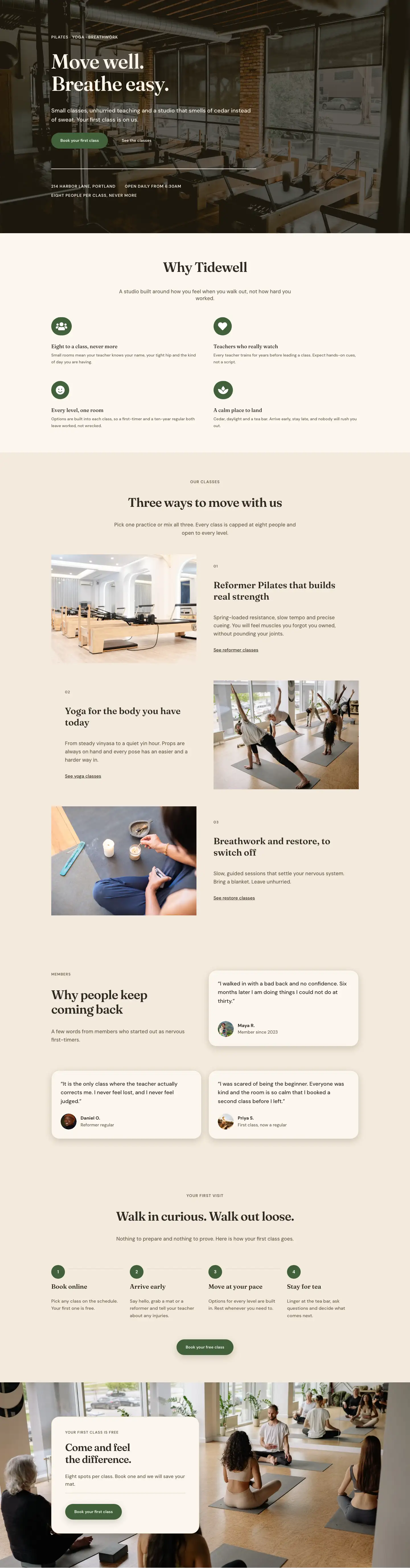
This page ships inside Tidewell: Pilates & Yoga Studio Theme (6 Pages), 6 coherent pages that share one brand.
Click to view the full page
Overview
The layout opens with a deliberate two-column header on warm cream (#fbf6ee). The left column uses a wider 16/24 flex proportion to anchor a breadcrumb trail set in 13px DM Sans (all caps, 1px letter-spacing), followed by the Fraunces H1 "Say hello" at 52px with -1px tracking and a 1.15 line height. The narrower right column (8/24) holds a single 18px sentence positioned with 36px of top padding so it sits mid-page rather than crowding the headline. A 1px sand border (#dccdb4) at the section's base draws a quiet horizontal line before the layout steps into richer content.
The main contact section shifts to a deeper linen (#f3eadc) and expands to 96px of vertical padding on all sides. On desktop, the left column (10/24) leads with a 4:5 portrait image in a mixed-radius container (pill-rounded at the two top corners, a more architectural 32px curve at the bottom), capped to 420px and left-aligned. Beneath it, two icon rows use Font Awesome Solid icons (map pin and clock) paired with stacked uppercase category labels and 17px DM Sans value text. The right column (14/24) stacks an eyebrow label, a 40px Fraunces H2, a contact paragraph, and the form card. That card uses 28px corner radii across all sides, a 1px #dccdb4 border, and a layered rgba(34,26,16,0.18) drop shadow that gives it physical presence against the linen field. Form fields are full pill shapes filled with the same linen tone as the section background, keeping the form from feeling intrusive. The submit button in forest green (#41603a) is the layout's first use of that accent color, so it reads as a clear primary action without competing with the surrounding warmth.
The FAQ section returns to cream and structures itself across two rows. The first row positions the "Good to know before you visit" H2 and a ghost "Email us" CTA in a flex-end-aligned pair, establishing a shared baseline before the questions begin. Six FAQ items then split across two equal columns, each entry separated by a 2px top rule with 20px of padding above it. Questions are set in Fraunces at 21px; answers in 16px DM Sans taupe. That weight difference keeps the FAQ scannable without background fills, cards, or accordion mechanics.
A full-bleed forest-green section (#41603a) closes the page: a Fraunces H2 at 48px in white shares a horizontal flex row with a cream pill CTA button and a 14px subtext note about limited spots. On phone, the row collapses to a vertical column with flex-start alignment so the button lands directly below the headline. Section padding scales from 96px on desktop to 44px on phone across every content section, keeping the rhythm consistent throughout the full-length page.
What’s inside
- Two-column hero header: Fraunces H1 at 52px with a breadcrumb trail and a companion 18px intro column on a warm cream background, separated from the body by a 1px sand baseline border
- 4:5 portrait image with a mixed-radius border (999px pill at the top two corners, 32px architectural curve at the bottom) constrained to 420px max-width
- Icon-labelled contact details block using native Divi Icon modules (Font Awesome Solid map pin and clock), uppercase category labels, and 17px address and hours text
- Native Divi Contact Form with three full-width pill-shaped fields (Name, Email, Message) and a forest-green `#41603a` "Send message" button with a warm drop shadow
- Floating form card with 28px corner radii, 1px `#dccdb4` border, and `rgba(34,26,16,0.18)` box shadow set inside the linen contact section
- Six-question FAQ grid split across two equal columns, each item anchored by a 2px top rule with no border on the remaining three sides
- FAQ section header row aligning the H2 heading and a ghost "Email us" CTA at their bottom edges before the question grid begins
- Full-bleed forest-green CTA bar with a Fraunces white headline at 48px and a cream pill booking button, stacking vertically on mobile
Who it’s for
Yoga studios, Pilates and barre spaces, movement coaching practices, and wellness retreats will find this a direct fit. It works equally well for meditation centers, physiotherapy clinics, and holistic health practitioners who want a contact page that reads as warm and considered rather than clinical. Any wellness or fitness business that depends on relationship-first client acquisition (private sessions, small-group classes, teacher training, or workshop bookings) benefits from the layout's pairing of a location-and-hours block, a low-friction contact form, and a six-question FAQ that pre-empts common booking objections before the visitor ever reaches out.
Customization tips
The three-tone palette (cream #fbf6ee, linen #f3eadc, forest green #41603a) is set in each module's decoration background. To rebrand, update those three hex values across the section backgrounds, the form card background, and the submit button; the sand border color #dccdb4 and the two text tones #2e2a22 and #675b49 travel consistently through heading and body font decorations. The Fraunces/DM Sans pairing is defined per-module; swapping both families takes fewer than a dozen field changes. The portrait image expects a 4:5 crop (800x1000px is a practical target); vertical studio or nature shots suit the pill-top mixed-radius frame. Keep the breadcrumb text under 40 characters and the H1 under 30 to preserve the 52px / 1.15 line-height rhythm. The contact form holds three fields by default; add a fourth (phone, enquiry type) directly inside the Contact Form module. The FAQ grid holds six items across two columns, so add or remove items in pairs to keep the columns even.
How to install this layout
- Download the layout JSON file from this page.
- Open the target page in the Divi 5 builder.
- Open the portability panel (up/down arrows icon) and choose the Import tab.
- Upload the JSON. Tick “replace existing content” only for full-page imports.
- Check the page at desktop and mobile widths, then swap in your copy and images.
Full walkthrough with troubleshooting: How to Import a Divi 5 Layout.
Questions about Tidewell Movement Studio — Organic Wellness Contact Page for Divi 5
Does the contact form use a native Divi module or a third-party plugin?
It uses Divi's native Contact Form module (`divi/contact-form`) with three built-in fields: Name, Email, and Message. No additional plugin is required. Divi routes submissions to the email address you set inside the module settings.
What creates the unusual rounded shape on the portrait image?
The image module applies 999px radius to both top corners (giving the pill arc) and 32px to both bottom corners. The combination lives entirely in the image's border decoration settings and can be changed to any values without writing custom CSS.
How does the two-column layout behave on mobile?
Both the contact section and the FAQ section switch to a single-column stack on phone via `flexWrap: wrap` and `flexDirection: column`. Section padding compresses from 96px to 44px, and the H1 scales from 52px down to 32px. The CTA bar also stacks vertically, placing the booking button directly below the headline.
What icons are used and where do they come from?
The address and hours rows each use a native Divi Icon module drawing from Font Awesome Solid: a location pin (unicode `f3c5`) and a clock (unicode `f017`). Both are set to 18px in the dark espresso tone `#2e2a22`. No custom icon library or image swap is needed.
Which section should I update first after importing?
Start with the contact details in the left column of the main section: replace the address, opening hours, phone number, and email. Then open the Contact Form module and set the destination email in its settings. The FAQ answers and the CTA headline are the next logical edits.
How are the FAQ items separated without using full border boxes or cards?
Each FAQ group has a 2px solid top border in `#2e2a22` with the other three sides set to 0px width, plus 20px of top padding inside the group. To recolor or remove a separator, change that single top-border value per item.
Which Divi version does this layout need?
Divi 5. The layout is generated natively for Divi 5 and validated against its real module structure before publication, so it imports clean into the current builder.
Can I use this layout on client websites?
Yes. Every download includes a commercial license covering unlimited sites you own or build for clients. Only reselling or redistributing the layout file itself is prohibited.
Included in these packs
More full landing pages
Browse all full landing pages
Kiln & Clay — Minimal Pottery_studio Visit Page for Divi 5
full_landing · pottery_studio · minimal

Kiln & Clay — Minimal Pottery_studio Our Story Page for Divi 5
full_landing · pottery_studio · minimal

Kiln & Clay — Minimal Pottery_studio Studio Membership Page for Divi 5
full_landing · pottery_studio · minimal

Kiln & Clay — Minimal Pottery_studio The Shop Page for Divi 5
full_landing · pottery_studio · minimal

Kiln & Clay — Minimal Pottery_studio Classes Page for Divi 5
full_landing · pottery_studio · minimal

Kiln & Clay — Minimal Pottery_studio Home Page for Divi 5
full_landing · pottery_studio · minimal