
Tidewell Movement Studio — Organic Wellness Memberships Page for Divi 5
Choose the membership that fits your practice. Drop-in from $28, Unlimited classes from $139/month, or Studio Plus with private sessions. No joining fee, cancel anytime.
Rate this element
Download this section, free
- Divi 5 JSON, imports in seconds
- Commercial license included
- No account needed
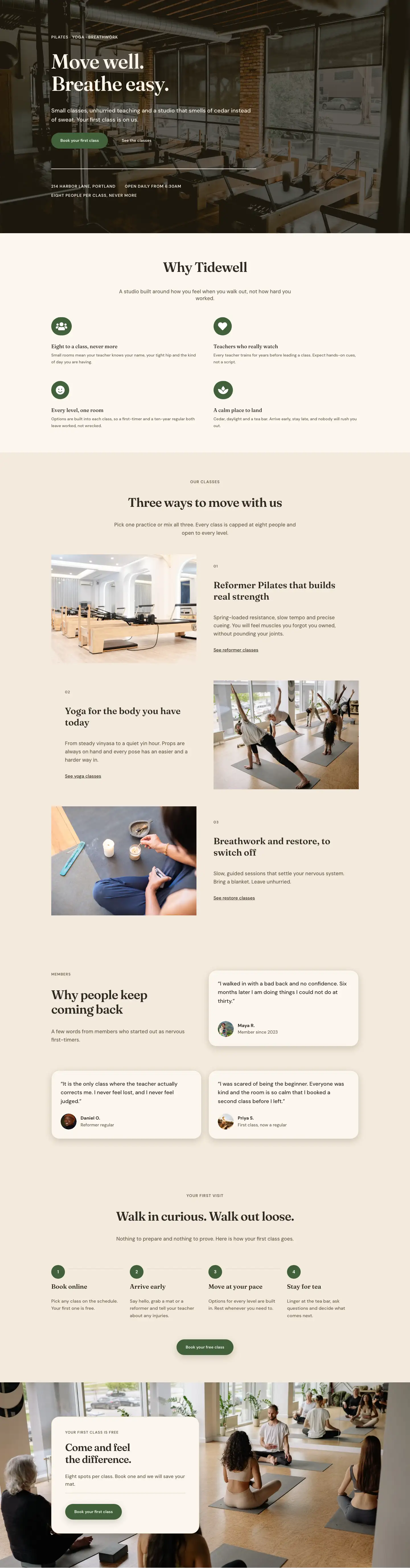
This page ships inside Tidewell: Pilates & Yoga Studio Theme (6 Pages), 6 coherent pages that share one brand.
Click to view the full page
Overview
The Tidewell Movement Studio Memberships page is built around a warm, organic palette and a deliberate typographic hierarchy that signals calm authority before a visitor reads a single word. The page opens with an asymmetric two-column header: Fraunces at 52px carries the H1 on a cream ground (#fbf6ee), while a narrower right column (8/24 flex) holds an 18px DM Sans reassurance line about no joining fee and no lock-in. A 1px sand border at the bottom of this section draws a visual breath before the pricing content begins. Section padding steps down gracefully from 72px on desktop through 56px on tablet to 40px on mobile, keeping the proportions intentional at every breakpoint.
The structural heart is the three-column pricing section. Three equal-height cards sit on a warm sand background (#f3eadc), each with 28px corner radius, a 1px #dccdb4 border, and a soft warm shadow. The center "Unlimited" card is filled solid forest green (#41603a), pulling the eye without resorting to a size differential or a contrasting accent stripe. It relies entirely on the palette doing the hierarchy work. Each card follows the same internal anatomy: a Fraunces H3 name, a one-line tagline, a 44px Fraunces price figure with a DM Sans unit label aligned to the baseline, a hairline divider, three checkmark-icon feature rows, and a pill-shaped CTA button. The feature-list group inside each card uses flexGrow so all three cards stretch to equal height regardless of copy length and the buttons always land at the same level.
A full comparison table follows, built from CSS Grid Group modules rather than an HTML table. Four columns alternate between #f3eadc and #fbf6ee cells separated by 1px #dccdb4 gaps. Checkmark icons and dash placeholders communicate inclusion and absence without labels. The FAQ section beneath uses five native Divi Toggle modules, each with a Fraunces H3 title at 28px and a DM Sans answer at 17px with 1.7em line height. The first toggle is pre-opened so visitors arrive to an active answer rather than a collapsed accordion. The page closes with a full-bleed forest green banner: the headline and a cream CTA button sit in a justified horizontal flex row on desktop, stacking cleanly to a column on mobile with the pill shape and shadow intact at every width.
What’s inside
- Asymmetric two-column section header (16/24 and 8/24 flex columns) with Fraunces H1 at 52px scaling down to 32px on mobile
- Three equal-height pricing cards (Drop-in, Unlimited, Studio Plus) with 28px border-radius, warm box shadow, and baseline-aligned 44px Fraunces price figures
- Forest green featured card (`#41603a` solid fill) with white typography, a cream "Most popular" badge built from a Group module with padding and border-radius, and a contrasting cream pill CTA button
- Icon-list feature rows using Font Awesome checkmark icons at 15px with DM Sans text labels, stretching to equal card height via flexGrow on the feature-list Group
- Four-column comparison grid built from CSS Grid Group modules with alternating warm-sand and cream cell backgrounds, checkmarks, and dash placeholders across all three plans
- Five native Divi Toggle FAQ modules with Fraunces H3 titles at 28px, 1px bottom-border row dividers, and the first item pre-opened by default
- Full-bleed forest green CTA banner with space-between horizontal flex layout on desktop, collapsing to a stacked column on mobile, with a cream pill button and supporting micro-copy line
Who it’s for
This layout fits any wellness business that sells recurring memberships or class packages: yoga studios, reformer Pilates spaces, somatic movement centers, breathwork and meditation practices, and multi-discipline wellness gyms. The three-tier pricing structure (drop-in, monthly unlimited, premium plus) maps directly to how most boutique fitness businesses actually sell. Independent instructors moving away from single-class booking platforms will find the no-contract, pause-friendly tone immediately usable. The organic palette and serif typography also suit spa-adjacent health clubs, retreat centers offering tiered memberships, and wellness coaches launching group programs.
Customization tips
The palette pivots from two values: swap #41603a (forest green) for your brand accent color and update it in the featured card background, the table-section "Join today" button, and the closing CTA banner background. The cream (#fbf6ee) and sand (#f3eadc) grounds suit most organic brand palettes without further adjustment. For a cooler brand, shift both slightly toward a pale gray-beige.
Price text lives in standalone Text modules, not computed fields, so replacing figures takes seconds. Keep price strings short (3-5 characters) to preserve the 44px Fraunces sizing without overflow. Feature rows follow a repeating Group plus Icon plus Text pattern: duplicate or remove an entire row group to adjust the count per card. The comparison table is manually mirrored against the cards, so update both together when the feature list changes.
FAQ Toggle titles are set at 28px Fraunces, which works well for questions up to about 60 characters. Longer questions should be shortened or the desktop font size reduced to 24px to avoid awkward line breaks before Divi's responsive scaling activates.
How to install this layout
- Download the layout JSON file from this page.
- Open the target page in the Divi 5 builder.
- Open the portability panel (up/down arrows icon) and choose the Import tab.
- Upload the JSON. Tick “replace existing content” only for full-page imports.
- Check the page at desktop and mobile widths, then swap in your copy and images.
Full walkthrough with troubleshooting: How to Import a Divi 5 Layout.
Questions about Tidewell Movement Studio — Organic Wellness Memberships Page for Divi 5
How do the three pricing cards maintain equal height when feature counts differ?
Each card column applies `flexGrow` and `flexShrink` sizing to the internal feature-list Group module. This pushes the CTA button to the card bottom regardless of how many feature rows you add or remove. Keep the Group structure intact and equal height is automatic.
The comparison table is not an HTML table. How do I add or remove a row?
The table is a 4-column CSS Grid built from nested Group modules inside a parent Group. To add a row, duplicate any existing set of four cell Groups and place them in sequence inside the parent. Update each cell's background color manually to maintain the alternating `#f3eadc` and `#fbf6ee` pattern.
What should I edit first after importing?
Start with the three card H3 headings and the 44px price Text modules at the top of each card column. Then update the five CTA button labels and links (one per card, one on the table section, one on the closing banner). Those edits give you a functionally customized page before touching anything else.
Does the "Most popular" badge on the Unlimited card require a plugin?
No. It is a Group module with a cream background, 12px border-radius, and a Text module inside. No shortcode or third-party plugin is involved. Edit the label text directly in that Text module and adjust the Group background color to match your brand.
How does the comparison table behave on narrow phones?
The four-column grid stays intact at all breakpoints. Cell padding reduces from 18px to 14px and text scales from 14px to 12px on mobile, keeping the table legible at 375px. If you add several more feature rows, check the render at 375px and reduce the mobile font size further in each Text module's phone settings.
Which Divi version does this layout need?
Divi 5. The layout is generated natively for Divi 5 and validated against its real module structure before publication, so it imports clean into the current builder.
Can I use this layout on client websites?
Yes. Every download includes a commercial license covering unlimited sites you own or build for clients. Only reselling or redistributing the layout file itself is prohibited.
Included in these packs
More full landing pages
Browse all full landing pages
Kiln & Clay — Minimal Pottery_studio Visit Page for Divi 5
full_landing · pottery_studio · minimal

Kiln & Clay — Minimal Pottery_studio Our Story Page for Divi 5
full_landing · pottery_studio · minimal

Kiln & Clay — Minimal Pottery_studio Studio Membership Page for Divi 5
full_landing · pottery_studio · minimal

Kiln & Clay — Minimal Pottery_studio The Shop Page for Divi 5
full_landing · pottery_studio · minimal

Kiln & Clay — Minimal Pottery_studio Classes Page for Divi 5
full_landing · pottery_studio · minimal

Kiln & Clay — Minimal Pottery_studio Home Page for Divi 5
full_landing · pottery_studio · minimal