
Tidewell Movement Studio — Organic Wellness The Studio Page for Divi 5
Discover Tidewell Movement Studio: two pilates and yoga studios, a tea bar and a calm corner of Harbor Lane. Book your first class free.
Rate this element
Download this section, free
- Divi 5 JSON, imports in seconds
- Commercial license included
- No account needed
This page ships inside Tidewell: Pilates & Yoga Studio Theme (6 Pages), 6 coherent pages that share one brand.
Click to view the full page
Overview
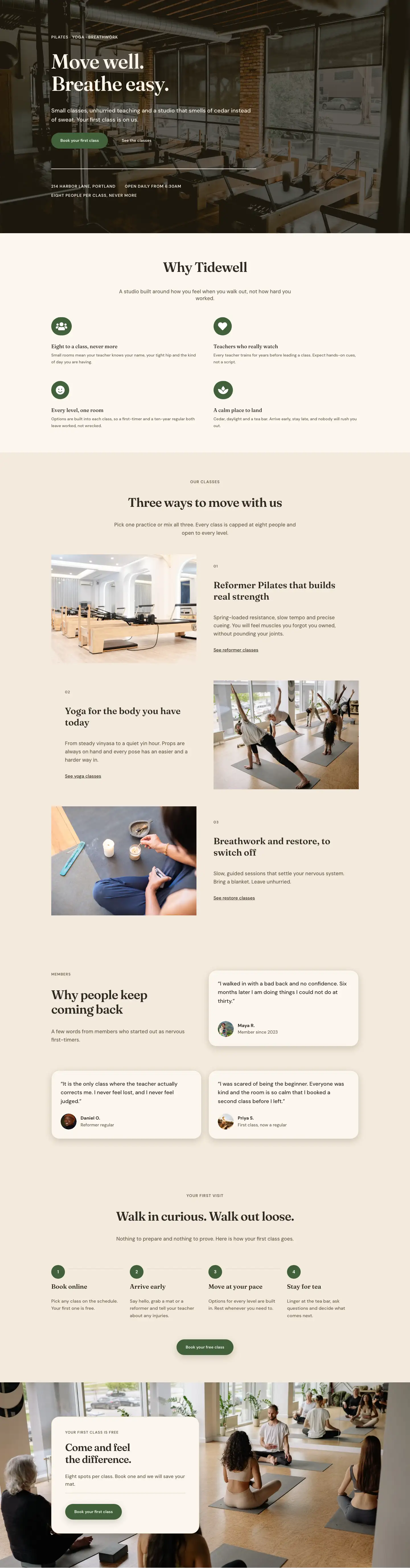
The layout opens with a split-column hero where a portrait-ratio (4:5) studio photograph fills the left column while a cream-tinted card group on the right is pulled 128px over the photo edge using a negative left margin. The card carries a 1px warm-sand border (#dccdb4), a 28px corner radius, and a soft drop shadow set in the layout's own box-shadow values, creating physical depth without a line of custom CSS. Inside it, an uppercase DM Sans eyebrow at 14px sits above a Fraunces H1 at 52px (scaling to 40px on tablet and 32px on phone via explicit breakpoint overrides), a two-sentence body paragraph, and a forest-green pill CTA button. On phones, the negative margin resets to zero, the card receives a -64px top pull instead so it tucks under the stacked image, and both columns expand to full width, preserving the layered impression at every viewport.
The second section cycles through three alternating image-and-text rows, each introduced by a small uppercase numeral (01, 02, 03) set in DM Sans above a Fraunces H3 at 32px. The rows alternate direction: on desktop the first and third pairs place the photo on the left, while the second reverses the columns. That second row also applies a phone order: -1 rule to its image column so that when the layout stacks vertically, the photo still reads before its text, keeping the rhythm consistent regardless of orientation. Each feature block caps its body copy at a 480px max-width container and closes with a standalone underlined text link rather than a button, a low-pressure CTA style that suits a studio whose identity is built on calm rather than conversion pressure.
The third section builds a six-image editorial spread from three equal columns, each holding a Divi Group with two stacked Image modules and a 16px row gap. Column one alternates a 4:5 portrait over a 4:3 landscape; column two leads with a 4:3 then a 4:5; column three mirrors column one. The images cascade at different heights across the row, producing the look of editorial masonry without any custom grid code. The section header is itself a flex row with the H2 left-aligned and a short caption right-aligned to flex-end, so both elements land at the visual bottom of the row regardless of how much heading text is present.
Two full-bleed image sections close the content. Each uses a Pexels background photo with a flat 70% dark gradient overlay (rgba 34, 26, 16) to hold text contrast. The first carries a single pullquote in Fraunces at 42px, prefaced by a decorative 120px opening quotation mark used as a typographic accent, then closed by a 64px divider and a two-line attribution block. The second presents a four-column timeline grid that collapses to two columns on tablet and one on phone, with each milestone entry topped by a 2px solid border, a large year in Fraunces at 48px, and a one-sentence description in DM Sans. The layout closes on a solid forest-green (#41603a) CTA band where a Fraunces H2 and a cream-coloured pill button share a horizontal flex row with space-between alignment on desktop and stack vertically on phones.
What’s inside
- Split hero with negative-margin card overlap: a 4:5 portrait image and a cream floating group offset by -128px on desktop, collapsing to a -64px top pull on mobile with no custom CSS required
- Three numbered alternating feature rows (01–03) with a phone `order: -1` override on the second row so every pair reads photo-first when the layout stacks
- Six-image editorial gallery grid: three equal columns each holding two stacked Image modules in mixed 4:5 and 4:3 ratios, creating a masonry-like height cascade at 16px gap
- Full-bleed pullquote section: background photo with 70% dark gradient overlay, a 120px Fraunces decorative quotation mark, 42px quote text, a 64px divider, and a two-line attribution
- Four-milestone brand timeline on a photo background: 4-column CSS grid (2-col on tablet, 1-col on phone) with a 2px top border per entry and a large year set in Fraunces at 48px
- Two distinct CTA treatments: a pill button in forest green (#41603a) inside the hero card, and a closing CTA band in the same green with a cream pill button and one-line reassurance copy
- Consistent dual-typeface system throughout: Fraunces (editorial serif) for all headings and the pullquote, DM Sans (geometric sans) for all body text, labels, links, and buttons
Who it’s for
This layout fits independent Pilates studios, yoga spaces, breathwork teachers, and boutique movement studios that lead with atmosphere. The warm linen palette, editorial serif headings, and numbered feature blocks work equally well for somatic movement practices, slow yoga, yin, and reformer studios. It also suits day spas with treatment rooms to introduce, retreat centres with a physical space story to tell, and any small fitness business where the room itself is a selling point. The brand timeline section makes it particularly strong for studios with a founding story or a local roots narrative they want visitors to feel before booking.
Customization tips
The palette uses five inline values: linen (#f3eadc) for all section backgrounds, cream (#fbf6ee) for the hero card fill and closing CTA button, dark espresso (#2e2a22) for main headings, warm taupe (#675b49) for body text and labels, and forest green (#41603a) for both CTA buttons and the closing band. Replacing all five in the Divi Theme Builder global presets repaints the full layout at once.
For photography: the hero portrait slot expects a 4:5 crop (tall, vertical), the three feature-row images expect a 4:3 crop (standard landscape), and the gallery columns each stack one 4:5 and one 4:3 image. Swapping photos in matching ratios preserves the editorial height offset. Keep the hero card body copy to roughly two short sentences (around 180 characters) so the button stays comfortably inside the card without pushing the layout out of proportion. The timeline grid has four milestone cells; a fifth wraps to a new row on desktop and works fine, but removing one leaves an uneven grid gap, so keep it at four or increase to eight.
How to install this layout
- Download the layout JSON file from this page.
- Open the target page in the Divi 5 builder.
- Open the portability panel (up/down arrows icon) and choose the Import tab.
- Upload the JSON. Tick “replace existing content” only for full-page imports.
- Check the page at desktop and mobile widths, then swap in your copy and images.
Full walkthrough with troubleshooting: How to Import a Divi 5 Layout.
Questions about Tidewell Movement Studio — Organic Wellness The Studio Page for Divi 5
How does the hero card overlap work and what happens on mobile?
On desktop the right-column group uses a -128px left margin to pull the card over the photo. On tablet this reduces to -96px. On phones the margin resets to zero and the group receives a -64px top margin instead, so it tucks slightly under the stacked image. No custom CSS is involved; all values are set in the Divi spacing controls at each breakpoint.
What aspect ratios should my replacement photos be?
The hero portrait slot is locked to 4:5 (tall vertical). All three feature-row images are 4:3 (landscape). In the gallery grid, each of the three columns stacks one 4:5 image on top of one 4:3 image. Using those same ratios when you swap photos keeps the height-cascade effect intact across the gallery columns.
Is the photo gallery a slider or a static grid?
It is a static grid with no carousel or JavaScript dependency. The three columns are standard Divi Column modules, each containing a Divi Group with two stacked Divi Image modules separated by a 16px row gap. On phones all three columns stack vertically in a single column.
Do the full-bleed sections require a specific background image size?
Both sections use CSS background-size: cover, so any landscape image works. An image at least 1400px wide prevents softness at large viewports. Because the overlay is a flat 70% opaque dark gradient, the photo reads through subtly; moody interior shots, plant close-ups, or textured surfaces all work well.
What should I update first when adapting this for my studio?
Start with the hero card: change the eyebrow label, the H1, the two-sentence body paragraph, and the button text. Then update the three numbered feature headings (01, 02, 03), their body copy, and the text links below each. Update the timeline years and milestone descriptions next. Swap the background images in the pullquote and timeline sections last, after the copy is in place.
Can I remove the timeline or the pullquote section if they do not fit my studio?
Yes. Each section is a self-contained Divi Section block and can be deleted without affecting the rest of the layout. If you remove the timeline, the green CTA band immediately follows the gallery, which reads cleanly. If you remove the pullquote, the timeline section takes its place as the first full-bleed moment in the page flow.
Which Divi version does this layout need?
Divi 5. The layout is generated natively for Divi 5 and validated against its real module structure before publication, so it imports clean into the current builder.
Can I use this layout on client websites?
Yes. Every download includes a commercial license covering unlimited sites you own or build for clients. Only reselling or redistributing the layout file itself is prohibited.
Included in these packs
More full landing pages
Browse all full landing pages
Kiln & Clay — Minimal Pottery_studio Visit Page for Divi 5
full_landing · pottery_studio · minimal

Kiln & Clay — Minimal Pottery_studio Our Story Page for Divi 5
full_landing · pottery_studio · minimal

Kiln & Clay — Minimal Pottery_studio Studio Membership Page for Divi 5
full_landing · pottery_studio · minimal

Kiln & Clay — Minimal Pottery_studio The Shop Page for Divi 5
full_landing · pottery_studio · minimal

Kiln & Clay — Minimal Pottery_studio Classes Page for Divi 5
full_landing · pottery_studio · minimal

Kiln & Clay — Minimal Pottery_studio Home Page for Divi 5
full_landing · pottery_studio · minimal