
Wagtail Animal Clinic — Playful Veterinary The Clinic Page for Divi 5
A warm, playful Divi 5 full landing page for veterinary clinics. Features a hero, clinic story timeline, pet photo gallery, testimonial, and booking CTA — ready to customize.
Rate this element
Download this section, free
- Divi 5 JSON, imports in seconds
- Commercial license included
- No account needed
This page ships inside Wagtail: Veterinary Clinic & Grooming Theme (6 Pages), 6 coherent pages that share one brand.
Click to view the full page
Overview
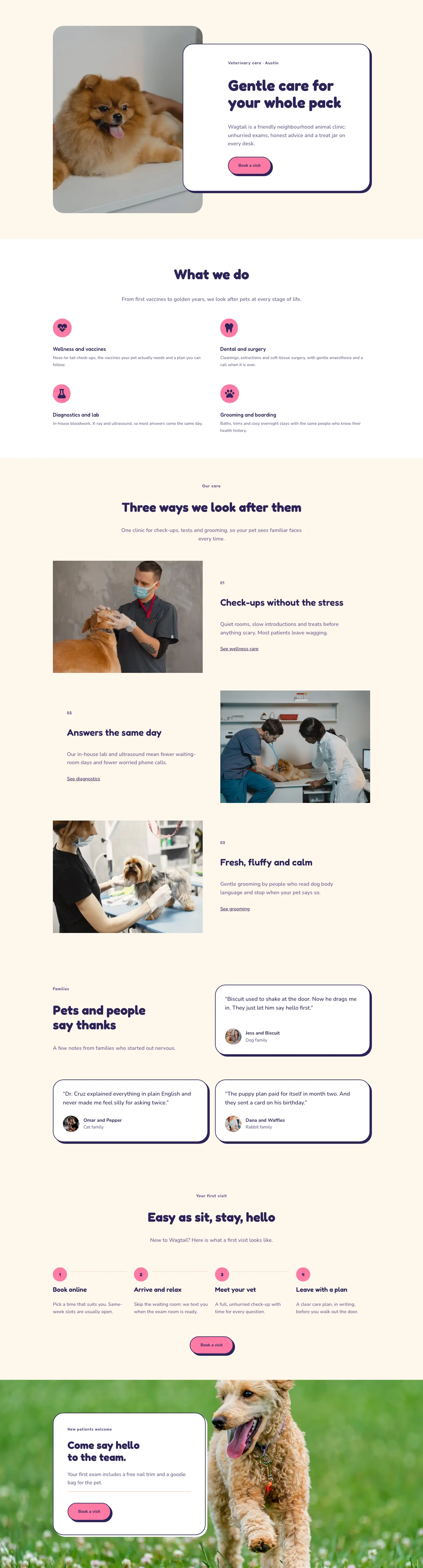
The Wagtail Clinic page opens with an asymmetric two-column hero: a 16/24 text column on the left and an 8/24 portrait-ratio (4:5) image column on the right, built entirely with native Divi section, row, and column modules. The h1 sits at 64px Fredoka Bold on desktop and steps down responsively to 46px on tablet and 36px on phone, keeping the headline legible without manual breakpoint overrides. Below the headline, two CTAs share a single flex row group: a fully-rounded pill button in bubblegum pink (#ff7aa5) with a 6px hard-offset box shadow (no blur, preset4), and a plain text link as a lower-commitment secondary path. The warm cream background (#fff7ec) runs through the majority of the page and functions as a neutral warmth anchor, allowing the navy (#2b2457), soft purple (#625a8c), and pink accents to do all the personality work without the layout ever feeling busy.
The second section inverts the tone with a full-bleed photo background overlaid by a flat navy gradient (rgba 43,36,87 at 68% on both stops), creating a dark storytelling band inside the same cream-dominant page. Over this, a four-column milestone grid tracks the clinic's growth from 2018 to 2025. Each milestone card leads with a 48px Fredoka year figure, a 3px solid white top-border acting as a visual rule, an h3 milestone heading, and a two-line description. The grid collapses to two columns on tablet and a single column on phone via the group module's responsive grid-column-count setting, requiring zero manual stacking.
Section three is a three-column editorial photo gallery. Each column stacks two images at alternating 4:5 and 4:3 aspect ratios, creating the height variation that makes the grid read as curated rather than mechanical. All six images use object-fit cover, so dropping in your own pet photography never breaks the proportions. The gallery header uses a classic editorial split: a 14/24 left column carries the h2 in 44px Fredoka, while a 10/24 right column holds a short caption, with the row aligned to flex-end so both columns meet at the same baseline.
The page closes with a centered pull-quote section featuring a 160px Fredoka opening-quote character, a 44px testimonial body, and a circular 56px avatar with client attribution, all sitting on the cream background. A final CTA band in solid pink (#ff7aa5) uses a horizontal flex group to place the h2 heading on the left and the booking button on the right on desktop, collapsing to a vertical stack on phone. The white pill button in the CTA band mirrors the same 6px hard-offset shadow and 999px border-radius used in the hero, giving the page a coherent visual grammar from top to bottom.
What’s inside
- Asymmetric hero with a 16/24 text column (h1 at 64px Fredoka, responsive to 36px on phone) and an 8/24 portrait-ratio (4:5) image module
- Rounded pill CTA button in #ff7aa5 with a 6px hard-offset box shadow and a secondary inline text link, both inside a single flex row group
- Full-bleed photo-background story section with a flat navy gradient overlay (rgba #2b2457 at 68%) and a four-column milestone grid (year, title, description) built from Divi group and text modules
- Three-column editorial photo gallery with 6 image modules at alternating 4:5 and 4:3 aspect ratios, each using object-fit cover
- Gallery section header using a 14/24 / 10/24 flex-end-aligned row split for an editorial heading-and-caption layout
- Centered pull-quote block: 160px Fredoka opening-quote character, 44px testimonial text constrained to 960px max-width, and a 56px circular avatar with attribution
- Solid-pink (#ff7aa5) CTA band with a horizontal heading-plus-button flex layout on desktop that collapses to a vertical column on phone
Who it’s for
This layout is built for independent and boutique veterinary clinics that want to feel warm and approachable rather than purely medical. It suits practices that want to tell a growth story, highlight a distinctive service like a cats-only room or grooming studio, or simply show off their patients. It also translates well to general pet-care businesses: grooming salons, boarding facilities, and animal shelters where a playful, emotionally inviting tone matters. Freelance web designers and agencies building for any animal-care client will find the Fredoka/Nunito type system and three-color palette easy to redirect to a new brand identity.
Customization tips
The palette runs on three values: cream background (#fff7ec), deep navy (#2b2457), and bubblegum pink (#ff7aa5). Updating all three consistently across sections shifts the entire mood. A teal accent instead of pink reads more clinical; a forest green reads outdoorsy and adventure-focused. The Fredoka/Nunito pairing carries the playful personality: swap Fredoka for Poppins or DM Sans to keep the roundness at a lower volume, or replace it with a serif like Playfair Display for a more upscale, boutique-vet feel. Gallery images should be supplied at roughly 800x1000px (4:5) and 800x600px (4:3) to match the locked aspect ratios; cropping happens automatically via object-fit cover so composition is the only thing to watch. Milestone card body copy sits best at one or two sentences; three or more lines pushes grid cells out of rhythm at tablet widths. Keep the hero h1 under 10 words to preserve the balanced two-line break that the text-wrap balance setting produces on desktop.
How to install this layout
- Download the layout JSON file from this page.
- Open the target page in the Divi 5 builder.
- Open the portability panel (up/down arrows icon) and choose the Import tab.
- Upload the JSON. Tick “replace existing content” only for full-page imports.
- Check the page at desktop and mobile widths, then swap in your copy and images.
Full walkthrough with troubleshooting: How to Import a Divi 5 Layout.
Questions about Wagtail Animal Clinic — Playful Veterinary The Clinic Page for Divi 5
How does the hero image behave on mobile?
The hero row is set to flex-wrap with column direction on phone, so the image stacks below the text block rather than disappearing. Both columns expand to full width (24/24), which means the portrait photo fills the screen immediately below the headline and CTA buttons.
How does the four-column milestone grid collapse on smaller screens?
The grid uses the group module's responsive grid-column-count setting: 4 columns on desktop, 2 on tablet, 1 on phone. The row-gap adjusts from 40px to 32px on phone. No manual reordering or visibility toggles are needed.
The story section background looks like a dark overlay. Is there a separate overlay module?
No extra module is involved. The dark effect is a single Divi section background that combines a Pexels image with a CSS gradient set to rgba(43,36,87,0.68) on both stops at 90 degrees, configured entirely within the section's background settings panel.
What image dimensions should I use for the gallery?
The first and third image in each column uses a 4:5 ratio (portrait, around 800x1000px works well); the second image uses a 4:3 ratio (landscape, around 800x600px). Keeping close to those proportions ensures the alternating height rhythm holds across all three columns on desktop.
Can I swap the single testimonial for multiple quotes?
The testimonial section holds one centered pull-quote. To add a second quote, duplicate the full section and place it directly after. The layout does not include a slider module, so multi-quote rotation would require adding a carousel module manually.
What is the first thing I should edit after importing?
Start with the hero h1 and the milestone year labels in the story section, since those contain the most brand-specific placeholder text. Then swap the six gallery images for your own pet photography and update the testimonial quote and avatar. The palette and typography can stay as-is until you are ready for a full rebrand pass.
Which Divi version does this layout need?
Divi 5. The layout is generated natively for Divi 5 and validated against its real module structure before publication, so it imports clean into the current builder.
Can I use this layout on client websites?
Yes. Every download includes a commercial license covering unlimited sites you own or build for clients. Only reselling or redistributing the layout file itself is prohibited.
Included in these packs
More full landing pages
Browse all full landing pages
Kiln & Clay — Minimal Pottery_studio Visit Page for Divi 5
full_landing · pottery_studio · minimal

Kiln & Clay — Minimal Pottery_studio Our Story Page for Divi 5
full_landing · pottery_studio · minimal

Kiln & Clay — Minimal Pottery_studio Studio Membership Page for Divi 5
full_landing · pottery_studio · minimal

Kiln & Clay — Minimal Pottery_studio The Shop Page for Divi 5
full_landing · pottery_studio · minimal

Kiln & Clay — Minimal Pottery_studio Classes Page for Divi 5
full_landing · pottery_studio · minimal

Kiln & Clay — Minimal Pottery_studio Home Page for Divi 5
full_landing · pottery_studio · minimal