
Wagtail Animal Clinic — Playful Veterinary Contact Page for Divi 5
A bright, friendly contact page layout for veterinary clinics. Includes a booking form, clinic info, FAQ, and a new-patient CTA — built for Divi 5.
Rate this element
Download this section, free
- Divi 5 JSON, imports in seconds
- Commercial license included
- No account needed
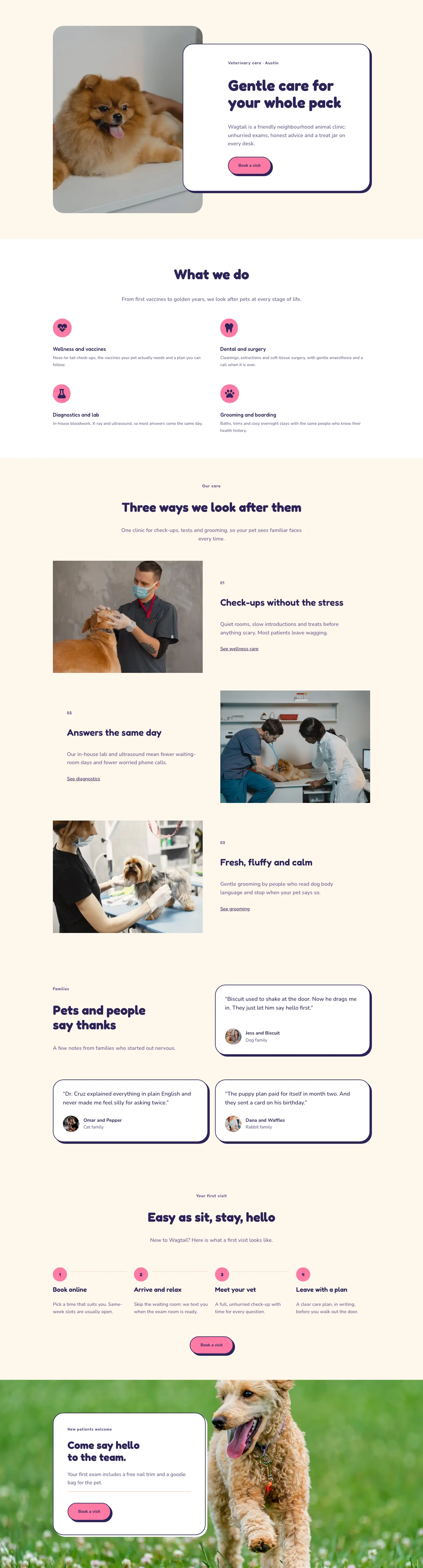
This page ships inside Wagtail: Veterinary Clinic & Grooming Theme (6 Pages), 6 coherent pages that share one brand.
Click to view the full page
Overview
The layout opens on a white header section where a breadcrumb trail and an H1 in Fredoka at 52px share a 16/24 + 8/24 split row with a single-sentence intro in Nunito at 18px. A 1px warm-sand bottom border (#f1dfcc) draws a clean line below without the visual weight of a full divider, and the section's padding steps down from 72px on desktop to 40px on phone so the heading never crowds a small screen.
The main contact section sits on a warm cream ground (#fff7ec) and uses an asymmetric 10/24 + 14/24 column split with a 72px gap. The left column anchors a portrait image in a 4:5 ratio with pill-shaped top corners (999px radius) and softly rounded bottom corners (32px), so the photo reads as a shaped cutout rather than a hard rectangle. Below the image, two icon-labeled rows show the address and opening hours: a small-caps Fredoka label at 12px with letter-spacing sits above a larger Nunito value in navy, a pairing that makes practical details scannable without a table. The right column holds the contact form inside a white card with fully rounded corners (36px), a 2px solid navy border (#2b2457), and a flat hard-offset box shadow (6px horizontal, 6px vertical, 0px blur). Three full-width pill-shaped fields (999px radius, cream fill) for Name, Email, and Message match the card's visual language, and the pink submit button (#ff7aa5) uses the same pill shape and hard shadow, inverting to navy on hover.
The third section, on white, holds six FAQ items split across two equal columns. Each item is separated by a 3px solid navy top border with 20px top padding, using ruled lines instead of cards to keep the section open. Question headings use Fredoka at 21px in navy; answers use Nunito at 16px in the medium purple (#625a8c). The section header splits a left-aligned H2 from a right-side ghost button ("Email us") that fills to navy on hover, providing a second conversion path without competing with the form.
The page closes on a full-width hot-pink CTA section with a horizontal two-column layout: a large Fredoka headline at 48px on the left and a white "Book a visit" button with a hard navy shadow on the right. All column structures flatten to a single full-width stack at phone breakpoint, and section padding steps consistently from 88px on desktop down to 40px on phone throughout.
What’s inside
- White header section with H1 in Fredoka (52px desktop, 32px phone) plus breadcrumb nav and intro paragraph in an asymmetric split row
- Portrait photo module in a 4:5 aspect ratio with pill-top (999px) and rounded-bottom (32px) border radius, plus icon-labeled address and opening-hours info blocks beneath
- Native Divi 5 Contact Form module in a rounded card (36px radius, 2px solid navy border, flat 6px hard box shadow) with three full-width pill-shaped fields for Name, Email, and Message
- Six FAQ items across two equal columns, each separated by a 3px solid top border and responsive 40px vertical gap, no card containers
- Hot-pink (#ff7aa5) CTA section with a large Fredoka headline and a white pill button, horizontal on desktop and stacked left-aligned on mobile
- Consistent pill-shape system (999px radius) applied to the image top, form fields, submit button, standalone Email Us button, and CTA button
- Dual-font pairing: Fredoka for all headings, overlines, and spaced-caps labels; Nunito for all body text, form fields, and buttons
Who it’s for
This layout is built for independent veterinary practices, animal clinics, and pet care businesses that want a contact page as warm as their team. It fits dog trainers, grooming salons, and pet boarding facilities equally well, anywhere the brand leans approachable and family-focused rather than clinical. The rounded shapes, conversational copy structure, and warm palette also translate naturally to pediatric dental practices, children's physiotherapy clinics, or any health-adjacent service that needs to signal care and accessibility to families rather than institutional authority.
Customization tips
The three accent colors (navy #2b2457, medium purple #625a8c, hot pink #ff7aa5) appear across headings, icon fills, borders, box shadows, and the CTA section background. Swapping the pink for a teal or coral and updating the CTA section background to match shifts the mood entirely without touching layout structure. The warm cream (#fff7ec) used for the main section background and form field fills is a single value; replacing it with pale sage or light sky-blue changes the warmth of the whole middle section at once.
The portrait image slot expects a 4:5 ratio (around 800x1000px works well). Avoid wide landscape crops as they will be clipped by the cover-fit setting. The contact form ships with three fields (Name, Email, Message); adding a "Pet name" or preferred appointment time field is a one-click addition inside the Divi Contact Form module. FAQ answers are short by design (one to two sentences each). Going beyond three lines per answer will create a visible height imbalance between the two FAQ columns on desktop, so keep answers tight or add items in pairs.
How to install this layout
- Download the layout JSON file from this page.
- Open the target page in the Divi 5 builder.
- Open the portability panel (up/down arrows icon) and choose the Import tab.
- Upload the JSON. Tick “replace existing content” only for full-page imports.
- Check the page at desktop and mobile widths, then swap in your copy and images.
Full walkthrough with troubleshooting: How to Import a Divi 5 Layout.
Questions about Wagtail Animal Clinic — Playful Veterinary Contact Page for Divi 5
Does the contact form send to my inbox without a plugin?
Yes. The form uses Divi's native Contact Form module and Divi's built-in email delivery. Set your recipient address in the module settings; no third-party form plugin is required.
The image has an unusual mixed border radius. How do I swap the photo?
Replace the image source URL inside the Image module. The border radius (pill top, 32px rounded bottom) and 4:5 aspect ratio are set on the module itself, so any tall portrait photo you drop in will adopt the same shape automatically.
What happens to the two-column contact section on tablets?
The row is set to wrap at tablet width, and both columns expand to full 24/24 width. The image column appears first, then the form card stacks below it. The 72px column gap collapses when the row wraps, so there is no leftover whitespace.
Can I add or remove FAQ items without breaking the two-column grid?
Each FAQ item is an independent group inside its column, so you can add or remove from either column without affecting the other. On phone the two columns stack into a single list, so an uneven count reads fine on mobile.
Can I delete the pink CTA section if I do not need it?
Yes. Each section is self-contained. Removing the final section leaves the white FAQ section as the page close, which works without a visual replacement given the neutral background.
Which Divi version does this layout need?
Divi 5. The layout is generated natively for Divi 5 and validated against its real module structure before publication, so it imports clean into the current builder.
Can I use this layout on client websites?
Yes. Every download includes a commercial license covering unlimited sites you own or build for clients. Only reselling or redistributing the layout file itself is prohibited.
Included in these packs
More full landing pages
Browse all full landing pages
Kiln & Clay — Minimal Pottery_studio Visit Page for Divi 5
full_landing · pottery_studio · minimal

Kiln & Clay — Minimal Pottery_studio Our Story Page for Divi 5
full_landing · pottery_studio · minimal

Kiln & Clay — Minimal Pottery_studio Studio Membership Page for Divi 5
full_landing · pottery_studio · minimal

Kiln & Clay — Minimal Pottery_studio The Shop Page for Divi 5
full_landing · pottery_studio · minimal

Kiln & Clay — Minimal Pottery_studio Classes Page for Divi 5
full_landing · pottery_studio · minimal

Kiln & Clay — Minimal Pottery_studio Home Page for Divi 5
full_landing · pottery_studio · minimal