
Wagtail Animal Clinic — Playful Veterinary Home Page for Divi 5
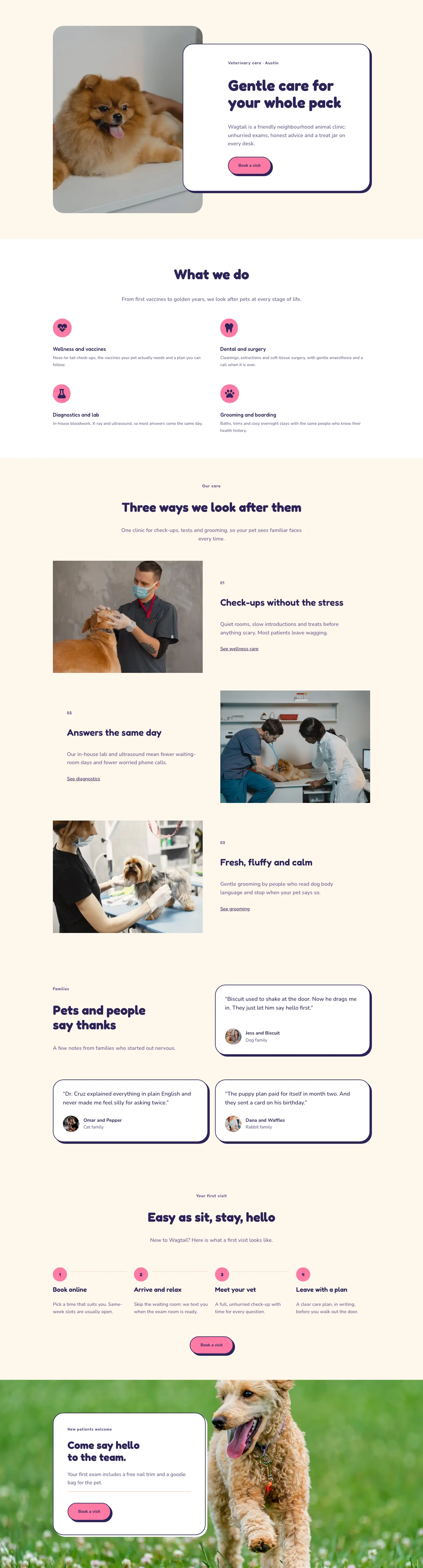
A warm, playful Divi 5 full-page layout for a neighbourhood veterinary clinic. Features a hero with overlapping card, services grid, alternating care sections, testimonials, a how-it-works steps flow, and a CTA — all in a pink-and-navy palette with Fredoka headings.
Rate this element
Download this section, free
- Divi 5 JSON, imports in seconds
- Commercial license included
- No account needed
This page ships inside Wagtail: Veterinary Clinic & Grooming Theme (6 Pages), 6 coherent pages that share one brand.
Click to view the full page
Overview
Wagtail Animal Clinic Home is a warm, confident full-page layout built around three visual ideas: rounded everything, a flat offset shadow that feels hand-stamped, and a two-tone palette that alternates between warm cream (#fff7ec) and clean white across six sections. The hero leads with a 4:5 portrait image on the left (fully rounded, 36px radius) and a white card on the right that overlaps the image by 128px on desktop, creating depth through a negative left margin baked directly into the layout JSON. That card holds the H1 in Fredoka at 52px, a single-sentence value line in Nunito at 18px, and a pill-shaped CTA button that inverts coral pink to navy on hover. The type system pairs Fredoka for all headings with Nunito for body and button text, with three distinct sizes of eyebrow label (14px centered for section intros, 13px left-aligned for numbered step prefixes) that keep hierarchy clear even in dense sections.
The services section places four Divi Blurb modules in a 2x2 grid, each carrying a circular coral-pink icon badge (999px border radius, 16px padding, left-aligned). The icons are FontAwesome Solid glyphs sitting on #ff7aa5 with a #2b2457 fill. Below that, a three-row alternating layout introduces each core care category using a numbered H4 prefix (01/02/03 in muted purple #625a8c), a 32px Fredoka H3, a short paragraph, and a bare underline text link. Images here use a 4:3 aspect ratio with object-fit cover; in the second row, a phone order: -1 declaration keeps the image above the text when columns stack rather than pushing it below.
The testimonials section places the section header and intro copy in the left half of the first row, with the first review card in the right half (a deliberate asymmetry that avoids the predictable three-across grid). A second row completes the set with two cards side-by-side. All three cards share the same treatment: white fill, 2px navy border, 36px radius, and a flat preset-4 shadow (6px right, 6px down, 0px blur) in #2b2457. Avatar portraits are 56px squares with the same 36px radius, and each card closes with a bold name line and a muted pet-type label in a two-row flex group.
Spacing scales deliberately across breakpoints: section padding runs 88px/60px/40px, the hero card's left overlap collapses from -128px to 0px on phone (a compensating -64px top margin slides the card under the image instead), and the four-column "first visit" process grid drops to two columns on tablet and one on phone. Horizontal divider lines inside each step badge group are disabled on phone via a disabledOn setting in the JSON, keeping the stacked layout clean. The final section layers a background photo (cover, center-center) behind a left-anchored white floating card at max-width 520px, matching the same border and shadow system used throughout the page.
What’s inside
- Overlapping hero card with a -128px left margin offset over a 4:5 rounded portrait image (36px radius), including a hover-inverting pill CTA button (coral pink to navy)
- Four-service Blurb grid (2x2) with circular coral-pink FontAwesome icon badges (heart-pulse, tooth, flask, paw) and left-aligned icon layout
- Three-row alternating care showcase with numbered H4 prefixes (01/02/03), 4:3 cover images, H3 section titles, and bare underline text links; row 2 applies phone order:-1 to keep the image above text on mobile
- Three testimonial cards (white, 2px #2b2457 border, 36px radius, flat 6px offset shadow) with 56px square rounded avatar portraits and named pet-and-owner attribution
- Four-step 'first visit' process grid (4-col desktop, 2-col tablet, 1-col phone) with numbered pink circular badges, step heading plus body, and horizontal cream divider lines that disable on phone
- Background-photo CTA section with a left-anchored floating white card (max-width 520px, same border and shadow system), an offer line, a cream divider, and a Book a Visit button
Who it’s for
This layout fits independent veterinary practices, small animal clinics, and mixed-care facilities that need to look approachable without sacrificing credibility. The four-service blurb structure also works for pet grooming studios or boarding kennels that offer a range of services under one roof. The warm, rounded aesthetic suits neighbourhood clinics rather than large hospital groups. Freelance web designers and Divi developers building sites for veterinary or pet-care clients will find the layout straightforward to rebrand, populate with real photography, and hand off to a non-technical owner.
Customization tips
The palette is driven by three hex values: #fff7ec (section backgrounds), #2b2457 (text and borders), and #ff7aa5 (buttons and icon badges). Replacing all three in Divi Global Presets or directly in each module will shift the entire page in minutes. Swapping #ff7aa5 for a mint or sky blue gives a calmer, more clinical feel; a warm amber reads more rustic and outdoorsy. Fredoka and Nunito can be replaced at the module level with any rounded sans-serif (Poppins or DM Sans preserve the friendly tone well). Hero body copy should stay under 25 words to avoid breaking the card's internal balance at the overlap point. Care-section images expect a 4:3 crop; the hero photo works best at portrait 4:5; avatar portraits must be square. Testimonial quotes hold best between 20 and 35 words. Beyond 40 words the two cards in the second testimonial row will differ noticeably in height.
How to install this layout
- Download the layout JSON file from this page.
- Open the target page in the Divi 5 builder.
- Open the portability panel (up/down arrows icon) and choose the Import tab.
- Upload the JSON. Tick “replace existing content” only for full-page imports.
- Check the page at desktop and mobile widths, then swap in your copy and images.
Full walkthrough with troubleshooting: How to Import a Divi 5 Layout.
Questions about Wagtail Animal Clinic — Playful Veterinary Home Page for Divi 5
How does the hero overlap behave on mobile?
On desktop the text card uses a -128px left margin to pull over the portrait photo. On phone that margin resets to 0px and a -64px top margin is applied instead, so the card slides down to sit partially over the bottom of the image rather than beside it. The stacking order stays readable without any custom CSS.
What icon set does the services section use?
The four Blurb modules use FontAwesome Solid glyphs: heart-pulse (), tooth (), flask (), and paw (). You can swap to any FontAwesome icon available in Divi 5 by editing the icon unicode in each Blurb's icon settings. The circular coral badge is a border-radius and background applied to the icon container, so it adapts to any icon automatically.
What aspect ratios do the images need?
The hero portrait is set to 4:5 (tall). The three care-section images use 4:3 (landscape). Avatar portraits in the testimonial cards are 1:1 (square). Keeping to these ratios prevents column height from shifting mid-row, particularly in the alternating zigzag rows where columns are vertically centered.
Can I add a fourth testimonial?
The layout ships with three cards: one in the right half of the first testimonials row (paired with intro copy on the left) and two in the second row. Adding a fourth means either converting the intro-copy column in the first row into a card as well, or duplicating the second row. The card structure (quote text, avatar group, name and label) can be duplicated directly in the Divi editor.
Do the step connector lines in the 'first visit' section disappear on small screens?
Yes, intentionally. Each horizontal divider line sits inside a Group module with a disabledOn phone setting in the layout JSON, so it only renders on tablet and desktop. On phone the four steps stack in a single column and the numbered pink badges provide all the sequencing needed.
What kind of photo works best for the final CTA section background?
The background is a CSS image on the section itself (not an Image module), set to cover and center-center. Any landscape photo at least 1920px wide will work. Because the white card is left-anchored at max-width 520px, a photo with the main subject on the right side of the frame will show well around the card on wider screens.
Which Divi version does this layout need?
Divi 5. The layout is generated natively for Divi 5 and validated against its real module structure before publication, so it imports clean into the current builder.
Can I use this layout on client websites?
Yes. Every download includes a commercial license covering unlimited sites you own or build for clients. Only reselling or redistributing the layout file itself is prohibited.
Included in these packs
More full landing pages
Browse all full landing pages
Kiln & Clay — Minimal Pottery_studio Visit Page for Divi 5
full_landing · pottery_studio · minimal

Kiln & Clay — Minimal Pottery_studio Our Story Page for Divi 5
full_landing · pottery_studio · minimal

Kiln & Clay — Minimal Pottery_studio Studio Membership Page for Divi 5
full_landing · pottery_studio · minimal

Kiln & Clay — Minimal Pottery_studio The Shop Page for Divi 5
full_landing · pottery_studio · minimal

Kiln & Clay — Minimal Pottery_studio Classes Page for Divi 5
full_landing · pottery_studio · minimal

Kiln & Clay — Minimal Pottery_studio Home Page for Divi 5
full_landing · pottery_studio · minimal