
Wagtail Animal Clinic — Playful Veterinary Wellness Plans Page for Divi 5
Choose a monthly wellness plan for your pet at Wagtail Animal Clinic. Puppy, adult, and senior plans cover exams, vaccines, dental, and more with no contract.
Rate this element
Download this section, free
- Divi 5 JSON, imports in seconds
- Commercial license included
- No account needed
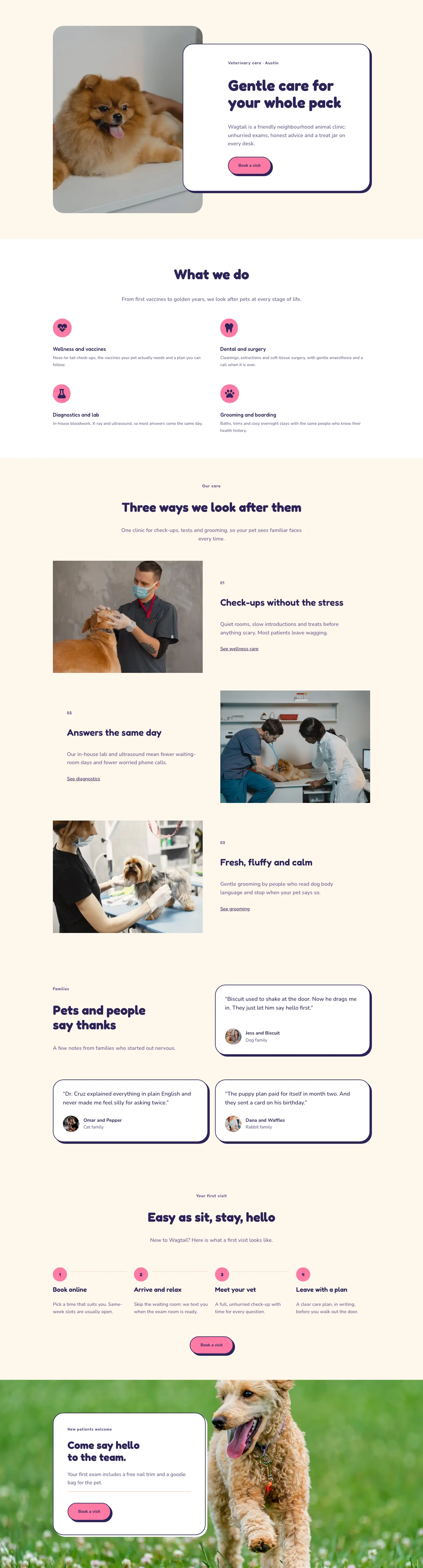
This page ships inside Wagtail: Veterinary Clinic & Grooming Theme (6 Pages), 6 coherent pages that share one brand.
Click to view the full page
Overview
The layout opens on a white section (#ffffff) with a 1px peach bottom border (#f1dfcc), divided into an asymmetric two-column row. The left column, weighted at 16/24, carries a breadcrumb in Fredoka at 13px and an H1 in deep navy (#2b2457) at 52px on desktop, stepping down to 32px on phones. The right column, weighted at 8/24, holds a single supporting sentence in Nunito at 18px, padded 36px from the top so it sits at optical mid-height against the heading. On phones both columns expand to full width and stack cleanly. This entrance communicates the page's purpose before any pricing appears.
The plan cards section places three equal columns inside a warm cream section (#fff7ec) with 88px vertical padding that compresses to 40px on phones. A centred overline in Fredoka at 13px and an H2 at 44px introduce the cards, then a row with alignItems: stretch forces all three columns to the same height regardless of feature-list length. Each card is a Divi 5 column module with 36px corner radius, a 2px solid navy border, and a preset4 box shadow offset 6px right and 6px down at zero blur. The middle Adult card ($29/month) swaps in a hot-pink background (#ff7aa5) and a "Most popular" badge built from a nested Group module containing a single Text module in a white 12px-radius pill. Feature rows inside every card pair a Font Awesome checkmark icon at 15px with a Nunito Text module inside a flex-row Group using alignItems: flex-start, keeping the icon anchored to the first baseline even when copy wraps. Each card closes with a full-width ghost CTA button (2px navy border, 999px border-radius) that fills navy on hover.
The comparison section reuses the cream background and builds its table entirely from nested Divi Group modules. The outer Group is set to display: grid with gridColumnCount: 4 and 1px column and row gaps filled by a #f1dfcc border, producing clean cell separators with no plugin or custom CSS. Cell backgrounds alternate between #fff7ec and white for zebra striping, with the Adult data column kept white to echo its highlighted card above. Five feature rows cover wellness exams, vaccines, dental cleaning, senior bloodwork, and mobility checks, using checkmark icons and text dashes as indicators. Below the table a pink "Join a plan" button provides a second conversion point before the FAQ.
The FAQ places six questions across two balanced columns on a white background, each question anchored by a 3px solid navy top border. The section header row aligns the H2 to the bottom edge against a "Call the clinic" ghost button using alignItems: flex-end, giving heading and phone CTA equal visual weight. The layout closes with a full-bleed pink strip (#ff7aa5) matching the Adult card accent, carrying a Fredoka heading at 48px and a white-filled "Book a visit" button with the same hard box shadow used on every card throughout. On phones the strip's horizontal flex row collapses to a stacked column with left-aligned text, and all heading sizes step down through tablet and phone breakpoints baked into each individual heading module.
What’s inside
- Three life-stage plan cards (Puppy & Kitten $39, Adult $29, Senior $49) built from Divi 5 column modules with 36px border-radius, 2px navy border, and a hard 6x6px preset4 box shadow at zero blur
- "Most popular" badge on the Adult card implemented as a nested Divi Group pill with white background and Fredoka text, not an image or overlay
- Icon-plus-text feature lists inside each card using Divi 5 Icon and Text modules in flex-row Groups with flex-start alignment, so checkmarks stay flush to the first line even when copy wraps
- Equal-height card columns via row-level alignItems: stretch combined with flexGrow/flexShrink sizing on the feature list group, which pushes each CTA button to the card's bottom edge
- Four-column comparison table built from a Divi Group in CSS grid mode (display: grid, gridColumnCount: 4) with 1px gap separators, no third-party table plugin required
- Six-question FAQ laid out across two equal columns, each item marked by a 3px solid navy top border serving as a typographic divider
- Full-bleed pink CTA strip (matching the Adult card accent) with a horizontal headline-plus-button layout that collapses to a stacked column on phones
- Responsive breakpoints at every section: plan cards stack single-column on phones, heading sizes step down through tablet and phone overrides baked into each module
Who it’s for
This layout suits independent veterinary clinics, multi-vet practices, and animal wellness centres that sell routine-care plans on a monthly billing model. It works equally well for mobile vet services, grooming studios with wellness add-ons, and boarding facilities that want to present tiered memberships with transparent pricing. The three life-stage tiers (puppy/kitten, adult, senior) map directly to the way most veterinary practices structure preventive care, so a Divi developer building a new site for a vet client can import and adapt this page with minimal structural changes to the underlying copy.
Customization tips
The most efficient palette change is swapping the three core accent colours: deep navy (#2b2457), lavender (#625a8c), and hot pink (#ff7aa5). These are set at the module level rather than a single global preset, so using Divi's Global Colors after import (or a JSON find-and-replace before it) will update all card borders, buttons, shadows, and the CTA strip in one pass. The warm cream (#fff7ec) and peach border (#f1dfcc) can stay neutral or shift to match a different brand palette without touching layout structure.
For plan card copy, keep plan names to two or three words and feature bullets to roughly 35 characters per line so the checkmark icon aligns to the first line without awkward indentation. The price figures use a 44px Fredoka numeral; if your prices run to four digits, reduce to around 36px to avoid wrapping inside the card. The comparison table is a fixed 4-column grid, so the number of feature rows is flexible but adding a fourth plan column requires restructuring the grid. FAQ answers are currently one to two sentences each; longer answers will stretch one column and may create uneven column heights at wider viewport widths.
How to install this layout
- Download the layout JSON file from this page.
- Open the target page in the Divi 5 builder.
- Open the portability panel (up/down arrows icon) and choose the Import tab.
- Upload the JSON. Tick “replace existing content” only for full-page imports.
- Check the page at desktop and mobile widths, then swap in your copy and images.
Full walkthrough with troubleshooting: How to Import a Divi 5 Layout.
Questions about Wagtail Animal Clinic — Playful Veterinary Wellness Plans Page for Divi 5
How does the comparison table stay aligned without a table plugin?
The table is a Divi Group module set to display: grid with gridColumnCount: 4 and 1px column and row gaps. Each cell is a separate nested Group with fixed padding, so column alignment is handled by the CSS grid context rather than manual widths or absolute positioning.
How does the Adult card stand out without a separate highlighted-card module?
The Adult card uses a hot-pink (#ff7aa5) background set directly on the Divi 5 column module, and carries a "Most popular" badge built from a nested Group containing a single Text module in a white pill. You can swap the badge copy or remove the Group entirely without touching the card's structural modules or the feature-list rows below it.
Do the three plan cards actually stay equal height, or does the tallest card push the row taller?
All three cards reach the same height because the parent row has alignItems: stretch set at the desktop breakpoint. Inside each card, the feature-list Group uses flexGrow and flexShrink sizing, so it expands to absorb any height difference and keeps the CTA button pinned to the card's bottom edge.
Is there any photography or imagery in this layout that I need to replace?
No. The layout relies entirely on typography, colour fills, Font Awesome icon modules, and spacing. There are no image modules, background photographs, or placeholder images to source or replace, which means the layout is immediately functional after you update the copy and colour values.
What should I edit first after importing the layout?
Start with the three plan names, prices, and feature-list Text modules inside the plan card columns. Next update the comparison table cell text to match your actual included features. Then replace the six FAQ answers. The CTA strip heading and button label are the last two pieces of copy on the page and take under a minute to update.
How does the FAQ section header with the call button behave on phones?
The header row uses alignItems: flex-end on desktop to baseline-align the H2 against the ghost button. On phones the row switches to flexWrap: wrap and flexDirection: column via the phone breakpoint override on the row module, so the heading stacks above the button with consistent left alignment.
Which Divi version does this layout need?
Divi 5. The layout is generated natively for Divi 5 and validated against its real module structure before publication, so it imports clean into the current builder.
Can I use this layout on client websites?
Yes. Every download includes a commercial license covering unlimited sites you own or build for clients. Only reselling or redistributing the layout file itself is prohibited.
Included in these packs
More full landing pages
Browse all full landing pages
Kiln & Clay — Minimal Pottery_studio Visit Page for Divi 5
full_landing · pottery_studio · minimal

Kiln & Clay — Minimal Pottery_studio Our Story Page for Divi 5
full_landing · pottery_studio · minimal

Kiln & Clay — Minimal Pottery_studio Studio Membership Page for Divi 5
full_landing · pottery_studio · minimal

Kiln & Clay — Minimal Pottery_studio The Shop Page for Divi 5
full_landing · pottery_studio · minimal

Kiln & Clay — Minimal Pottery_studio Classes Page for Divi 5
full_landing · pottery_studio · minimal

Kiln & Clay — Minimal Pottery_studio Home Page for Divi 5
full_landing · pottery_studio · minimal