
Wagtail Animal Clinic — Playful Veterinary Services Page for Divi 5
A bright, friendly Divi 5 services page for veterinary clinics. Features a hero, services accordion, wellness exam checklist, FAQ, and booking CTA — all in a warm pastel palette with Fredoka and Nunito fonts.
Rate this element
Download this section, free
- Divi 5 JSON, imports in seconds
- Commercial license included
- No account needed
This page ships inside Wagtail: Veterinary Clinic & Grooming Theme (6 Pages), 6 coherent pages that share one brand.
Click to view the full page
Overview
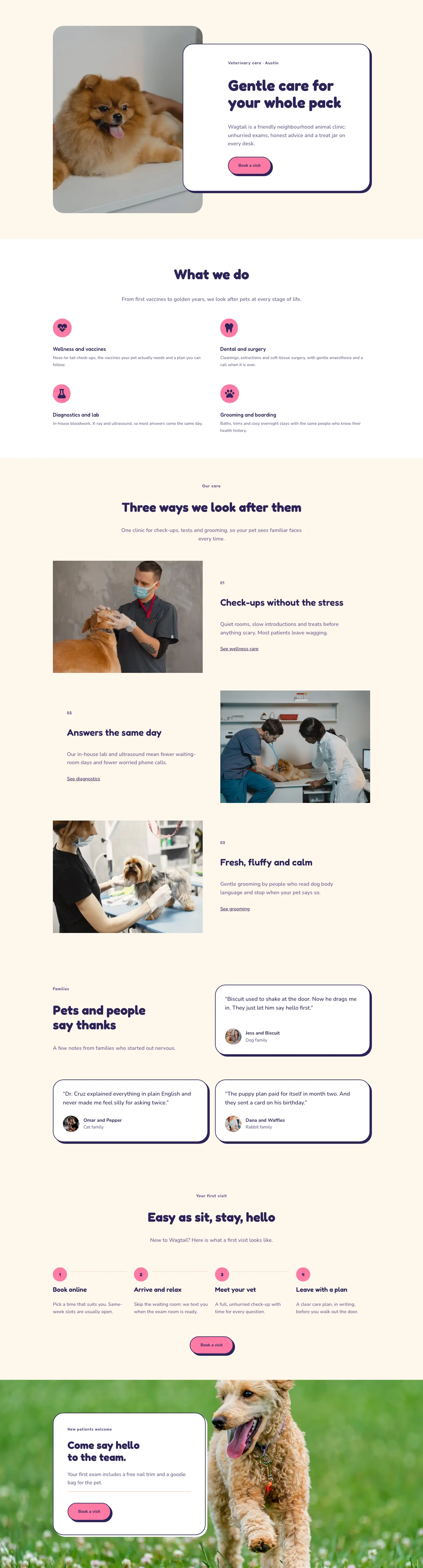
Wagtail Animal Clinic Services is a four-section full-landing page built entirely from native Divi 5 modules. The page opens with a full-bleed hero: a Pexels photo of a vet with a small dog sits behind a deep indigo overlay (rgba(43,36,87,0.68)), and a Fredoka 56 px H1 plus a Nunito subtitle drop in over it at 120 px top padding on desktop, scaling down gracefully to 64 px on mobile. The warm cream background (#fff7ec) carries across sections two and four, with a clean white break in section three, so the page breathes without ever feeling disconnected.
Section two pairs a left column of text and a four-item accordion against a tall 4:5 portrait photo on the right. The accordion uses a flush underline border style (2 px indigo bottom rule, no outer border) to keep things airy, with Fredoka titles at 20 px and Nunito body copy in the muted purple #625a8c. On mobile the columns stack vertically, the image dropping below the accordion with 32 px bottom padding on the text column so the two never crowd each other.
Section three flips the column weight: a narrow one-third text column on the left carries the section heading and a single-sentence intro, while the two-thirds right column renders eight icon-plus-text rows inside a CSS Grid (two columns, 40 px gap), each row using a Font Awesome checkmark at 18 px in indigo. On mobile the grid collapses to a single column and the section padding tightens to 40 px top and bottom.
Section four is a centered FAQ built around a second accordion variant, this one styled with a 36 px border radius, a solid 2 px indigo border, and a preset-4 box shadow with a hard 6 px offset, giving it a bold graphic-novel feel that contrasts with the quieter underline accordion above. Six questions cover check-up frequency, species seen, first-visit prep, anxious pets, emergencies, and standalone grooming. The page closes with a hot-pink CTA band (#ff7aa5) containing a pill-shaped white button with the same 6 px hard shadow, plus a reassurance line about new patients and a free nail trim.
What’s inside
- Full-bleed hero section with Pexels photo, 68% indigo gradient overlay, Fredoka H1 at 56 px desktop / 32 px mobile, and breadcrumb nav text
- Services accordion (4 items) using Fredoka titles and a flush 2 px underline border, with the first item pre-opened, beside a tall 4:5 portrait image column
- 8-item icon checklist rendered in a CSS Grid (2 cols, 40 px gap) using native divi/icon and divi/text pairs with Font Awesome checkmarks
- Centered FAQ accordion (6 items) with 36 px rounded border, hard-offset 6 px box shadow, and a warm white open-state background
- Hot-pink CTA band with a pill-shaped button (999 px radius), hard shadow, hover-invert colour transition, and a trust line below the button
- Fredoka / Nunito type pairing applied consistently across all headings and body copy, with an indigo + warm cream + hot-pink three-colour palette
- Responsive padding staircase (120 px → 88 px → 64 px on the hero; 88 px → 60 px → 40 px on content sections) set directly on each section
Who it’s for
This layout is a strong fit for independent veterinary clinics, mobile vets, and multi-service animal hospitals that want a services page that feels warm rather than clinical. It also works for pet groomers and boarding facilities that offer a care menu alongside their primary service. Freelance WordPress developers and Divi agency owners building sites for clients in the pet-care industry will find the accordion-plus-image structure and icon checklist immediately reusable across different clinic brands with minimal restyling.
Customization tips
Swap the full palette in one pass by changing the three hex values that appear most often: #fff7ec (warm cream), #2b2457 (deep indigo), and #ff7aa5 (hot pink). The cream and indigo sit in section backgrounds, border colours, icon colours, and heading colours; update them globally and the whole page shifts tone. Replace the hero and services-section Pexels images with your own clinic photography — the hero image works best at 1920 px wide (16:9 or wider), while the portrait image in section two is locked to a 4:5 aspect ratio, so crop to roughly 800 × 1000 px before uploading. Accordion item copy should stay under 40 words per panel to avoid layout stretch on smaller viewports. The eight-item checklist grid can be reduced to six items (one full row removed) without visual gaps because the grid auto-fills by row.
How to install this layout
- Download the layout JSON file from this page.
- Open the target page in the Divi 5 builder.
- Open the portability panel (up/down arrows icon) and choose the Import tab.
- Upload the JSON. Tick “replace existing content” only for full-page imports.
- Check the page at desktop and mobile widths, then swap in your copy and images.
Full walkthrough with troubleshooting: How to Import a Divi 5 Layout.
Questions about Wagtail Animal Clinic — Playful Veterinary Services Page for Divi 5
How many accordion modules are in this layout?
Two: a flat underline-style accordion in the services section (4 items), and a rounded bordered accordion with a hard box shadow in the FAQ section (6 items). They use different visual treatments intentionally.
Does the icon checklist grid really collapse on mobile?
Yes. The divi/group wrapping the eight rows is set to gridColumnCount 2 on desktop and gridColumnCount 1 on mobile, so all eight items stack into a single column on smaller screens without any manual reordering.
What aspect ratio should I use for the portrait photo in section two?
The divi/image module enforces a 4:5 ratio (width 4, height 5) with object-fit cover. Crop your photo to roughly 800 × 1000 px before uploading for the sharpest result.
Can I add more items to the checklists or accordions?
Yes. Add accordion-item blocks inside either accordion, or add more icon-plus-text group pairs inside the grid group. The grid will reflow automatically; aim for an even number of checklist items to keep both columns balanced.
What should I edit first after importing?
Update the hero headline and subtitle, swap the two Pexels images for your own clinic photos, and replace the placeholder phone number in the FAQ closing line. Those four changes make the page ready to publish.
Which Divi version does this layout need?
Divi 5. The layout is generated natively for Divi 5 and validated against its real module structure before publication, so it imports clean into the current builder.
Can I use this layout on client websites?
Yes. Every download includes a commercial license covering unlimited sites you own or build for clients. Only reselling or redistributing the layout file itself is prohibited.
Included in these packs
More full landing pages
Browse all full landing pages
Kiln & Clay — Minimal Pottery_studio Visit Page for Divi 5
full_landing · pottery_studio · minimal

Kiln & Clay — Minimal Pottery_studio Our Story Page for Divi 5
full_landing · pottery_studio · minimal

Kiln & Clay — Minimal Pottery_studio Studio Membership Page for Divi 5
full_landing · pottery_studio · minimal

Kiln & Clay — Minimal Pottery_studio The Shop Page for Divi 5
full_landing · pottery_studio · minimal

Kiln & Clay — Minimal Pottery_studio Classes Page for Divi 5
full_landing · pottery_studio · minimal

Kiln & Clay — Minimal Pottery_studio Home Page for Divi 5
full_landing · pottery_studio · minimal